







Question: Using Matlab only please answer the following Solve each problem in a separate script file and name it as Initials-Hw-07-pb-##.m. Copy the results from the
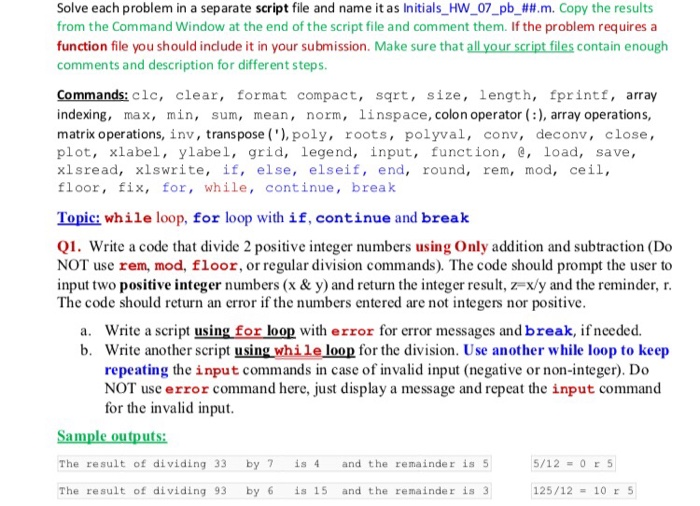
Solve each problem in a separate script file and name it as Initials-Hw-07-pb-##.m. Copy the results from the Command Window at the end of the script file and comment them. If the problem requires a function file you should indude it in your submission. Make sure that all your script files contain enough comments and description for different steps. Commands: clc, clear, format compact, sqrt, size, length, fprintf, array indexing, max, min, sum, mean, norm, linspace, colon operator:), array operations, matrix operations, inv, transpose (), poly, roots, polyval, conv, deconv, close, plot, xlabel, ylabel, grid, legend, input, function, e, load, save, xlsread, xlswrite, if, else, elseif, end, round, rem, mod, ceil, floor, fix, for, while, continue, brea)k Topic: while loop, for loop with if, continue and break Q1. Write a code that divide 2 positive integer numbers using Only addition and subtraction (Do NOT use rem, mod, floor, or regular division commands). The code should prompt the user to input two positive integer numbers (x & y) and return the integer result, z=xy and the reminder, r The code should return an crror if the numbers entered are not integers nor positive a. Write a script using for loop with error for error messages and break, if nceded. b. Write another script using while loop for the division. Use another while loop to keep repeating the input commands in case of invalid input (negative or non-integer). Do NOT use error command here, just display a message and repeat the input command for the invalid input The result of dividing 33 by 7 is 4 and the remainder is 5 The result of dividing 93 by 6 is 15 and the remainder is 3 125/1210 r 5
Step by Step Solution
There are 3 Steps involved in it

Get step-by-step solutions from verified subject matter experts
 Study Help