







Question: Using Matlab or some other graphing software create plots of Xp(t), xdt) and the sum x(t) = Xc(t) + Xp(t) for a driven, damped, sinusoi
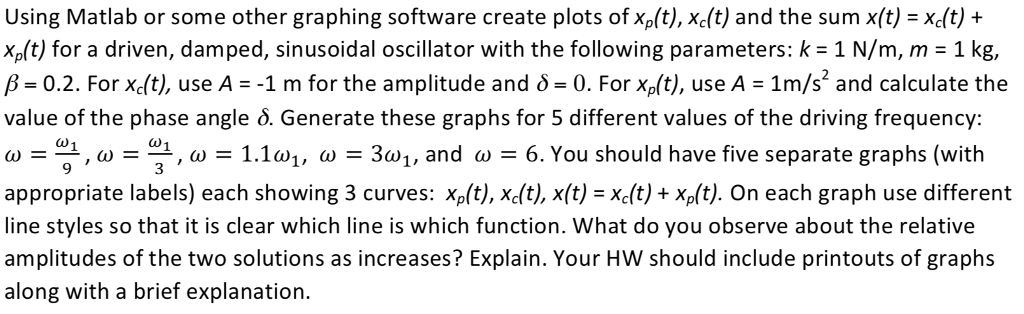
Using Matlab or some other graphing software create plots of Xp(t), xdt) and the sum x(t) = Xc(t) + Xp(t) for a driven, damped, sinusoi m, m 1 kg, = 0.2. For Xc(t), use As-1 m for the amplitude and = 0. For xp(t), use A-1m/s2 and calculate the value of the phase angle . Generate these graphs for 5 different values of the driving frequency = 9 , 31, = 1.1 1, = 31, and = 6. You should have five separate graphs (with appropriate labels) each showing 3 curves: Xp(t), xdt), x(t) = xc(t) + xp(t). On each graph use different line styles so that it is clear which line is which function. What do you observe about the relative amplitudes of the two solutions as increases? Explain. Your HW should include printouts of graphs along with a brief explanation. dal oscillator with the following parameters: k-1N/ Using Matlab or some other graphing software create plots of Xp(t), xdt) and the sum x(t) = Xc(t) + Xp(t) for a driven, damped, sinusoi m, m 1 kg, = 0.2. For Xc(t), use As-1 m for the amplitude and = 0. For xp(t), use A-1m/s2 and calculate the value of the phase angle . Generate these graphs for 5 different values of the driving frequency = 9 , 31, = 1.1 1, = 31, and = 6. You should have five separate graphs (with appropriate labels) each showing 3 curves: Xp(t), xdt), x(t) = xc(t) + xp(t). On each graph use different line styles so that it is clear which line is which function. What do you observe about the relative amplitudes of the two solutions as increases? Explain. Your HW should include printouts of graphs along with a brief explanation. dal oscillator with the following parameters: k-1N/
Step by Step Solution
There are 3 Steps involved in it

Get step-by-step solutions from verified subject matter experts
 Study Help