







Question: USING MATLAB PLS! THIS IS ALL THE INFORMATION USING MATLAB PLS! 5.11 A tensile testing machine such as the one shown in Figure P5.11a and
USING MATLAB PLS! THIS IS ALL THE INFORMATION
USING MATLAB PLS!
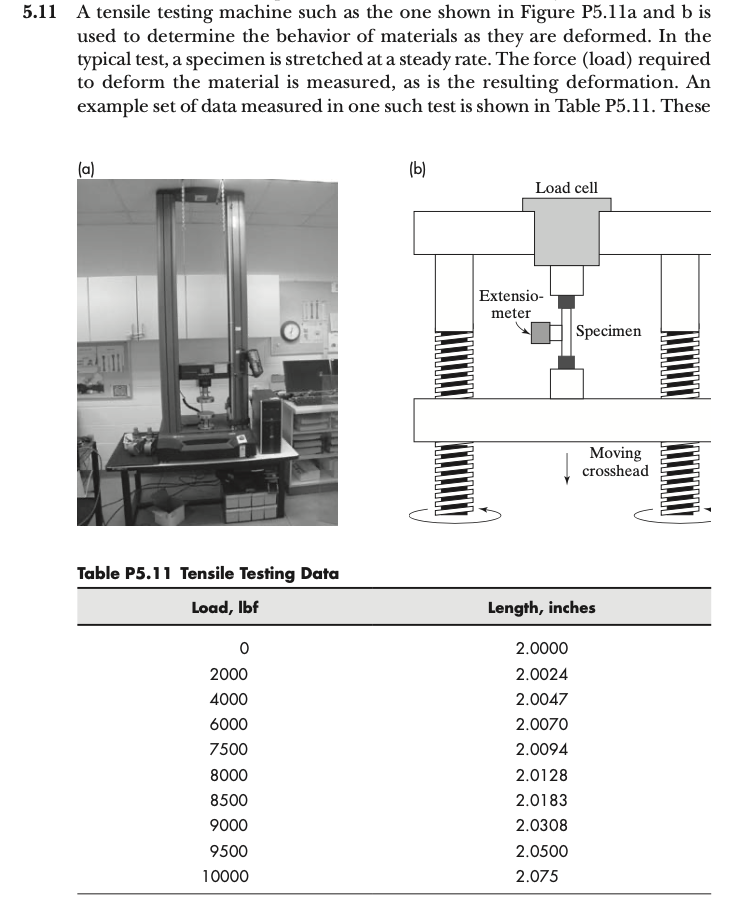
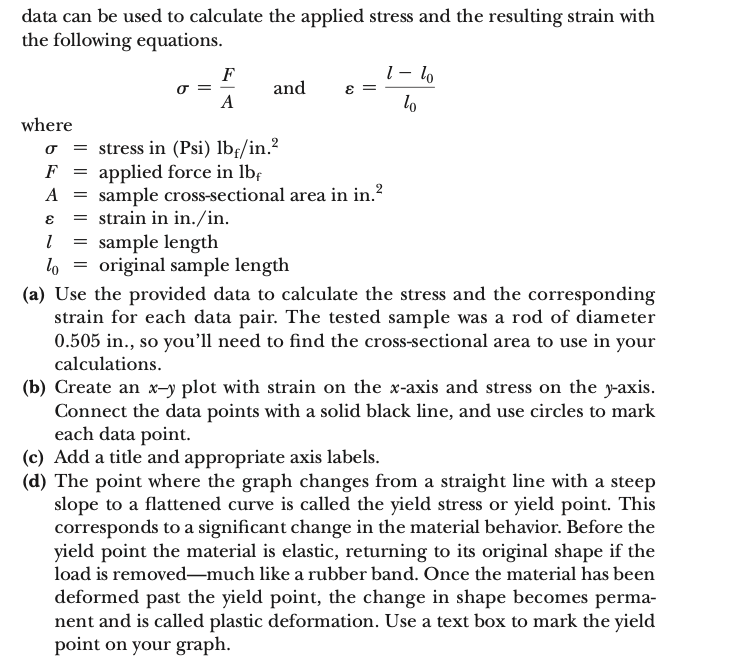
5.11 A tensile testing machine such as the one shown in Figure P5.11a and b is used to determine the behavior of materials as they are deformed. In the typical test, a specimen is stretched at a steady rate. The force (load) required to deform the material is measured, as is the resulting deformation. An example set of data measured in one such test is shown in Table P5.11. These Table P5.11 Tencile Testina Data data can be used to calculate the applied stress and the resulting strain with the following equations. =AF and =l0ll0 where = stress in (Psi) lbf/ in. 2 F= applied force in lbf A= sample cross-sectional area in in. 2 = strain in in./in. l= sample length l0= original sample length (a) Use the provided data to calculate the stress and the corresponding strain for each data pair. The tested sample was a rod of diameter 0.505 in., so you'll need to find the cross-sectional area to use in your calculations. (b) Create an xy plot with strain on the x-axis and stress on the y-axis. Connect the data points with a solid black line, and use circles to mark each data point. (c) Add a title and appropriate axis labels. (d) The point where the graph changes from a straight line with a steep slope to a flattened curve is called the yield stress or yield point. This corresponds to a significant change in the material behavior. Before the yield point the material is elastic, returning to its original shape if the load is removed-much like a rubber band. Once the material has been deformed past the yield point, the change in shape becomes permanent and is called plastic deformation. Use a text box to mark the yield point on your graph
Step by Step Solution
There are 3 Steps involved in it

Get step-by-step solutions from verified subject matter experts
 Study Help