







Question: USING MATLAB!! Problem 4: File Inputs/Outputs (.jpg) Write a script funWithRGBseagull.m that does the following things with the file seagull.jpg provided on Canvas a) Reads
USING MATLAB!!
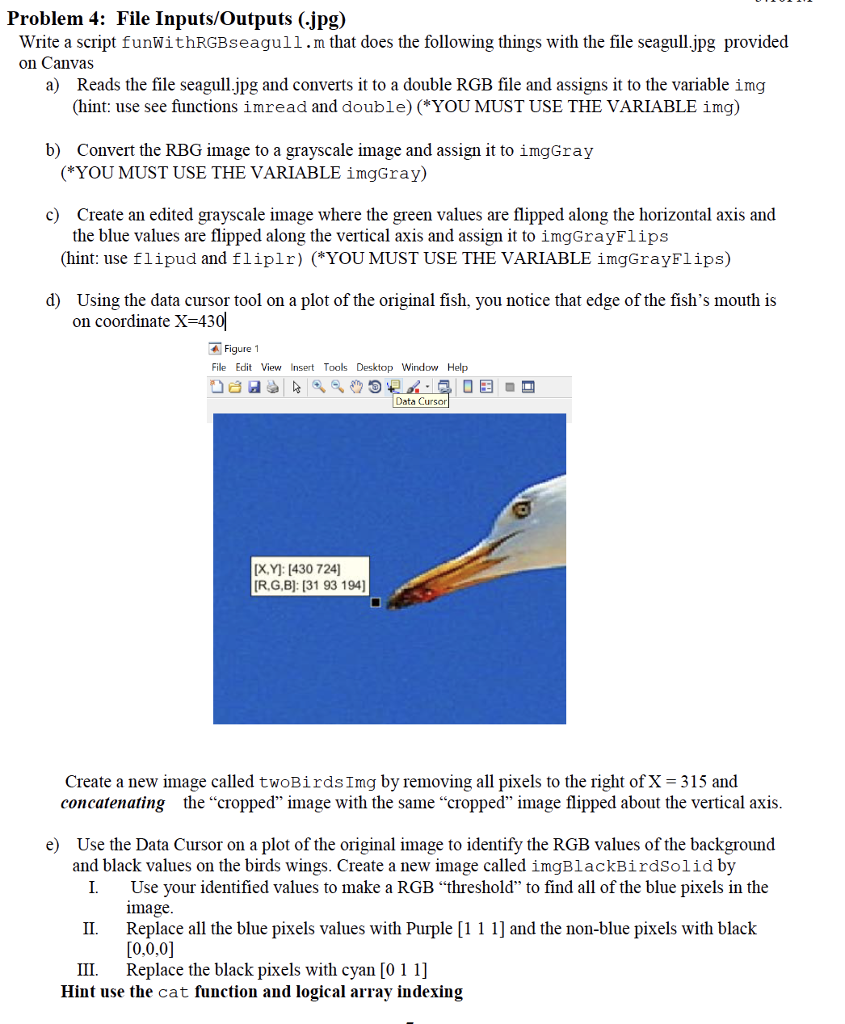
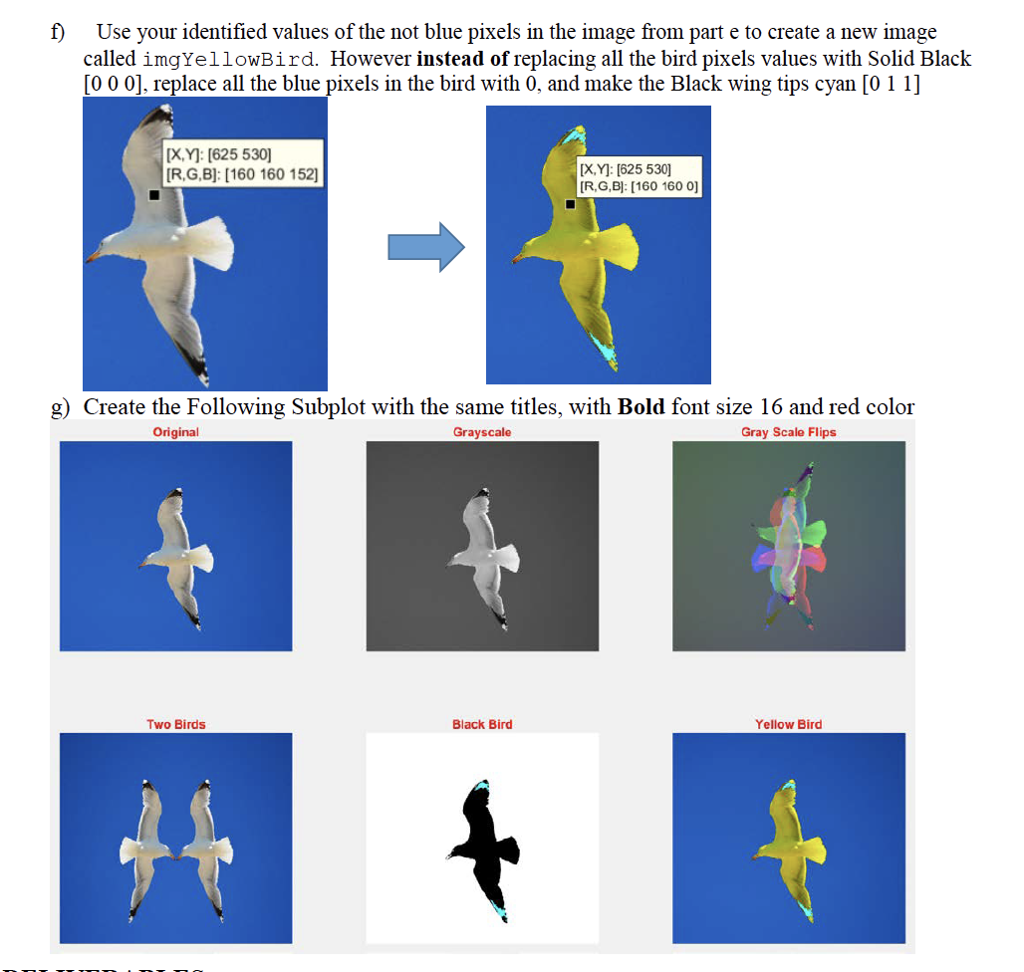
Problem 4: File Inputs/Outputs (.jpg) Write a script funWithRGBseagull.m that does the following things with the file seagull.jpg provided on Canvas a) Reads the file seagull.jpg and converts it to a double RGB file and assigns it to the variable img (hint: use see functions imread and double) ( YOU MUST USE THE VARIABLE img) b) Convert the RBG image to a grayscale image and assign it to imgGray (*YOU MUST USE THE VARIABLE imgGray) c) Create an edited grayscale image where the green values are flipped along the horizontal axis and the blue values are flipped along the vertical axis and assign it to imgGrayFlips (hint: use flipud and fliplr) (*YOU MUST USE THE VARIABLE imgGrayFlips) d) Using the data cursor tool on a plot of the original fish, you notice that edge of the fish's mouth is on coordinate X-430 Figure 1 File Edit View nsert Tools Desktop Window Help Data Cursor [X,Y: 430 724] R,G,B]: [31 93 194] Create a new image called twoBirdsImg by removing all pixels to the right of X-315 and concatenating the "cropped" image with the same "cropped" image flipped about the vertical axis e) Use the Data Cursor on a plot of the original image to identify the RGB values of the background and black values on the birds wings. Create a new image called imgBlackBirdSolid by I. Use your identified values to make a RGB "threshold" to find all of the blue pixels in the II. Replace all the blue pixels values with Purple [1 1 1] and the non-blue pixels with black III. Replace the black pixels with cyan [0 1 1] mage [0,0,0] Hint use the cat function and logical array indexing Problem 4: File Inputs/Outputs (.jpg) Write a script funWithRGBseagull.m that does the following things with the file seagull.jpg provided on Canvas a) Reads the file seagull.jpg and converts it to a double RGB file and assigns it to the variable img (hint: use see functions imread and double) ( YOU MUST USE THE VARIABLE img) b) Convert the RBG image to a grayscale image and assign it to imgGray (*YOU MUST USE THE VARIABLE imgGray) c) Create an edited grayscale image where the green values are flipped along the horizontal axis and the blue values are flipped along the vertical axis and assign it to imgGrayFlips (hint: use flipud and fliplr) (*YOU MUST USE THE VARIABLE imgGrayFlips) d) Using the data cursor tool on a plot of the original fish, you notice that edge of the fish's mouth is on coordinate X-430 Figure 1 File Edit View nsert Tools Desktop Window Help Data Cursor [X,Y: 430 724] R,G,B]: [31 93 194] Create a new image called twoBirdsImg by removing all pixels to the right of X-315 and concatenating the "cropped" image with the same "cropped" image flipped about the vertical axis e) Use the Data Cursor on a plot of the original image to identify the RGB values of the background and black values on the birds wings. Create a new image called imgBlackBirdSolid by I. Use your identified values to make a RGB "threshold" to find all of the blue pixels in the II. Replace all the blue pixels values with Purple [1 1 1] and the non-blue pixels with black III. Replace the black pixels with cyan [0 1 1] mage [0,0,0] Hint use the cat function and logical array indexing
Step by Step Solution
There are 3 Steps involved in it

Get step-by-step solutions from verified subject matter experts
 Study Help