







Question: Using MatLabs JUST PART C 1. (25 pts.) Write the following MATLAB functions: a). B = matrixTranspose(A): a transpose function with input of an arbitrary
Using MatLabs JUST PART C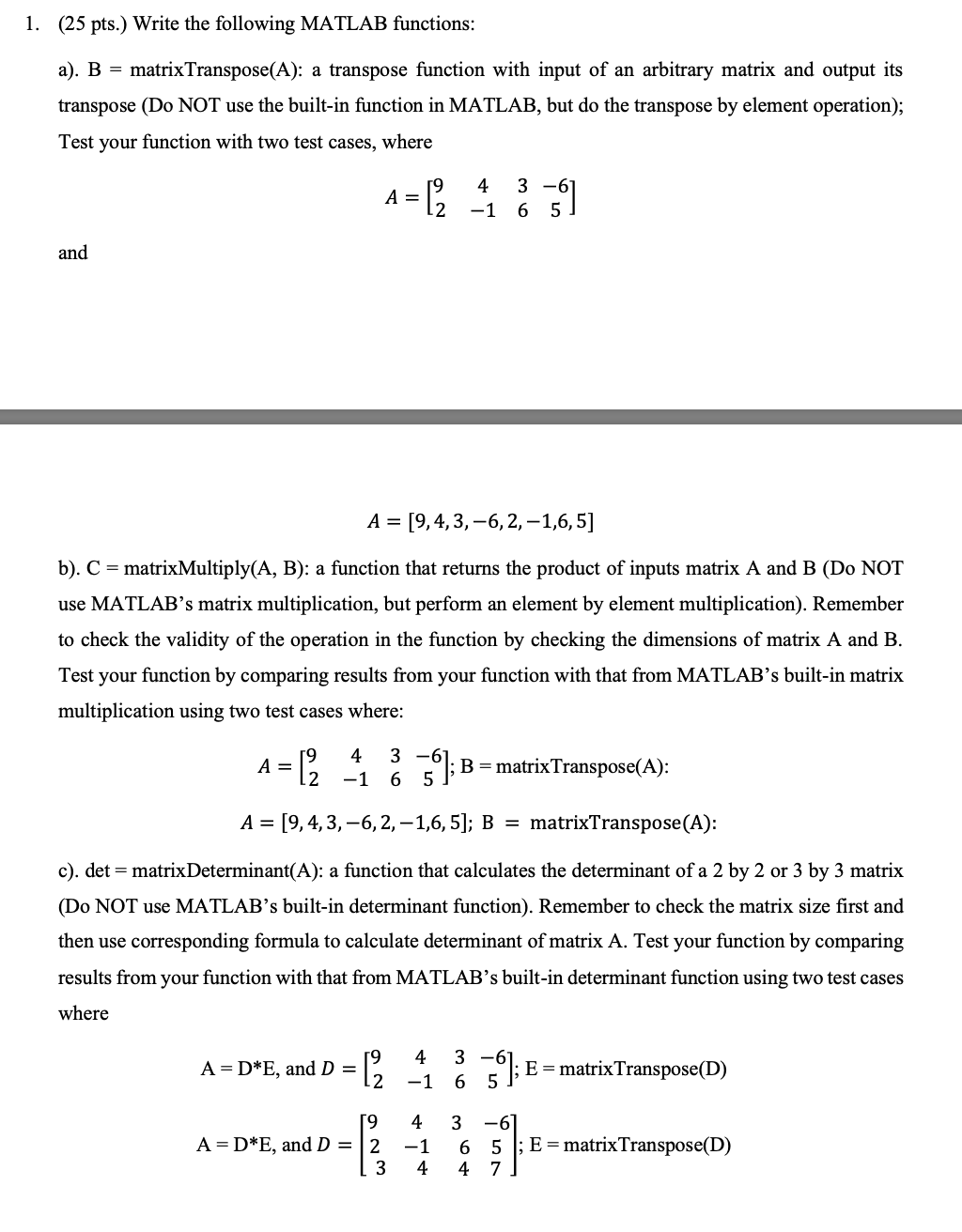
1. (25 pts.) Write the following MATLAB functions: a). B = matrixTranspose(A): a transpose function with input of an arbitrary matrix and output its transpose (Do NOT use the built-in function in MATLAB, but do the transpose by element operation); Test your function with two test cases, where A= = 12 43 3-6 6 5 and A = [9,4,3, -6, 2, -1,6,5] b). C = matrixMultiply(A, B): a function that returns the product of inputs matrix A and B (Do NOT use MATLAB's matrix multiplication, but perform an element by element multiplication). Remember to check the validity of the operation in the function by checking the dimensions of matrix A and B. Test your function by comparing results from your function with that from MATLAB's built-in matrix multiplication using two test cases where: A = [? 4 -1 3-61 6 5 B = matrix Transpose(A): 2 A = [9,4,3, -6,2,-1,6, 5); B = matrixTranspose(A): c). det = matrix Determinant(A): a function that calculates the determinant of a 2 by 2 or 3 by 3 matrix (Do NOT use MATLAB's built-in determinant function). Remember to check the matrix size first and then use corresponding formula to calculate determinant of matrix A. Test your function by comparing results from your function with that from MATLAB's built-in determinant function using two test cases where 4 A = D*E, and D = (2 -1 3 -6 6 5 ); E = matrixTranspose(D) 3 19 A=D*E, and D = 2 3 4 -1 4 6 4 -6 5 ; E = matrix Transpose(D) 7
Step by Step Solution
There are 3 Steps involved in it

Get step-by-step solutions from verified subject matter experts
 Study Help