







Question: Using MIPS Assembly Language Lab#4 starter code .data array_siz: .asciiz Enter Array Size: enter_num: .asciiz Enter Num: .text main: # Display Enter Array
Using MIPS Assembly Language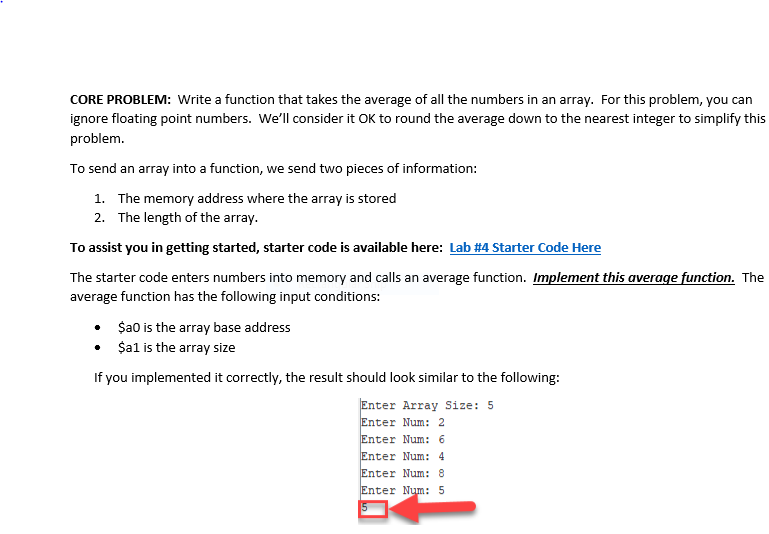
Lab#4 starter code
.data array_siz: .asciiz "Enter Array Size: " enter_num: .asciiz "Enter Num: " .text
main: # Display "Enter Array Size: " li $v0, 4 la $a0, array_siz syscall #Get Array Size and Store in $s0 li $v0, 5 syscall move $s0, $v0 # Array Size move $t0, $gp #$t0 is base address li $t1, 0 # i = 0 start: bge $t1, $s0, end #Dispaly "Enter Num: " li $v0, 4 la $a0, enter_num syscall #Get Num and Store in Memory li $v0, 5 syscall sw $v0, 0($t0) addi $t0, $t0, 4 # Advance Address to Next Word addi $t1, $t1, 1 # i++ j start end: move $a0, $gp # 1st Parameter is the base address li $a1, 5 # 2nd Parameter is array size jal avg #jal stddev # Uncomment for Challenge problem # Print Result move $a0, $v0 li $v0, 1 syscall j exit
avg: # YOUR CODE HERE # $a0 is the array base address # $a1 is the array size #The average should be placed in $v0 (for now just set to zero) li $v0, 0 jr $ra
Step by Step Solution
There are 3 Steps involved in it

Get step-by-step solutions from verified subject matter experts
 Study Help