







Question: Using MPLAB and the given code ... the given code makes my 4 leds light simultaneously I have to modify the code to display my
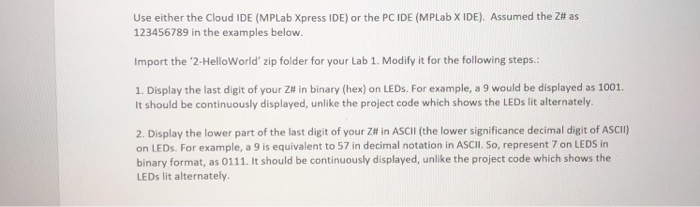
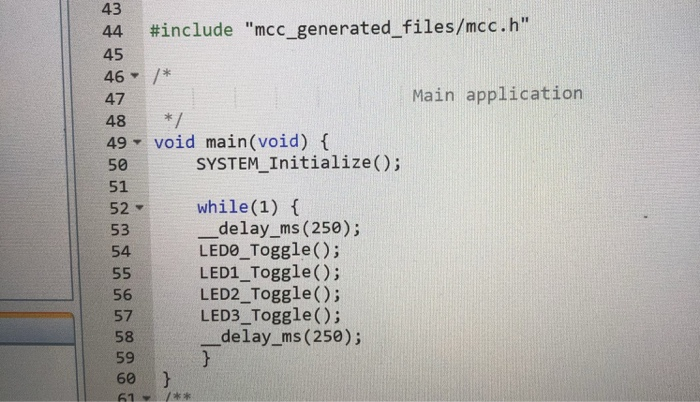
Use either the Cloud IDE (MPLab Xpress IDE) or the PC IDE (MPLab X IDE). Assumed the Z# as 123456789 in the examples below. Import the '2-HelloWorld zip folder for your Lab 1. Modify it for the following steps.: 1. Display the last digit of your Z" in binary (hex) on LEDs. For example, a 9 would be displayed as 1001. It should be continuously displayed, unlike the project code which shows the LEDs lit alternately 2. Display the lower part of the last digit of your Z# in Ascil (the lower significance decimal digit of ASCI) on LEDs. For example, a 9 is equivalent to 57 in decimal notation in ASCII. So, represent 7 on LEDS in binary format, as 0111. It should be continuously displayed, unlike the project code which shows the LEDs lit alternately. 43 #include "mcc-generated-files/mcc.h" 44 45 46/* 47 Main applicatior 48*/ 49 void main(void) ( 50 51 SYSTEM_Initialize(O; while(1) f delay_ms (250); LEDO Toggle); LED1_Toggle(); LED2_ Toggle(); LED3_Toggle); 53 54 56 57 58 59 60 delay ms (250); Use either the Cloud IDE (MPLab Xpress IDE) or the PC IDE (MPLab X IDE). Assumed the Z# as 123456789 in the examples below. Import the '2-HelloWorld zip folder for your Lab 1. Modify it for the following steps.: 1. Display the last digit of your Z" in binary (hex) on LEDs. For example, a 9 would be displayed as 1001. It should be continuously displayed, unlike the project code which shows the LEDs lit alternately 2. Display the lower part of the last digit of your Z# in Ascil (the lower significance decimal digit of ASCI) on LEDs. For example, a 9 is equivalent to 57 in decimal notation in ASCII. So, represent 7 on LEDS in binary format, as 0111. It should be continuously displayed, unlike the project code which shows the LEDs lit alternately. 43 #include "mcc-generated-files/mcc.h" 44 45 46/* 47 Main applicatior 48*/ 49 void main(void) ( 50 51 SYSTEM_Initialize(O; while(1) f delay_ms (250); LEDO Toggle); LED1_Toggle(); LED2_ Toggle(); LED3_Toggle); 53 54 56 57 58 59 60 delay ms (250)
Step by Step Solution
There are 3 Steps involved in it

Get step-by-step solutions from verified subject matter experts
 Study Help