



Question: using MS project In thit akeichment is devoibed vaine the 7 hot stve Use the attached Template document file to present your answers to the
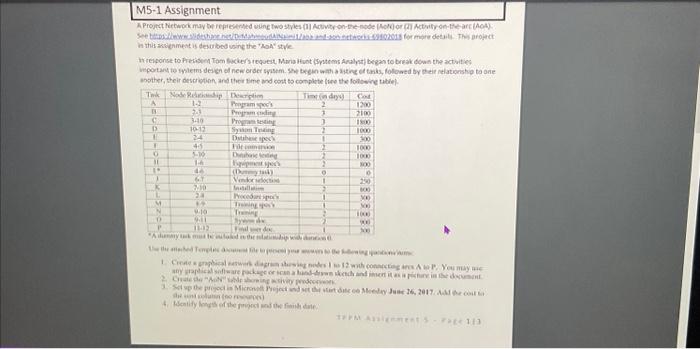
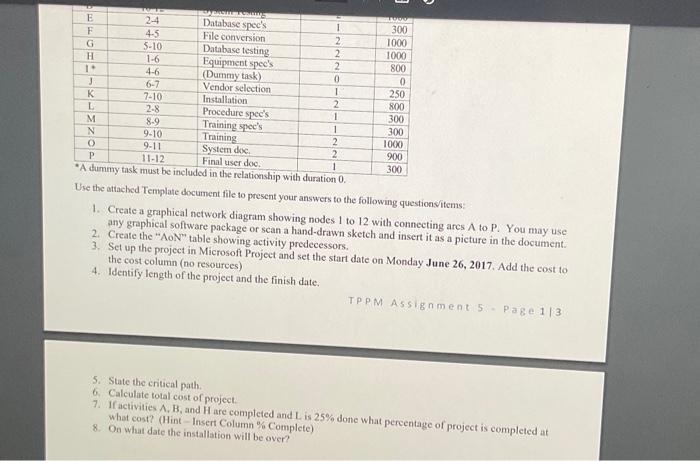
In thit akeichment is devoibed vaine the 7 hot stve Use the attached Template document file to present your answers to the following questionsitems: 1. Create a graphical nctwork diagram showing nodes 1 to 12 with connecting ares A to P. You may use any graphical software package or scan a hand-drawn sketch and insert it as a picture in the document. 2. Create the "AoN" table showing activity predecessors. 3. Set up the project in Microsoft Project and set the start date on Monday June 26, 2017. Add the cost to the cost column (no resources) 4. Identify length of the project and the finish date. TPPA Assignment 5=P a A a 1/3 5. State the critical path. 6. Calculate total cost of project. 7. If activities A, B, and H are completed and L is 25% done what percentage of project is completed at what cost? (Hint - Insert Column \% Complete) 8. On what date the installation will be over? In thit akeichment is devoibed vaine the 7 hot stve Use the attached Template document file to present your answers to the following questionsitems: 1. Create a graphical nctwork diagram showing nodes 1 to 12 with connecting ares A to P. You may use any graphical software package or scan a hand-drawn sketch and insert it as a picture in the document. 2. Create the "AoN" table showing activity predecessors. 3. Set up the project in Microsoft Project and set the start date on Monday June 26, 2017. Add the cost to the cost column (no resources) 4. Identify length of the project and the finish date. TPPA Assignment 5=P a A a 1/3 5. State the critical path. 6. Calculate total cost of project. 7. If activities A, B, and H are completed and L is 25% done what percentage of project is completed at what cost? (Hint - Insert Column \% Complete) 8. On what date the installation will be over
Step by Step Solution
There are 3 Steps involved in it

Get step-by-step solutions from verified subject matter experts