







Question: using ( nasm ) language Write an assembly language program that prompts a user to enter the number of students in the class, and then
using (nasm) language
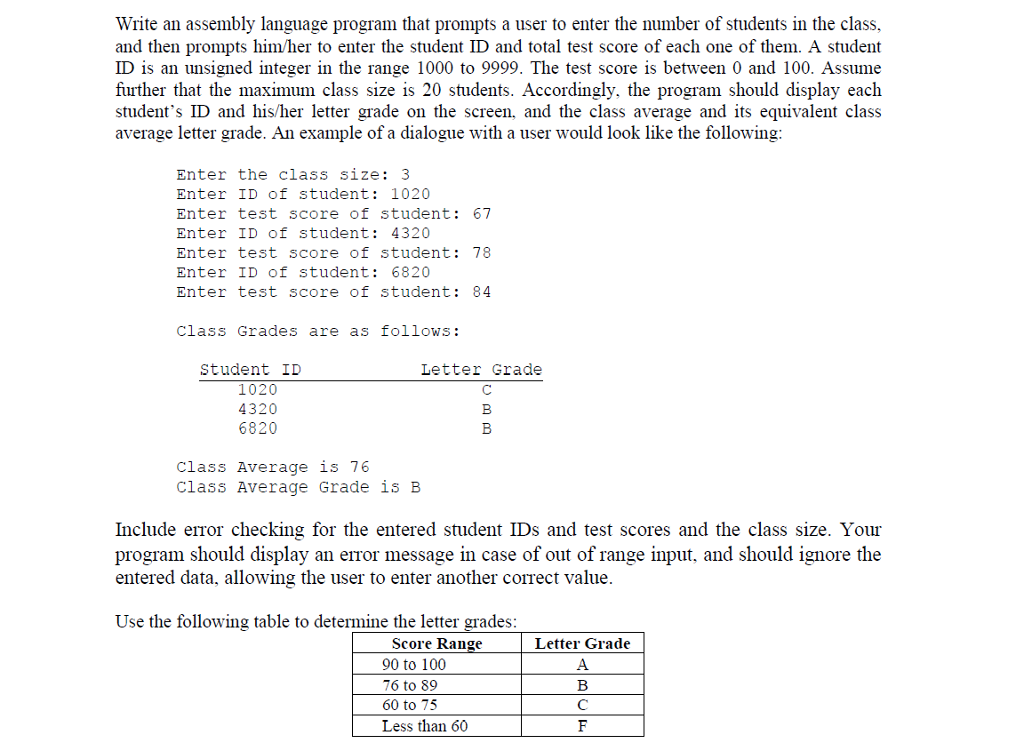
Write an assembly language program that prompts a user to enter the number of students in the class, and then prompts him/her to enter the student ID and total test score of each one of them. A student ID is an unsigned integer in the range 1000 to 9999. The test score is between 0 and 100. Assume further that the maximum class size is 20 students. Accordingly, the program should display each student's ID and his/her letter grade on the screen, and the class average and its equivalent class average letter grade. An example of a dialogue with a user would look like the following Enter the class size: 3 Enter ID of student: 1020 Enter test score of student: 67 Enter ID of student: 4320 Enter test score of student: 78 Enter ID of student: 6820 Enter test score of student: 84 Class Grades are as follows Student ID Letter Grade 1020 4320 6820 Class Average is 76 Class Average Grade is B Include error checking for the entered student IDs and test scores and the class size. Your program should display an error message in case of out of range input, and should ignore the entered data, allowing the user to enter another correct value Use the following table to determine the letter grades Score Range 90 to 100 76 to 89 60 to 75 Less than 60 Letter Grade Write an assembly language program that prompts a user to enter the number of students in the class, and then prompts him/her to enter the student ID and total test score of each one of them. A student ID is an unsigned integer in the range 1000 to 9999. The test score is between 0 and 100. Assume further that the maximum class size is 20 students. Accordingly, the program should display each student's ID and his/her letter grade on the screen, and the class average and its equivalent class average letter grade. An example of a dialogue with a user would look like the following Enter the class size: 3 Enter ID of student: 1020 Enter test score of student: 67 Enter ID of student: 4320 Enter test score of student: 78 Enter ID of student: 6820 Enter test score of student: 84 Class Grades are as follows Student ID Letter Grade 1020 4320 6820 Class Average is 76 Class Average Grade is B Include error checking for the entered student IDs and test scores and the class size. Your program should display an error message in case of out of range input, and should ignore the entered data, allowing the user to enter another correct value Use the following table to determine the letter grades Score Range 90 to 100 76 to 89 60 to 75 Less than 60 Letter Grade
Step by Step Solution
There are 3 Steps involved in it

Get step-by-step solutions from verified subject matter experts
 Study Help