







Question: Using NetBeans, create a Java project with the classes shown on the UML diagram shown below. An insurance policy is a financial instrument that pays
Using NetBeans, create a Java project with the classes shown on the UML diagram shown below.
An insurance policy is a financial instrument that pays an amount of money, known as the death benefit, to a named beneficiary, upon the death of the insured. The goal of the project is to track the insurance policy and insured data. The test class should create an object of each of the LifeInsurancePolicy and the InsuredPerson classes.
To create the two objects, the user will be prompted to enter each data value. For example:
Type in the policy number and press enter:
The program will output the object's data, using the toString() methods using this order:
Policy Number: xxxxxxxxxx
Issuance Date: xx/xx/xxxx
Expiration Date: xx/xx/xxxx
Death Benefit: $xxxxxx.00
Insured ID: xxxxxx
Beneficiary: xxxxxx xxxxxx
Insured Name: xxxxxx xxxxxx
Insured DOB: xx/xx/xxxx
Insured Address: xxxxxx xxxxxx xxxxxx xxxxxx
Insured email: xxxxxxx@xxxxxx.xxx
The output must be displayed using the toString methods of both classes.
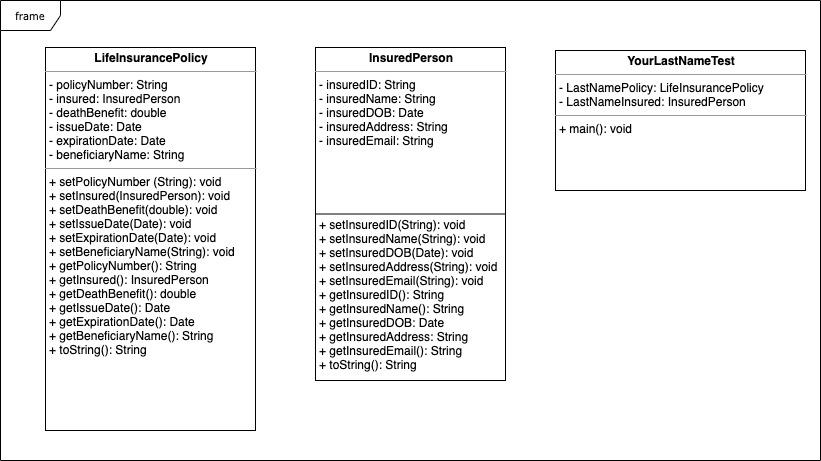
frame InsuredPerson - insurediD: String insured Name: String insuredDOB: Date |- insuredAddress: String |- insuredEmail: String YourLastName Test - LastNamePolicy: Lifelnsurance Policy |- LastNamelnsured: InsuredPerson + main(): void LifelnsurancePolicy -policyNumber: String insured: InsuredPerson |- deathBenefit: double - issue Date: Date - expiration Date: Date |- beneficiaryName: String + setPolicyNumber (String): void + setInsured(InsuredPerson): void + setDeathBenefit(double): void + setissue Date(Date): void + setExpirationDate(Date): void + setBeneficiaryName(String): void + getPolicyNumber(): String + getInsured(): InsuredPerson + getDeathBenefit(): double + getissue Date(): Date + getExpiration Date(): Date + getBeneficiaryName(): String + toString(): String + setInsuredlD(String): void + setinsuredName(String): void + setinsuredDOB(Date): void + setinsuredAddress(String): void + setInsuredEmail(String): void + getInsurediD(): String + getinsuredName(): String + getInsuredDOB: Date + getinsuredAddress: String + getinsuredEmail(): String + toString(): String
Step by Step Solution
There are 3 Steps involved in it

Get step-by-step solutions from verified subject matter experts
 Study Help