







Question: Using OpenGL in C++ in XCODE: //reference for creating the sliders and use the same methods including a passive function for the mouse #include #include
Using OpenGL in C++ in XCODE:
//reference for creating the sliders and use the same methods including a passive function for the mouse
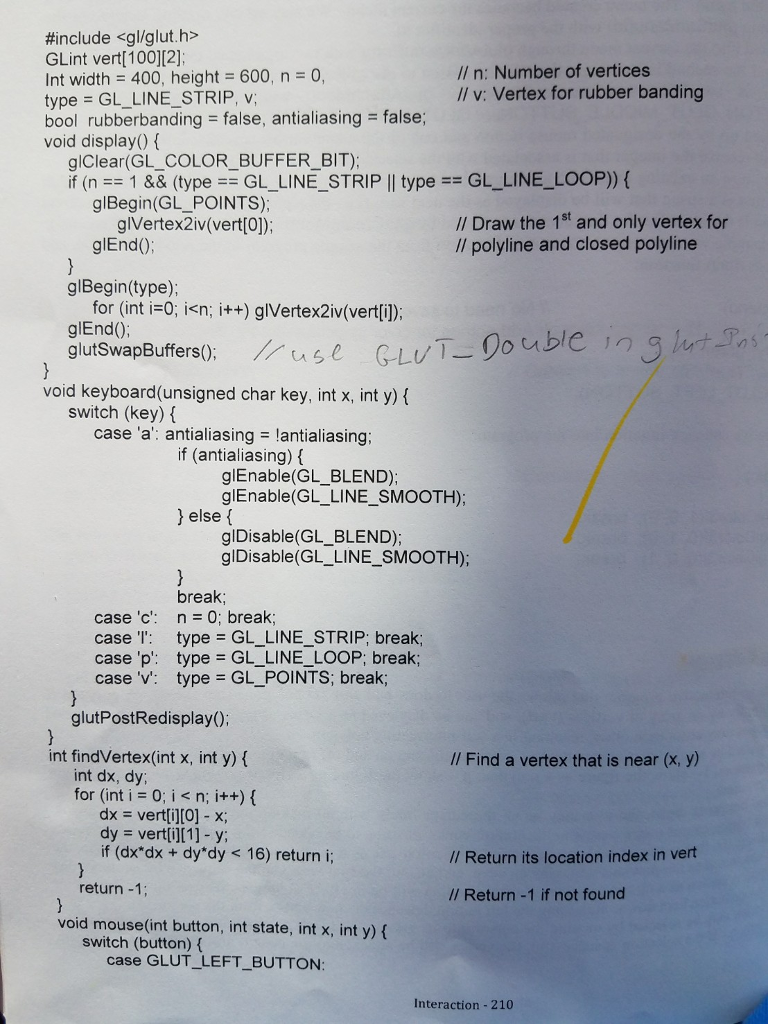
#include
#include
#include
GLint vert[100][2];
int width =400, height=600, n=0,
type = GL_LINE_STRIP, v;
bool rubberbanding = false, antialiasing = false;
void display(){ // display function
glClear(GL_COLOR_BUFFER_BIT);
if (n==1 && (type ==GL_LINE_STRIP || type == GL_LINE_LOOP)) {
glBegin(GL_POINTS);
glVertex2iv(vert[0]);
glEnd();
}
glBegin(type);
for (int i=0; i
glEnd();
glutSwapBuffers();
}
void keyboard(unsigned char key, int x, int y){
switch (key) {
case 'a': antialiasing = !antialiasing;
if (antialiasing) {
glEnable(GL_BLEND);
glEnable(GL_LINE_SMOOTH);
}else{
glDisable(GL_BLEND);
glDisable(GL_LINE_SMOOTH);
}
break;
case 'c': n=0; break;
case 'l': type=GL_LINE_STRIP; break;
case 'p': type= GL_LINE_LOOP; break;
case 'v': type = GL_POINTS; break;
}
glutPostRedisplay();
}
int findVertex(int x, int y){
int dx, dy;
for (int i=0; i
dx=vert[i][0]-x;
dy=vert[i][1]-y;
if (dx*dy + dy*dy
}
return -1;
}
void mouse(int button, int state, int x, int y){
switch (button) {
case GLUT_LEFT_BUTTON:
if (state == GLUT_DOWN) {
v=n++;
vert[v][0]=x;
vert[v][1]=height-1-y;
rubberbanding = true;
glutPostRedisplay();
}
else rubberbanding = false;
break;
case GLUT_RIGHT_BUTTON:
if (state == GLUT_DOWN && (v=findVertex(x, height-1-y))!= -1){
if (glutGetModifiers()==GLUT_ACTIVE_CTRL) {
for (int i =v; i
vert[i][0]=vert[i+1][0];
vert[i][1]=vert[i+1][1];
}
n--;
}else{
vert[v][0]=x;
vert[v][1]=height-1-y;
rubberbanding=true;
}
glutPostRedisplay();
}
else rubberbanding= false;
break;
}
}
void motion(int x, int y){
if (rubberbanding) {
vert[v][0]=x;
vert[v][1]=height-1-y;
glutPostRedisplay();
}
}
int main(int argc, char** argv) { //main function
glutInit(&argc, argv);
glutInitDisplayMode(GLUT_RGB|GLUT_DOUBLE);
glutInitWindowSize(width, height);
glutInitWindowPosition(50, 100);
glutCreateWindow("edit polygons");
glClearColor(0.0, 0.0, 0.0, 0.0);
glClear(GL_COLOR_BUFFER_BIT);
glColor3f(1, 1, 0);
glMatrixMode(GL_PROJECTION);
glLoadIdentity();
gluOrtho2D(0, width, 0, height);
glBlendFunc(GL_SRC_ALPHA, GL_ONE_MINUS_SRC_ALPHA);
glutDisplayFunc(display);
glutKeyboardFunc(keyboard);
glutMouseFunc(mouse);
glutMotionFunc(motion);
glutMainLoop();
}
![#include #include GLint vert[100][2]; int width =400, height=600, n=0, type = GL_LINE_STRIP,](https://dsd5zvtm8ll6.cloudfront.net/si.experts.images/questions/2024/09/66f9705bb57d8_25966f9705b153db.jpg)
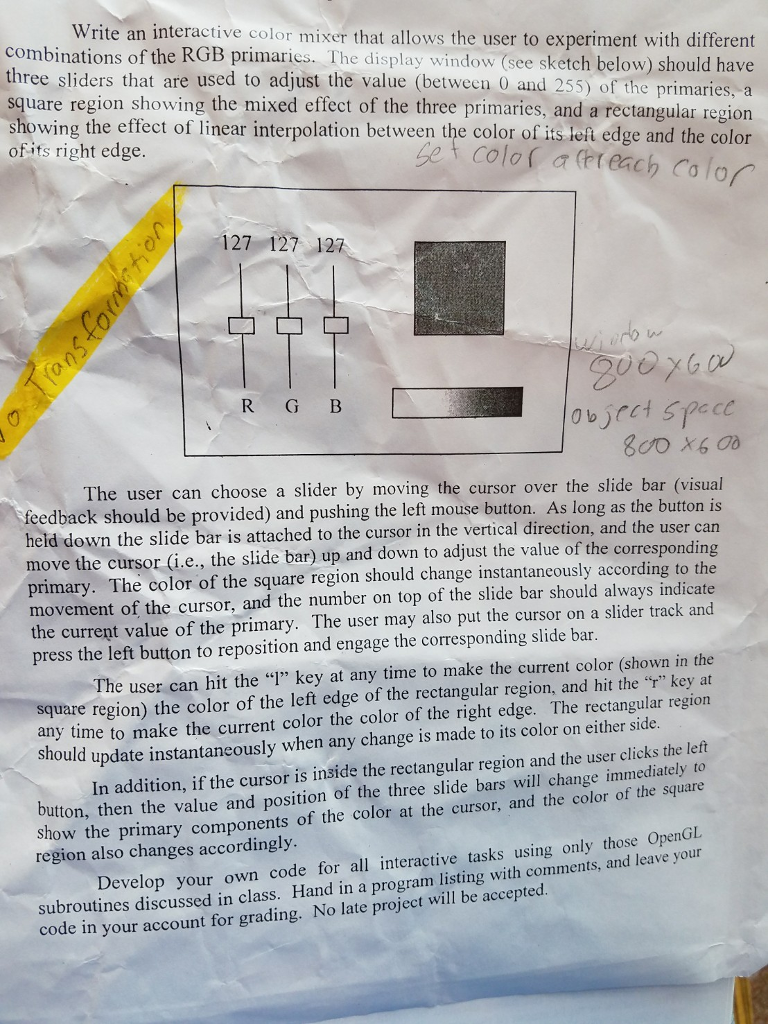
Write an interactive color mixer that allows the user to experiment with different combinations of the RGB primaries. The display window (see sketch below) should have three sliders that are used to adjust the value (between 0 and 255) of the primaries, square region showing the mixed effect of the three primaries, and a rectangular region showing the effect of linear interpolation between the color of its teft edge and the color of ifs right edge Set colo( (Fr each calor o127 127 127 Ad 0 0 R G B feedback should be provided) and pushing the left held down the slide bar is attached to the cursor in the vertical direction, and the user can The user can choose a slider by moving the cursor over the slide bar (visual mouse button. As long as the button is djust the value of the corresponding primary. The color of the square region should change instantancously according to the movement of the cursor, and the number on top of the slide bar should always indicate the current value of the primary. The user may also put the cursor on a slider track and press the left button to reposition and engage the corresponding slide bar The user can hit the "" key at any time to make the current color (shown in the square region) the color of the left edge of the rectangular region, and hit the "" key at any time to make the current color the color of the right edge. The rectangular region should update instantaneously when any change is made to its color on either s utton, then the value and position of the three slide bars will change immediately to how the primary components of the color at the cursor, and the color of the square In addition, if the cursor is inside the rectangular region and the user clicks the left region also changes accordingly subroutines discussed in class. Hand in a program listing with comments, and leave your code in your account for grading. No late project will be accepted. Develop your own code for all interactive tasks using only those OpenGL
Step by Step Solution
There are 3 Steps involved in it

Get step-by-step solutions from verified subject matter experts
 Study Help