







Question: Using Oracle SQL developer Create 2 tables based on the ER model shown below . Include all the constraints in the CREATE TABLE statements. You
Using Oracle SQL developer
Create 2 tables based on the ER model shown below . Include all the constraints in the CREATE TABLE statements. You should have only two create Table statements and no ALTER TABLE statements. Name all constraints except NOT NULLs.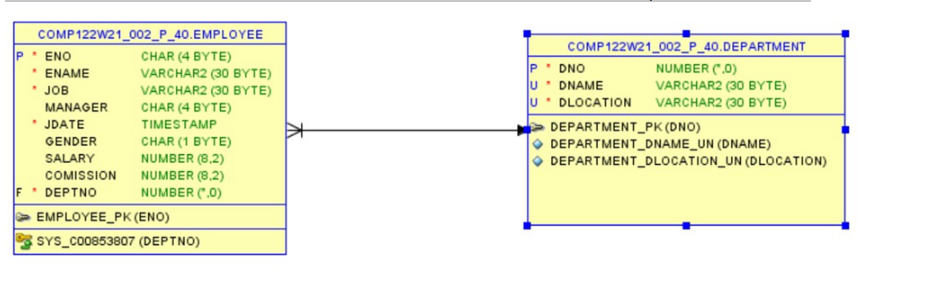
Use the column data types and sizes as indicated in the ER model.
ENO and DNO are used to uniquely identify rows in these tables.
Each Employee must be assigned a Department, and no duplicate department names are allowed.
Assign commission default value 0 .
The Salary entered should be greater than zero.
If the data is given in Gender column, only 'M' or 'F' are acceptable values.
Each table should have 5 data records in them.
question 2
a.Create a table called supplier with the following fields :
supplier_idnumeric(10) - > Primary key with constraint name supplier_name varchar2(50) - >unique name
contact_name varchar2(50)
city varchar2(10)
Region > should accept only ('N', 'NW', 'NE', 'S', 'SE', 'SW', 'W', 'E')
-
b. Insert 5 records into the supplier table.
c. Add a phone number column in the supplier table using DDL command
d. Write a sql command to make city as unused column
e. Delete the unused column in the supplier table
f. Rename the table "supplier" to "supplier_contact ".
g. Write a sql command to delete all the records in the supplier table.
h. Write a sql command to Retrieve the deleted table
i. Write a sql command to permanently delete the table , so that it is not moved to recyclebin
Step by Step Solution
There are 3 Steps involved in it

Get step-by-step solutions from verified subject matter experts
 Study Help