







Question: Using packet tracer file Configure each device with the appropriate IP address based on the network address given Configure Routing Default Static Route, Static Route
Using packet tracer file
- Configure each device with the appropriate IP address based on the network address given
- Configure Routing
- Default Static Route, Static Route or both so all devices can communicate
- Routing protocol RIPv2 with floating static routes on RouterA and RouterD
- Test connectivity between all host and make sure it is successful.
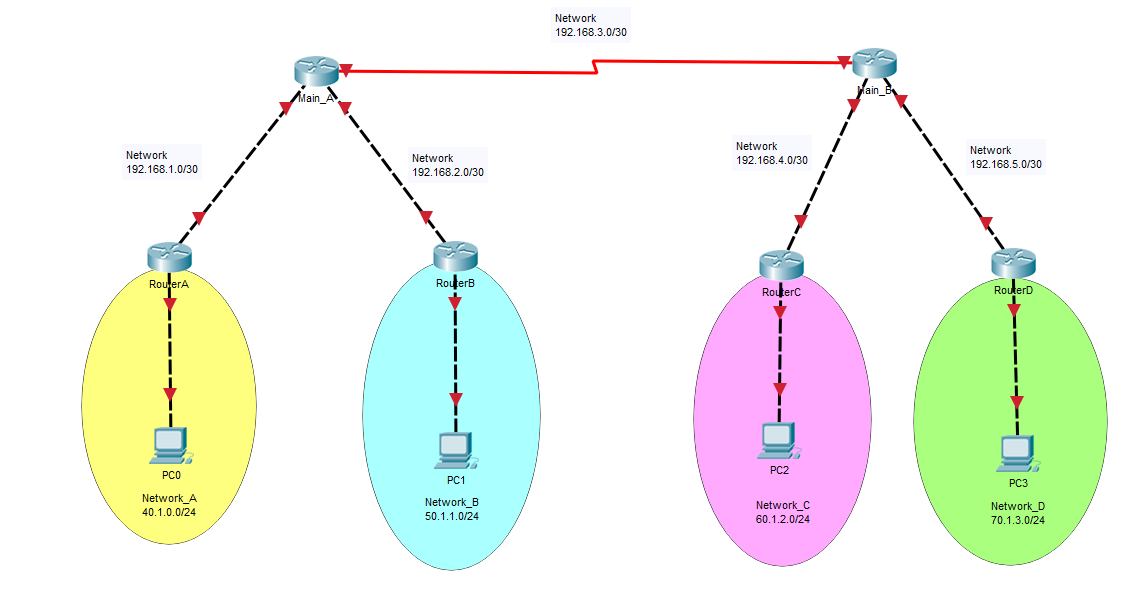
Network 192.168.1.0/30 Main, Network 192.168.2.0/30 Network 192.168.3.0/30 Network 192.168.4.0/30 Main_B Network 192.168.5.0/30 RouterA RouterB RouterC RouterD PCO PC2 PC1 Network C Network_A 40.1.0.0/24 Network_B 50.1.1.0/24 60.1.2.0/24 PC3 Network_D 70.1.3.0/24
Step by Step Solution
There are 3 Steps involved in it
1 Expert Approved Answer
Step: 1 Unlock

Question Has Been Solved by an Expert!
Get step-by-step solutions from verified subject matter experts
Step: 2 Unlock
Step: 3 Unlock
 Study Help