







Question: Using pandas, I need to calculate the average HDI for each category. The category is based off of the HDI Tier. There are 5

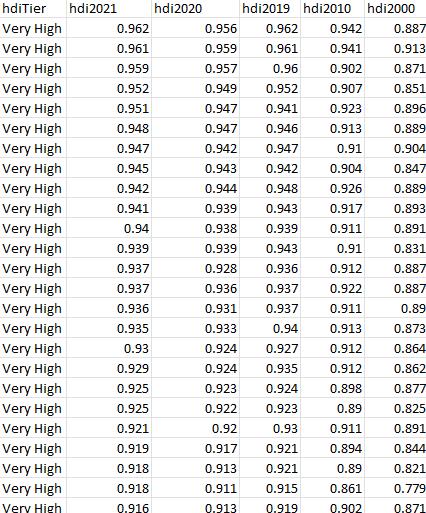
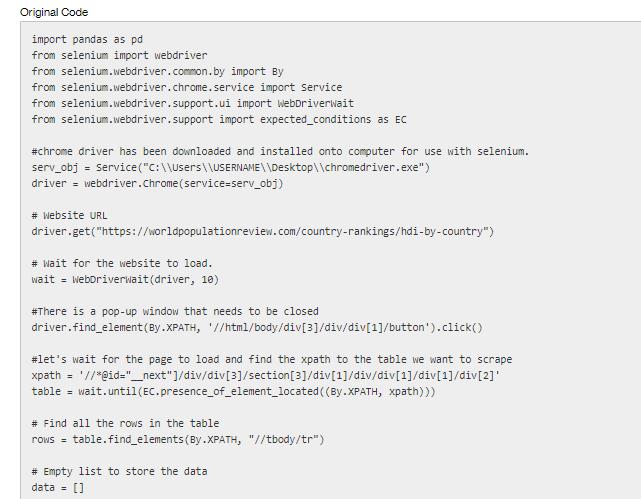
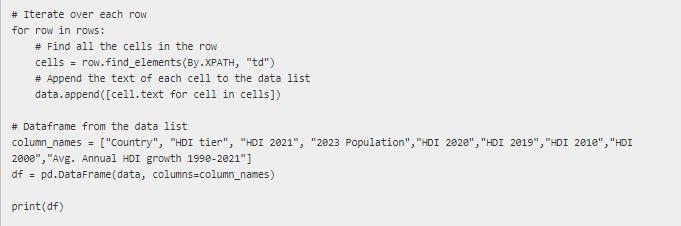
Using pandas, I need to calculate the average HDI for each category. The category is based off of the HDI Tier. There are 5 categories: "Very High", "High", "Medium", "Low", and "not rate". hdiTier hdi2021 Very High Very High Very High Very High Very High Very High Very High Very High Very High Very High Very High Very High Very High Very High Very High Very High Very High Very High Very High Very High Very High Very High Very High Very High Very High 0.962 0.961 0.959 0.952 0.951 0.948 0.947 0.945 0.942 0.941 0.94 0.939 0.937 0.937 0.936 0.935 0.93 0.929 0.925 0.925 0.921 0.919 0.918 0.918 0.916 hdi2020 hdi2019 hdi 2010 hdi2000 0.942 0.941 0.902 0.907 0.923 0.913 0.91 0.904 0.926 0.917 0.911 0.91 0.912 0.922 0.911 0.913 0.912 0.912 0.956 0.959 0.957 0.949 0.952 0.947 0.941 0.947 0.946 0.942 0.947 0.943 0.942 0.944 0.948 0.939 0.943 0.938 0.939 0.939 0.943 0.928 0.936 0.936 0.937 0.931 0.937 0.933 0.94 0.924 0.927 0.924 0.935 0.923 0.924 0.922 0.923 0.92 0.93 0.917 0.921 0.913 0.921 0.911 0.915 0.913 0.919 0.962 0.961 0.96 0.898 0.89 0.911 0.894 0.89 0.861 0.902 0.887 0.913 0.871 0.851 0.896 0.889 0.904 0.847 0.889 0.893 0.891 0.831 0.887 0.887 0.89 0.873 0.864 0.862 0.877 0.825 0.891 0.844 0.821 0.779 0.871 Original Code import pandas as pd from selenium import webdriver from selenium.webdriver.common.by from selenium.webdriver.chrome.service import Service from selenium.webdriver.support.ui import WebDriverwait from selenium.webdriver.support import expected_conditions as EC #chrome driver has been downloaded and installed onto computer for use with selenium. serv_obj = Service ("C:\\Users\\USERNAME\\Desktop\\chromedriver.exe") driver = webdriver.Chrome (service=serv_obj) # Website URL import By driver.get("https://worldpopulationreview.com/country-rankings/hdi-by-country") # Wait for the website to load. wait = WebDriverwait (driver, 10) #There is a pop-up window that needs to be closed driver.find_element(By.XPATH, '//html/body/div[3]/div/div[1]/button').click() #let's wait for the page to load and find the xpath to the table we want to scrape xpath = '//*@id="_next"]/div/div[3]/section [3]/div[1]/div/div[1]/div[1]/div[2]' table = wait.until (EC.presence_of_element_located ((By.XPATH, xpath))) # Find all the rows in the table rows = table.find_elements (By.XPATH, "//tbody/tr") # Empty list to store the data data = [] # Iterate over each row for row in rows: # Find all the cells in the row cells = row.find_elements (By.XPATH, "td") # Append the text of each cell to the data list data.append([cell.text for cell in cells]) # Dataframe from the data list column_names = ["Country", "HDI tier", "HDI 2021", "2023 Population", "HDI 2020", "HDI 2019", "HDI 2018", "HDI 2000", "Avg. Annual HDI growth 1998-2021"] df = pd.DataFrame (data, columns=column_names) print (df)
Step by Step Solution
3.38 Rating (160 Votes )
There are 3 Steps involved in it
To calculate the average HDI for each category you can use the Pandas library First you need to preprocess the data to make sure the HDI values are nu... View full answer

Get step-by-step solutions from verified subject matter experts
 Study Help