







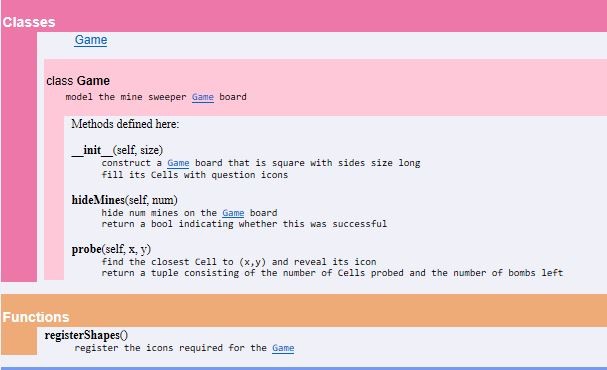
Question: Using Python 3 Game: Minesweeper Import the turtle and cell modules 1. Write the registerShapes function (it must match the documentation in game.html) This function
Using Python 3
Game: Minesweeper
Import the turtle and cell modules
1. Write the registerShapes function (it must match the documentation in game.html)
This function registers the 12 icon shapes
2. Establish private attributes for the board size, board (a list), number of bombs, cells probed
Fill the board with Cell objects, making them the question icon and moving them to the proper position on the screen. (Cell objects understand Turtle methods.)


##CODES##
import game
import turtle
def main():
def play(x,y): #creates a closure function
turns,left = g.probe(x,y) #this gives a tuple
if left == 0: # if the number of bombs runs out in Minesweeper, it will restart the game
again = turtle.textinput('you took {} turns'.format(turns),'Play again?')
if again == 'y':#if the user type "y" to replay the game again
main()
elif again == 'n': # if the user type "n" to stop playing the game
turtle.bye() #this closes the screen or the game entirely
size = int(turtle.textinput('Minesweeper','board size')) #converts the method into an integer
g = game.Game(size)
done = False # creates a loop (boolean)
while not done:
mines = int(turtle.textinput('Minesweeper','How many mines?'))#ask how many mines
done = g.hideMines(mines) #hides the mines
turtle.onscreenclick(play) #uses the default mouse icon to click on the minesweeper #turtle.onscreenclick(g.probe) creates a different mouse
main()
Step by Step Solution
There are 3 Steps involved in it

Get step-by-step solutions from verified subject matter experts
 Study Help