







Question: USING PYTHON 3 Using a try-except, write code to a file from the user. If the user gives a file that cannot be opened then
USING PYTHON 3
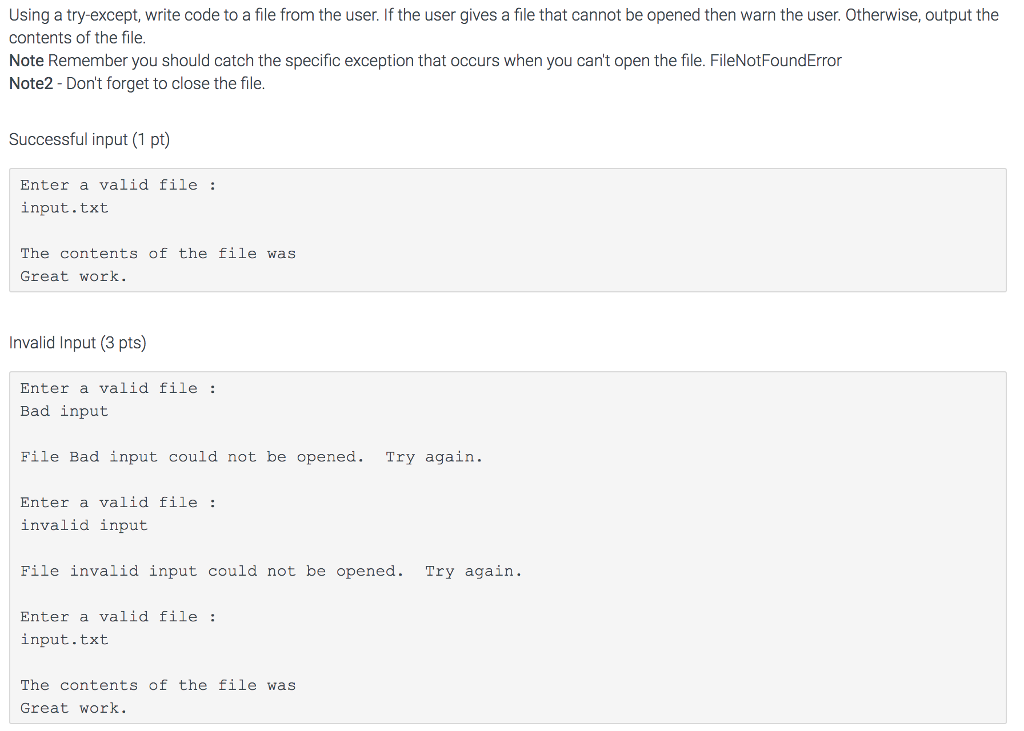
Using a try-except, write code to a file from the user. If the user gives a file that cannot be opened then warn the user. Otherwise, output the contents of the file. Note Remember you should catch the specific exception that occurs when you can't open the file. FileNotFoundError Note2-Don't forget to close the file. Successful input (1 pt) Enter a valid file input.txt The contents of the file was Great work. Invalid Input (3 pts) Enter a valid file Bad input File Bad input could not be opened. Try again. Enter a valid file: invalid input File invalid input could not be opened. Try again. Enter a valid file input.txt The contents of the file was Great work
Step by Step Solution
There are 3 Steps involved in it

Get step-by-step solutions from verified subject matter experts
 Study Help