







Question: using python 3 Write a fancy time formatter, time_formater(h,m), that takes a time of day, expressed in hours, h (integer 0 to 23) and minutes,
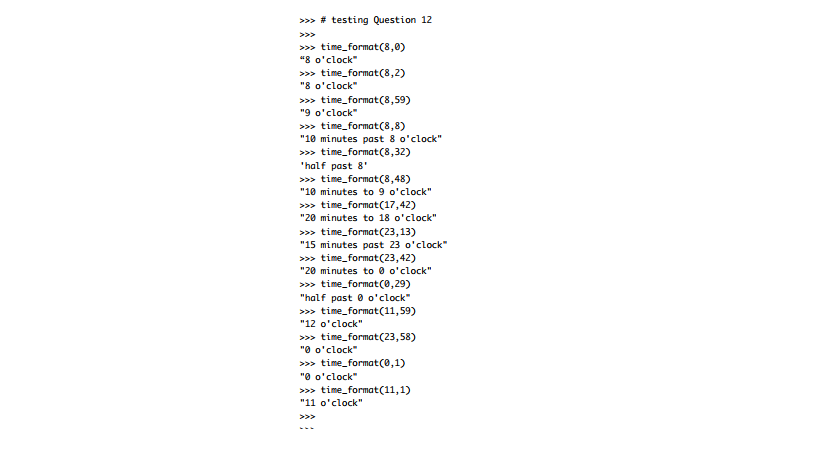 using python 3 Write a fancy time formatter, time_formater(h,m), that takes a time of day, expressed in hours, h (integer 0 to 23) and minutes, m (integer 0 to 59). The function first rounds the minutes to the nearest 5 minutes, and then returns the time as descriptive string. In particular, after rounding the minutes, the string has to be such that it uses oclock and half past for 0 and 30 minutes, respectively. For less than 30 minutes, it has to use past format and for more than 30 minute it has to use to format. See the examples in Section 2 for clarification and examples on how your function must behave. Your code for rounding minutes to the nearest 5 minutes should not take more than ONE line of code. You may use if statements in this question.
>>> # testing Question 12 time format (8,0) "8 o'clock >time_format(8,2) "8 o'clock "9 o'clock "10 minutes past 8 o'clock" half past 8 "10 minutes to 9 o'clock" time format(8,59) time format (8,8) time format(8,32) time format(8,48) time_format(17,42) "20 minutes to 18 o'clock" time format (23,13) "15 minutes past 23 o'clock time format (23,42) "20 minutes to 0 o'clock" time format(0,29) "half past o'clock" "12 o'clock" "0 o'clock "0 o'clock "11 o'clock" time_format (11,59) time format (23,58) time_format (0,1) time format(11,1)
Step by Step Solution
There are 3 Steps involved in it

Get step-by-step solutions from verified subject matter experts
 Study Help