







Question: Using Python and Format( ) for widths - II 2. Print a payroll statement. Read in the following employee information: Employee's name, number of hours
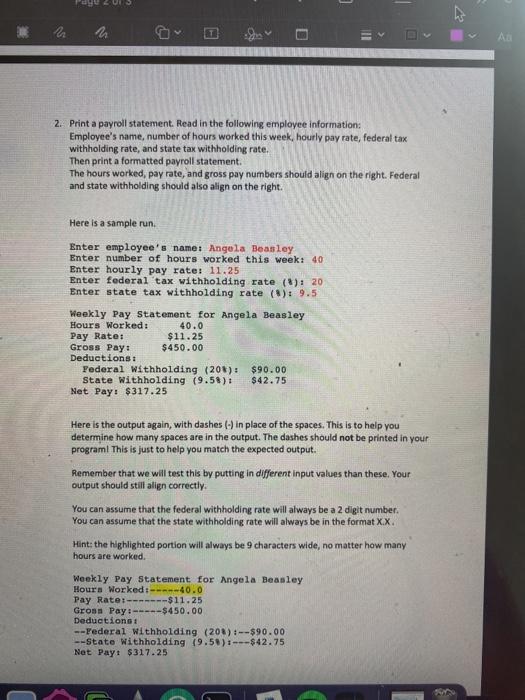
- II 2. Print a payroll statement. Read in the following employee information: Employee's name, number of hours worked this week, hourly pay rate, federal tax withholding rate, and state tax withholding rate. Then print a formatted payroll statement. The hours worked, pay rate, and gross pay numbers should align on the right. Federal and state withholding should also align on the right. Here is a sample run Enter employee's name: Angola Beasley Enter number of hours worked this week: 40 Enter hourly pay rate: 11.25 Enter federal tax withholding rate ($): 20 Enter state tax withholding rate ($): 9.5 Weekly Pay Statement for Angela Beasley Hours Worked: 40.0 Pay Rate: $11.25 Gross Pay: $450.00 Deductions: Federal Withholding (208): $90.00 State Withholding (9.5%): $42.75 Net Pay: $317.25 Here is the output again, with dashes (-) in place of the spaces. This is to help you determine how many spaces are in the output. The dashes should not be printed in your programl This is just to help you match the expected output. Remember that we will test this by putting in different input values than these. Your output should still align correctly You can assume that the federal withholding rate will always be a 2 digit number. You can assume that the state withholding rate will always be in the format X.X. Hint: the highlighted portion will always be 9 characters wide, no matter how many hours are worked Weekly Pay Statement for Angela Beasley Hours Worked-40.0 Pay Rate:-------$11.25 Gross Pay.-----$450.00 Deductions: --Federal Withholding (208): --$90.00 --State Withholding (9.5) ---$42.75 Net Pay: $317.25
Step by Step Solution
There are 3 Steps involved in it

Get step-by-step solutions from verified subject matter experts
 Study Help