







Question: Using Python code in Jupiter notebook can someone please help me answer this Problem? could you please type your code as a response please so
Using Python code in Jupiter notebook can someone please help me answer this Problem? could you please type your code as a response please so it's easier to read? Thank you.

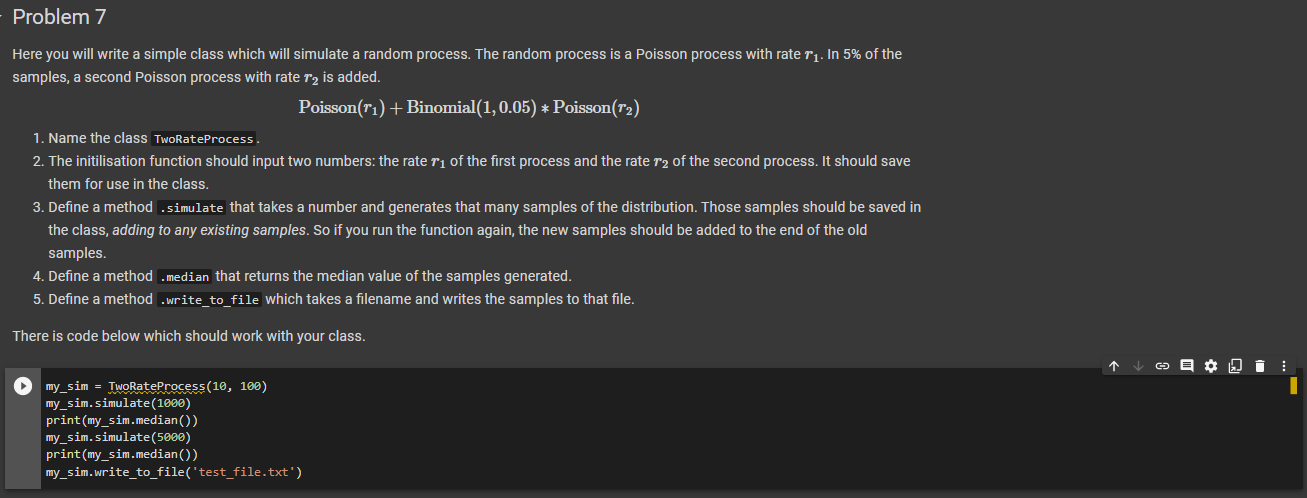
Ymatplotlib inline import matplotlib.pyplot as plt import numpy as np import numpy.random as rnd import pandas as pd Here you will write a simple class which will simulate a random process. The random process is a Poisson process with rate r1. In 5% of the samples, a second Poisson process with rate r2 is added. Poisson(r1)+Binomial(1,0.05)Poisson(r2) 1. Name the class TwoRateProcess. 2. The initilisation function should input two numbers: the rate r1 of the first process and the rate r2 of the second process. It should save them for use in the class. 3. Define a method .simulate that takes a number and generates that many samples of the distribution. Those samples should be saved in the class, adding to any existing samples. So if you run the function again, the new samples should be added to the end of the old samples. 4. Define a method .median that returns the median value of the samples generated. 5. Define a method .write_to_file which takes a filename and writes the samples to that file. There is code below which should work with your class. my_sim = TwoRateProcess (10,100) my_sim.simulate(1000) print(my_sim.median()) my_sim.simulate(5000) print(my_sim.median())
Step by Step Solution
There are 3 Steps involved in it

Get step-by-step solutions from verified subject matter experts
 Study Help