







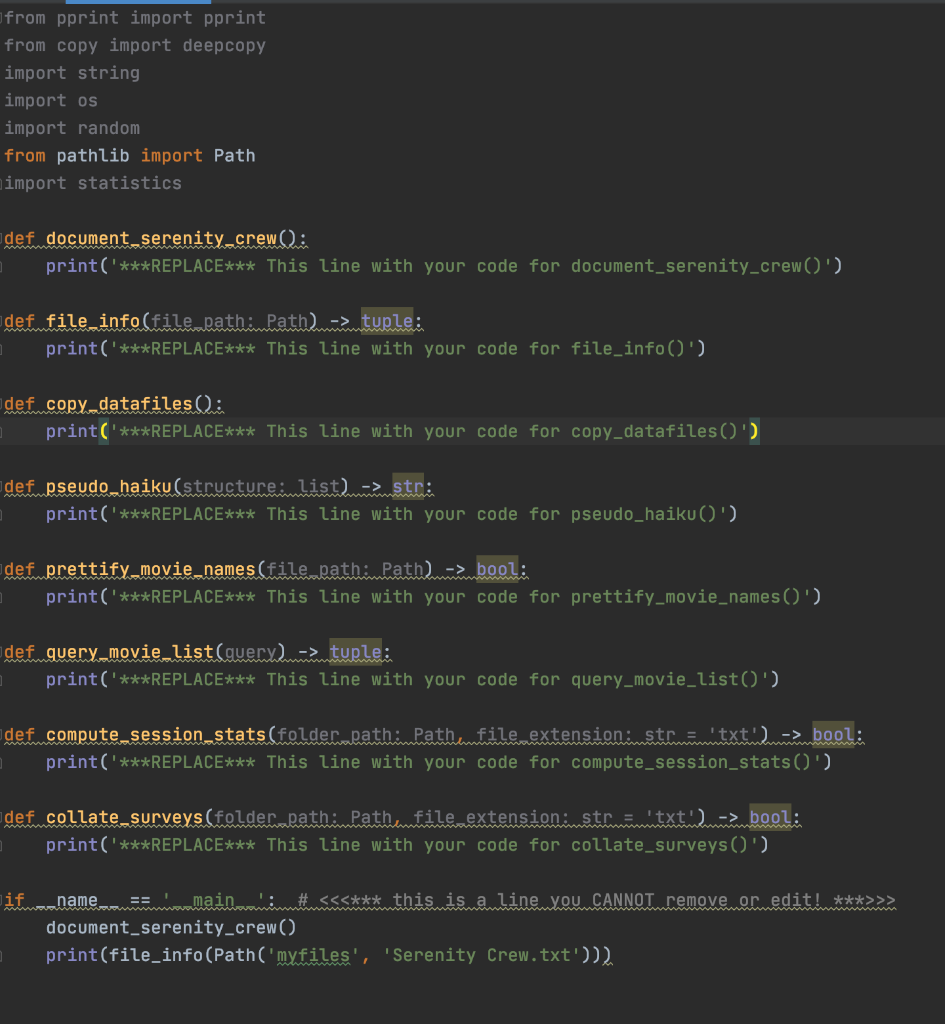
Question: Using python complete the functions in the provided script, function definitions are provided below: Please avoid using any Python facilities/capabilities we have yet to cover
Using python complete the functions in the provided script, function definitions are provided below:
Please avoid using any Python facilities/capabilities we have yet to cover in the course.
Please use expressive variable names.
# ALL FILES YOUR CODE CREATES NEED TO GO IN THE "MYFILES" FOLDER
# YOU ARE NOT TO ALTER ANY GIVEN FILE IN ANY WAY, OR ADD ANYTHING
# ANY FILE OR FOLDER TO ANY GIVEN FOLDER
# ASSUME THESE FOLDERS AND FILES EXIST FOR SUBMISSION
# NOTE: NONE OF THE SOLUTIONS FOR ASSIGNMENT CAN USE THE CSV MODULE
# NOTE: NONE OF THE SOLUTIONS FOR ASSIGNMENT CAN USE THE PANDAS MODULE
# TESTS ARE NOT PROVIDED THIS WEEK. PAY CLOSE ATTENTION TO
# THE PROMPTS, VISUALLY CHECK FILES YOU CREATE TO MAKE SURE
# THEY ARE IN THE CORRECT OUTPUT FOLDER AND CONTAIN THE TEXT YOU INTENDED TO WRITE.
def document_serenity_crew():
- create a file called "Serenity Crew.txt" with each of these names:
- Mal, Zoe, Jayne, Book, Inara, Kaylee, Simon, and River each on a line by itself.
- Make sure you create your file within the myfiles folder.
- No error handling is required.
def file_info(file_path: Path) -> tuple:
- Write a function that takes a path as its argument. It should return a tuple, with the following values:
- file' if it is a valid file, 'directory' if it is a valid folder/directory, 'unknown' otherwise
- Number of characters if it is a file, Number of files if it is a folder (non-recursive)
- If the first value is 'unknown', the size should be 0
E.g., print(file_info(Path('files', 'MLK_dream_speech_1963.txt'))): assume these files and folder paths exists
('file', 8899)
print(file_info(Path('files', 'twin_peaks.txt')))
('unknown', 0)
def copy_datafiles():
- Open each .txt file in the datafiles folder.
- Read in the text and then write it back out to an identically named file in the mydatafiles sub-folder within the myfiles folder.
- You have to achieve this by reading in the text from each file as a string and then writing it back out to the new file.
- This function requires no error handling and has no return value.
- When done, the mydatafiles folder will contain a copy of each file within the datafiles folder.
def pseudo_haiku(structure: list) -> str:
- Make some random pseudo-haiku poetry by reading in the words from words.txt and then returning a poem based on these words.
- The structure is dependent on the list that is passed to the function when called.
- Each word in your poem is to be randomly chosen from the entire word list found within words.txt.
E.g., if the list [5, 7, 5] is given, then you have to return a haiku with 3 lines.
The first with 5 words,
the second with 7 words,
and the last with 5 words.
Note: This is called pseudo-Haiku because Haiku counts syllables whereas we are counting words.
E.g.:
print(pseudo_haiku(structure=[5, 7, 5]))
enter mark broad provide pose
hundred cut bar fraction sister trip even
add twenty suit finish base
print(pseudo_haiku(structure=[3,4,5,3]))
one do speech
cut effect stick where
throw experiment port duck before
tell sure fig
print(pseudo_haiku(structure=[]))
would return an empty string
You can assume it will be called with a list of numbers (or an empty list)
def prettify_movie_names(file_path: Path) -> bool:
- create a function that opens the movie list file within the files folder and writes it back out to myfiles with each line in this format:
MOVIENAME (YEAR)
instead of the current format, which is
MOVIENAME = YEAR
- If everything works out, return True, if there are any problems reading the file, return False
- prettify_movie_names(file_path=Path('files', 'movie.txt') should return True
- prettify_movie_names(file_path=Path('files', 'movie2015.txt') should return False (because it doesn't exist)
Warning, you can't just write the data back to the original file.
You have to use the same file name as the one given, but store your updated version in the myfiles folder.
The output will be like this:
- The Terminator (1984)
- Mad Max 2: The Road Warrior (1981)
- The Invisible Man (1933)
def query_movie_list(query) -> tuple:
- This function takes a single parameter. It can either be a movie name (string) or a date (could be a string or int).
- If a movie name is given, you need to return the corresponding year(s) from movie_list_2018.txt as strings.
- It just so happens that each movie is listed once, so this tuple will either be empty (if the move doesn't exist) or it will contain a single item.
- If a movie year is given (in int or str format), you need to return all movie(s) from that year in a tuple. If the year is not found, then you need to return an empty tuple.
E.g.: assume these files and folder paths exists
- query_movie_list('Aliens') should return (1986,)
- query_movie_list(1981) should return ('Mad Max 2: The Road Warrior', 'The Evil Dead')
- you don't need any error handling for this function.
def compute_session_stats(folder_path: Path, file_extension: str = 'txt') -> bool:
- Open the files in the given input folder (e.g., it could be the datafiles folder).
- read in the contents from each .txt file there.
- The contents of each text file is a bunch of numbers separated by commas...there are some newlines as well.
- Gather all of the numbers from each file and compute a mean and standard deviation for each one using statistics.mean() and statistics.stdev().
- Each float value you produce should have 2 significant digits after the decimal point.
- You'll also need to extract the participant ID number from each file name.
- Then create an output file in the myfiles folder called "stats.csv".
- On each line, print 3 comma separated values: the participant ID, that participant's mean, and that participant's stdev.
- The first line should be "PID,Mean,Stdev"
- Notice that there are no spaces between the values!
- If an invalid folder_path is given, return False, otherwise return True when 'stats.csv' has been successfully created.
E.g.,: assume these files and folder paths exists
PID,Mean,Stdev
109,392.75,229.56
103,409.84,232.79
100,403.04,225.67
def collate_surveys(folder_path: Path, file_extension: str = 'txt') -> bool:
- The goal of collage_surveys() is similar to compute_session_stats().
- You are to read in the text files in the provided folder.
- Each file in this folder will contain text.
- You are to create a single output file in the myfiles folder called "collated_surveys.csv".
- On each line of collated_surveys.csv should be a survey number (take it from the filename), the number of characters in the response, and then the response.
- The first line of collated_surveys.csv needs to be "survey_number,character_count,response"
- Notice that there are no spaces between the values!
- If an invalid foler_path is given, return False, otherwise return True when 'collated_surveys.csv' has been successfully created.
E.g.: assume these files and folder paths exists
survey_number,character_count,response
13,19, hurts walking speed
06,134, I would say I always try to be safe when using my phone while walking by not walking close to the street...
09,79, I feel that it affect my safety more because i am not concentrating on the road
Words.txt
the
of
to
and
a
in
is
it
you
that
he
was
for
on
one
we
movie.txt
The Terminator = 1984 Mad Max 2: The Road Warrior = 1981 The Invisible Man = 1933 E.T. The Extra-Terrestrial = 1982 Aliens = 1986 The Evil Dead = 1981
** comment: I don't understand why it was assigned to you then? Is it possible for you to refund my question or find another tutor who can work on it!
from pprint import pprint from copy import deepcopy import string import os import random from pathlib import Path import statistics def document serenity_crew (: print('***REPLACE*** This line with your code for document_serenity_crew()') def file info(file pathimath, mamtuple: print('***REPLACE*** This line with your code for file_info()') defm.copy.datafilesi print('***REPLACE*** This line with your code for copy_datafiles()') idef pseudo_haiku (structure list)--> str: print('***REPLACE*** This line with your code for pseudo_haiku()') def prettify_movie_names (file pathimPath-> bool: print('***REPLACE*** This line with your code for prettify_movie_names()') defmquery_movie list (queremmtuple: print('***REPLACE*** This line with your code for query_movie_list()') defm.compute session_stats (folderapathimathumfile extensionimetrimmtxtmambool: print('***REPLACE*** This line with your code for compute_session_stats()') def..collate_surveys (folderapathimpathimile extensionimstammtextilmbool: print('***REPLACE*** This line with your code for collate_surveys()') lif _name__ == 'main': # >> document_serenity_crew() print(file_info(Path('myfiles', 'Serenity Crew.txt'))). from pprint import pprint from copy import deepcopy import string import os import random from pathlib import Path import statistics def document serenity_crew (: print('***REPLACE*** This line with your code for document_serenity_crew()') def file info(file pathimath, mamtuple: print('***REPLACE*** This line with your code for file_info()') defm.copy.datafilesi print('***REPLACE*** This line with your code for copy_datafiles()') idef pseudo_haiku (structure list)--> str: print('***REPLACE*** This line with your code for pseudo_haiku()') def prettify_movie_names (file pathimPath-> bool: print('***REPLACE*** This line with your code for prettify_movie_names()') defmquery_movie list (queremmtuple: print('***REPLACE*** This line with your code for query_movie_list()') defm.compute session_stats (folderapathimathumfile extensionimetrimmtxtmambool: print('***REPLACE*** This line with your code for compute_session_stats()') def..collate_surveys (folderapathimpathimile extensionimstammtextilmbool: print('***REPLACE*** This line with your code for collate_surveys()') lif _name__ == 'main': # >> document_serenity_crew() print(file_info(Path('myfiles', 'Serenity Crew.txt')))
Step by Step Solution
There are 3 Steps involved in it

Get step-by-step solutions from verified subject matter experts
 Study Help