







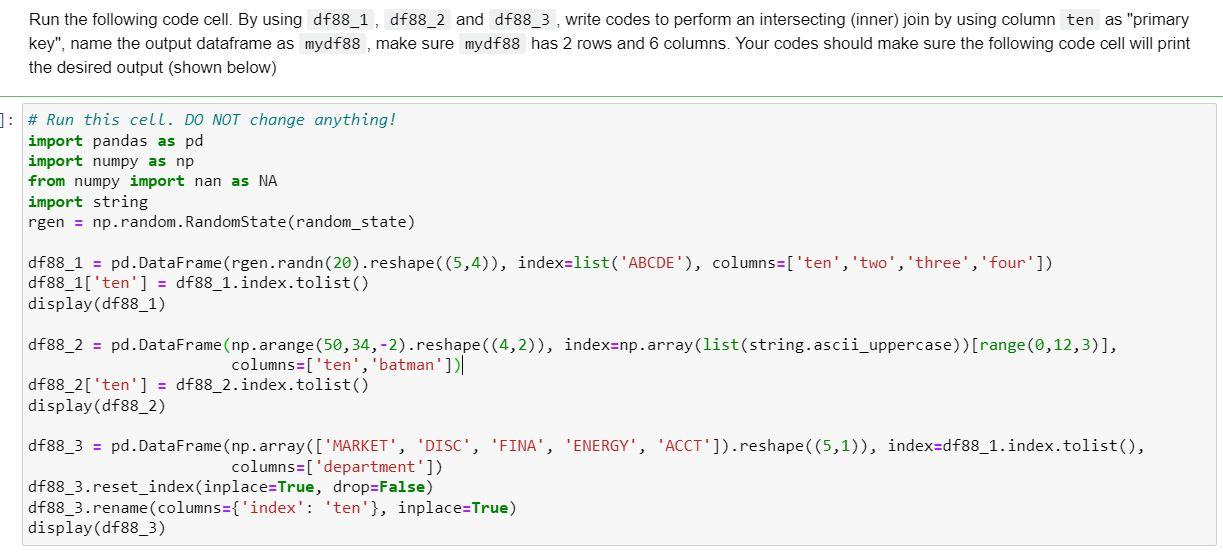
Question: Using Python Run the following code cell. By using df88_1, df88_2 and df88_3, write codes to perform an intersecting (inner) join by using column ten
Using Python
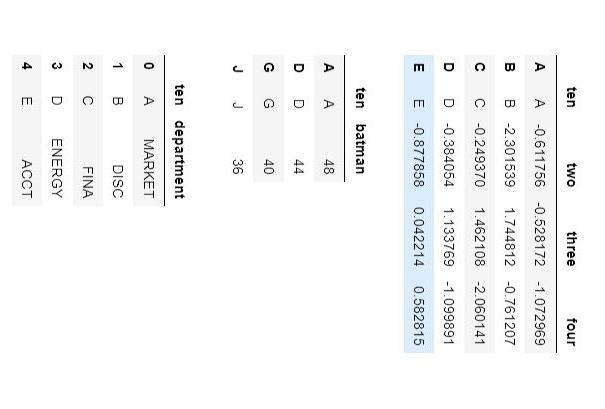
Run the following code cell. By using df88_1, df88_2 and df88_3, write codes to perform an intersecting (inner) join by using column ten as "primary key", name the output dataframe as mydf88, make sure mydf88 has 2 rows and 6 columns. Your codes should make sure the following code cell will print the desired output (shown below) \begin{tabular}{rrrrr} & ten & two & three & four \\ \hline A & A & -0.611756 & -0.528172 & -1.072969 \\ B & B & -2.301539 & 1.744812 & -0.761207 \\ C & C & -0.249370 & 1.462108 & -2.060141 \\ D & D & -0.384054 & 1.133769 & -1.099891 \\ E & E & -0.877858 & 0.042214 & 0.582815 \end{tabular} \begin{tabular}{rrr} & ten & batman \\ \hline A & A & 48 \\ D & D & 44 \\ G & G & 40 \\ J & J & 36 \end{tabular} \begin{tabular}{rrr} & ten & department \\ \hline 0 & A & MARKET \\ 1 & B & DISC \\ 2 & C & FINA \\ 3 & D & ENERGY \\ 4 & E & ACCT \end{tabular}
Step by Step Solution
There are 3 Steps involved in it

Get step-by-step solutions from verified subject matter experts
 Study Help