







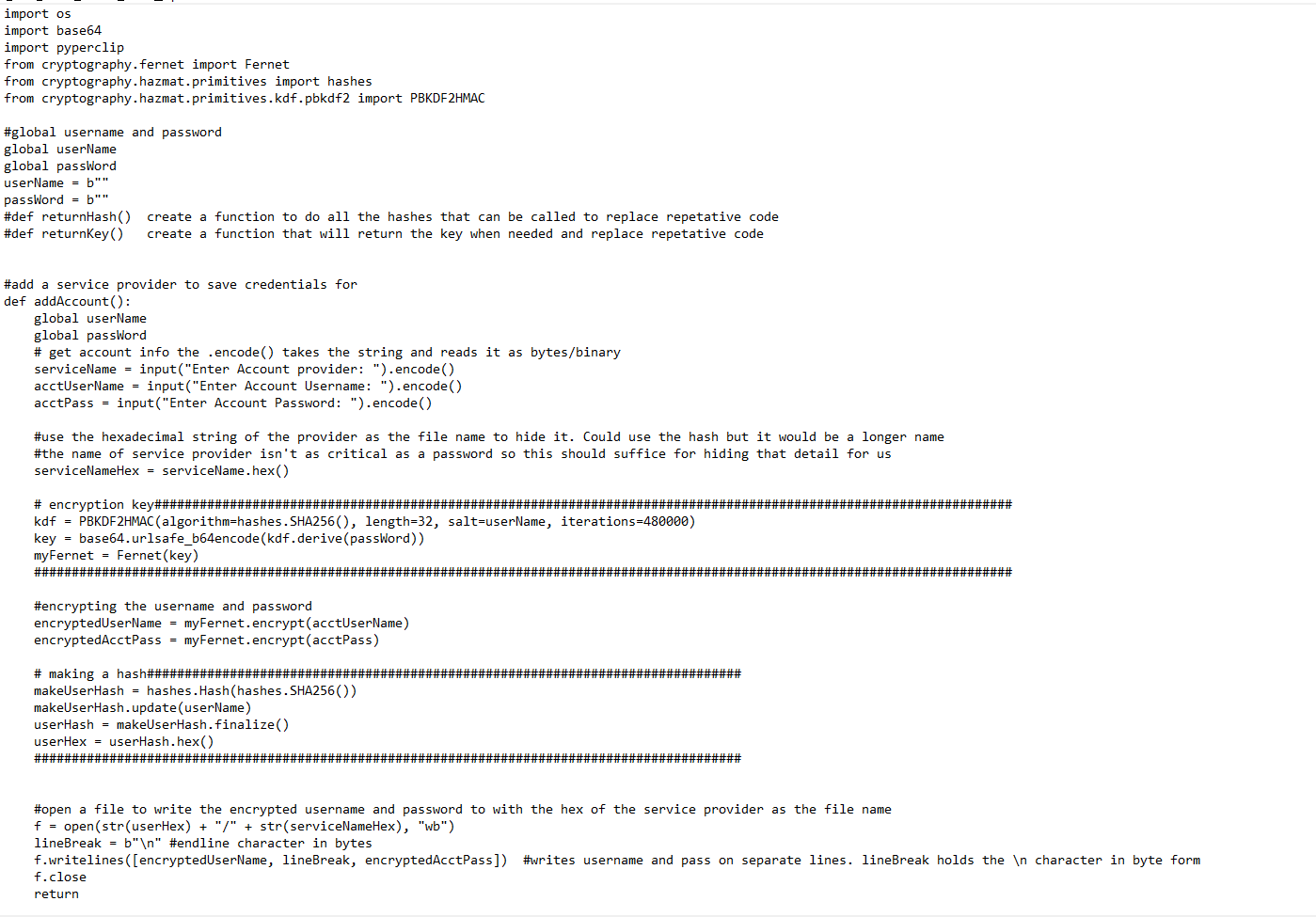
Question: Using Python The code is provided These are the questions needed to be answered by placing code in the one provided # making a hash##########################################################################
Using Python The code is provided
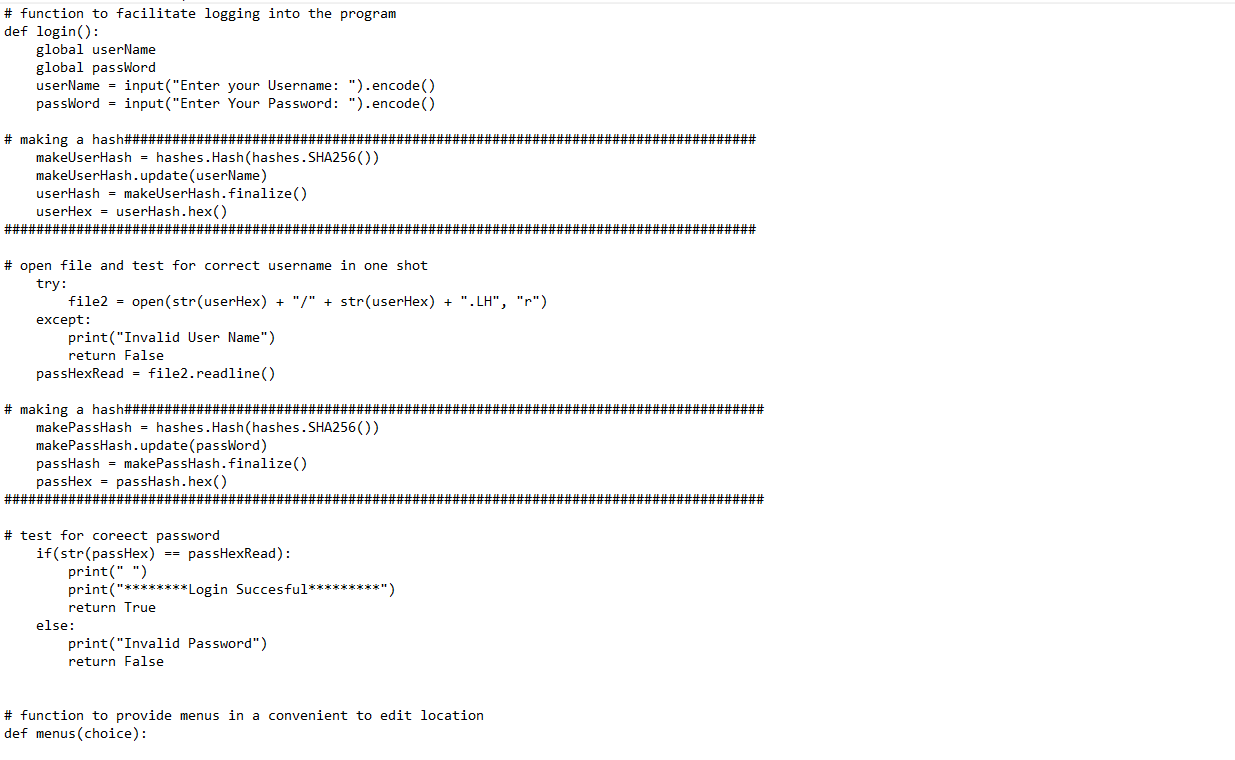
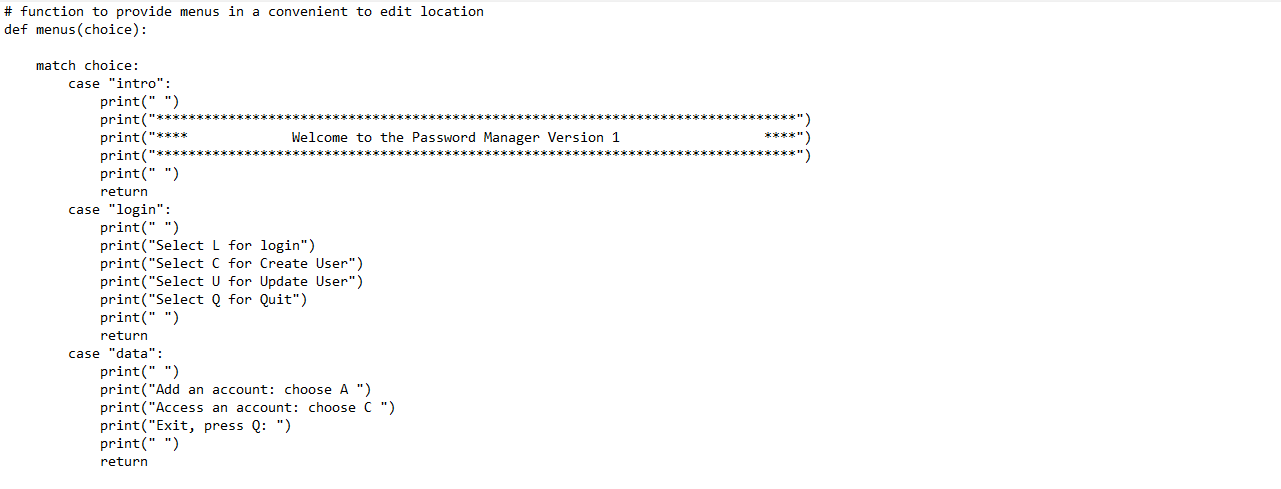
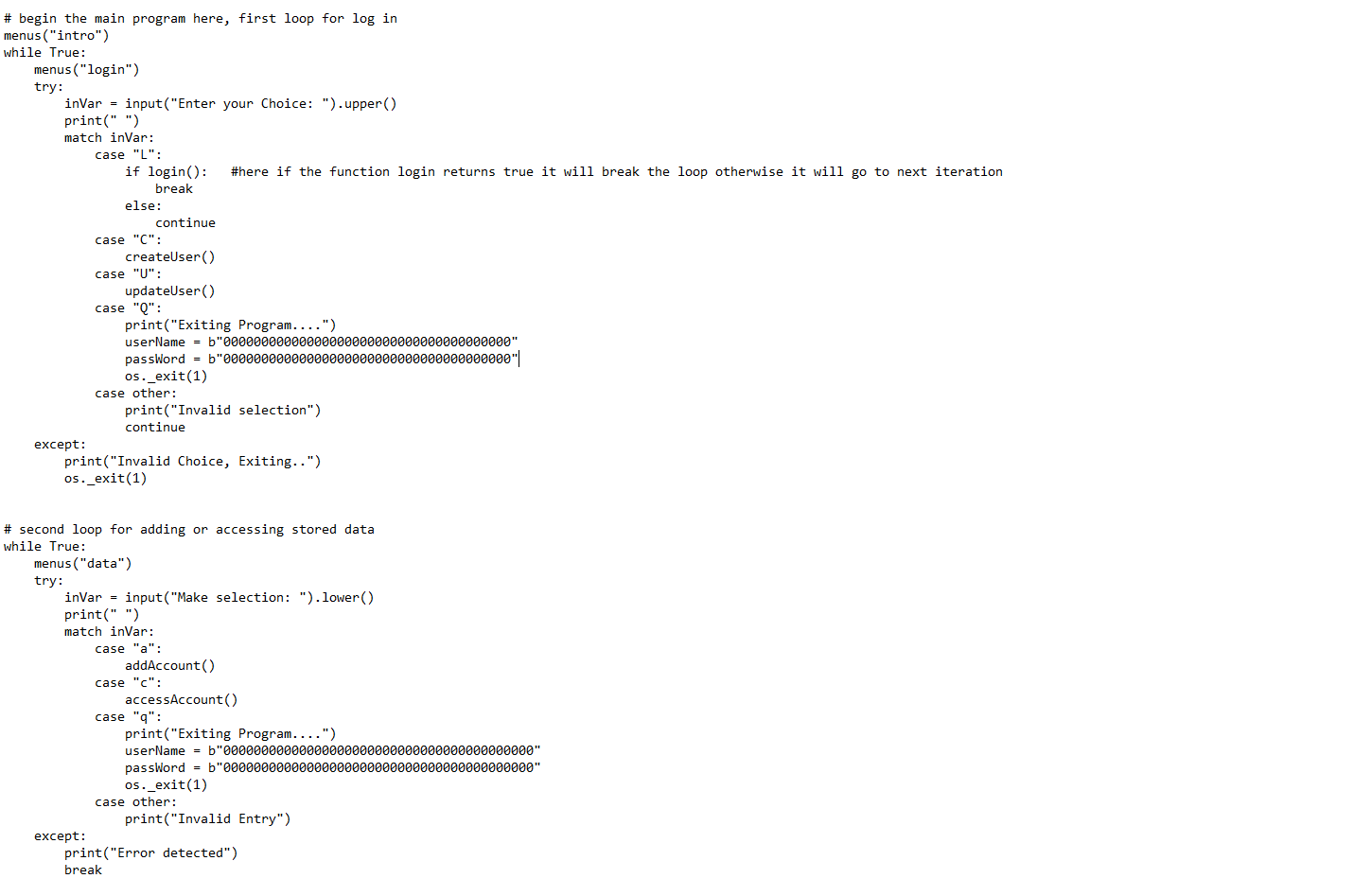
These are the questions needed to be answered by placing code in the one provided
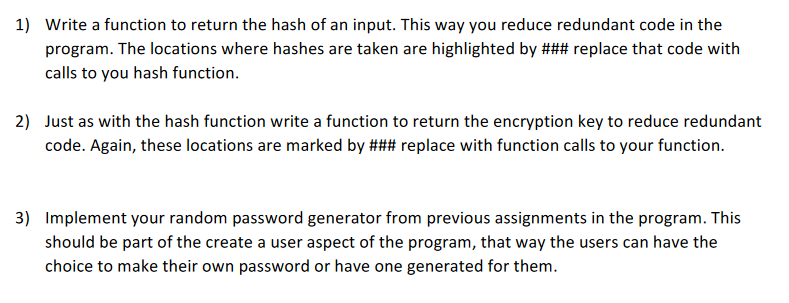
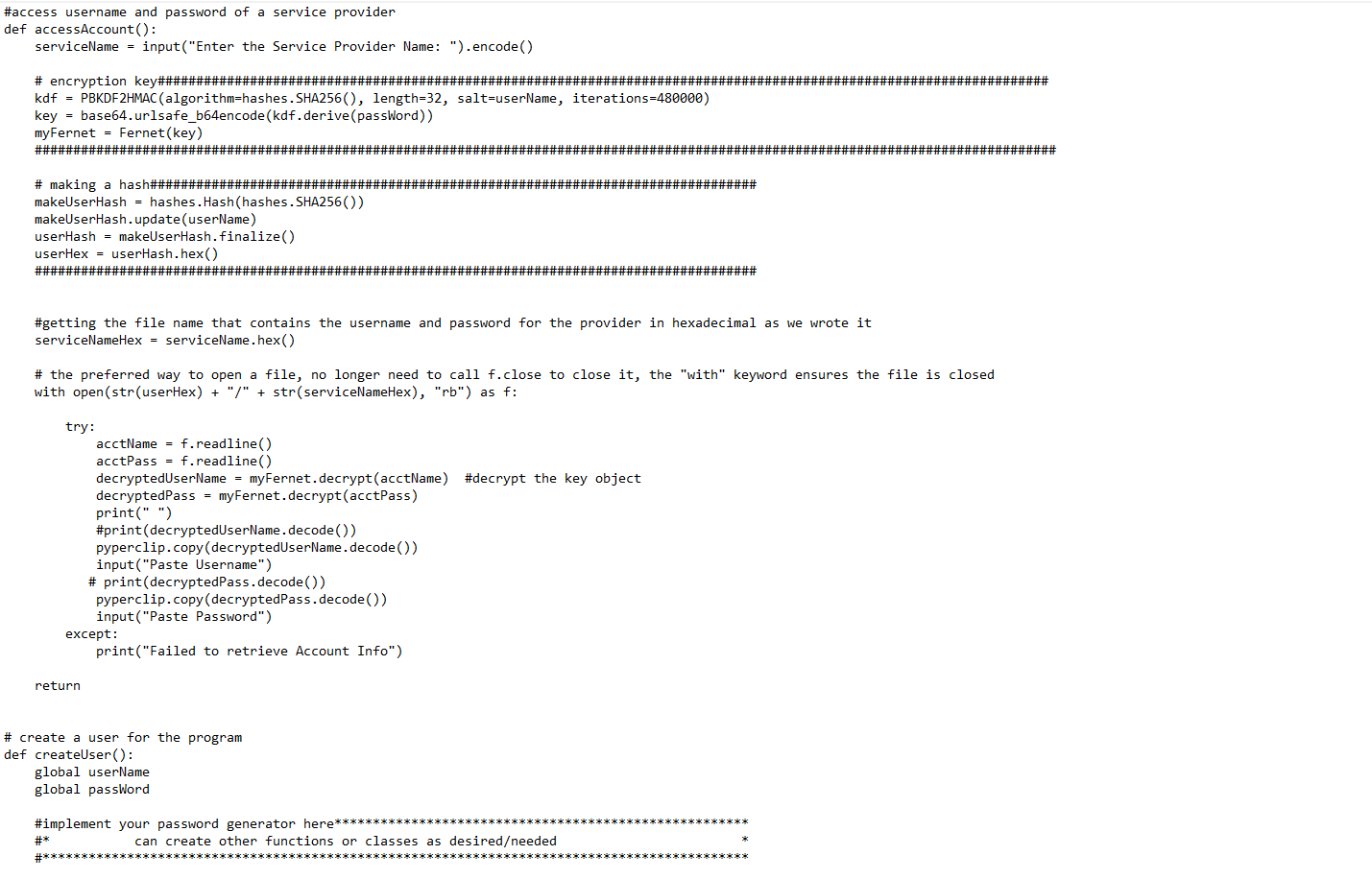
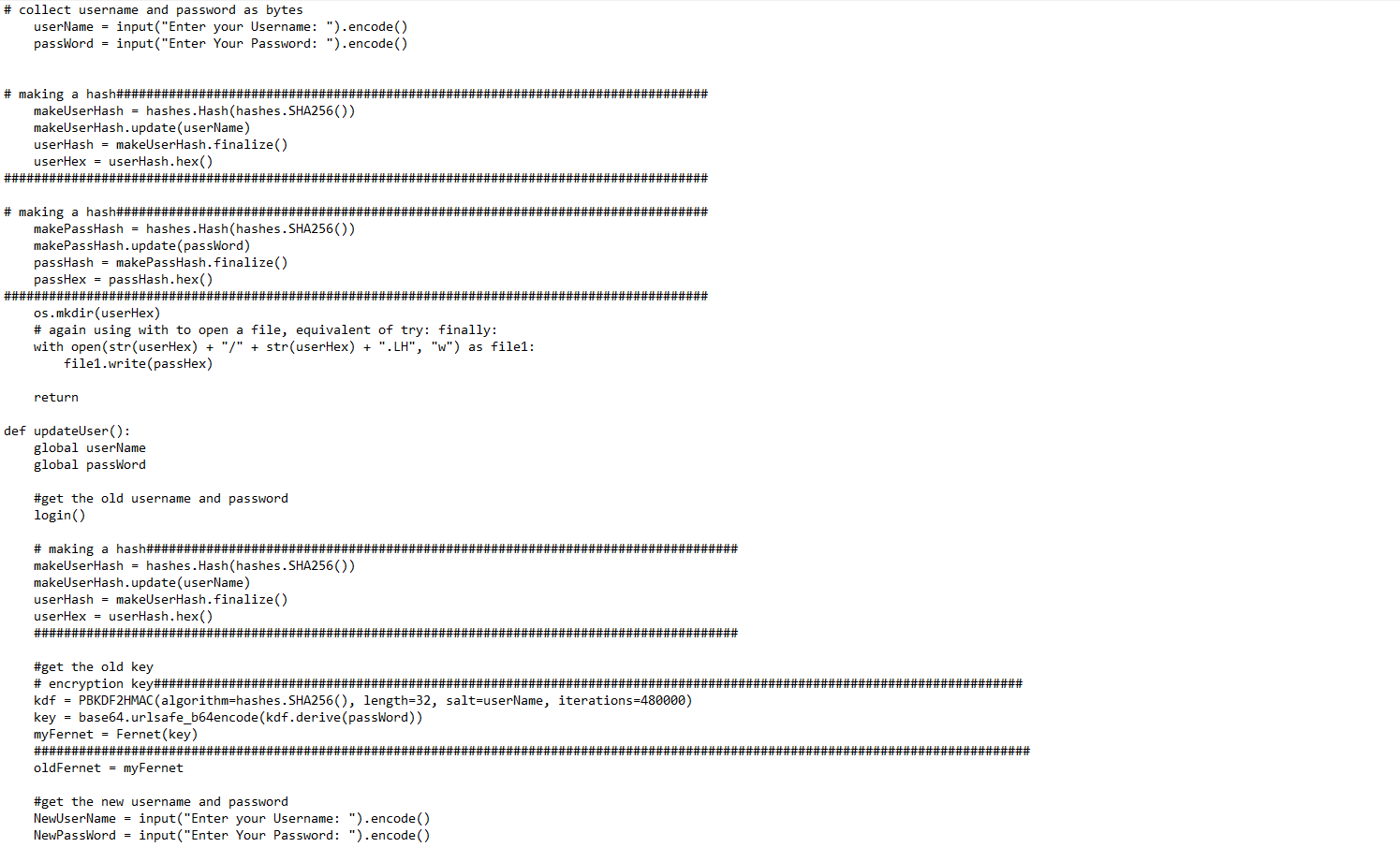
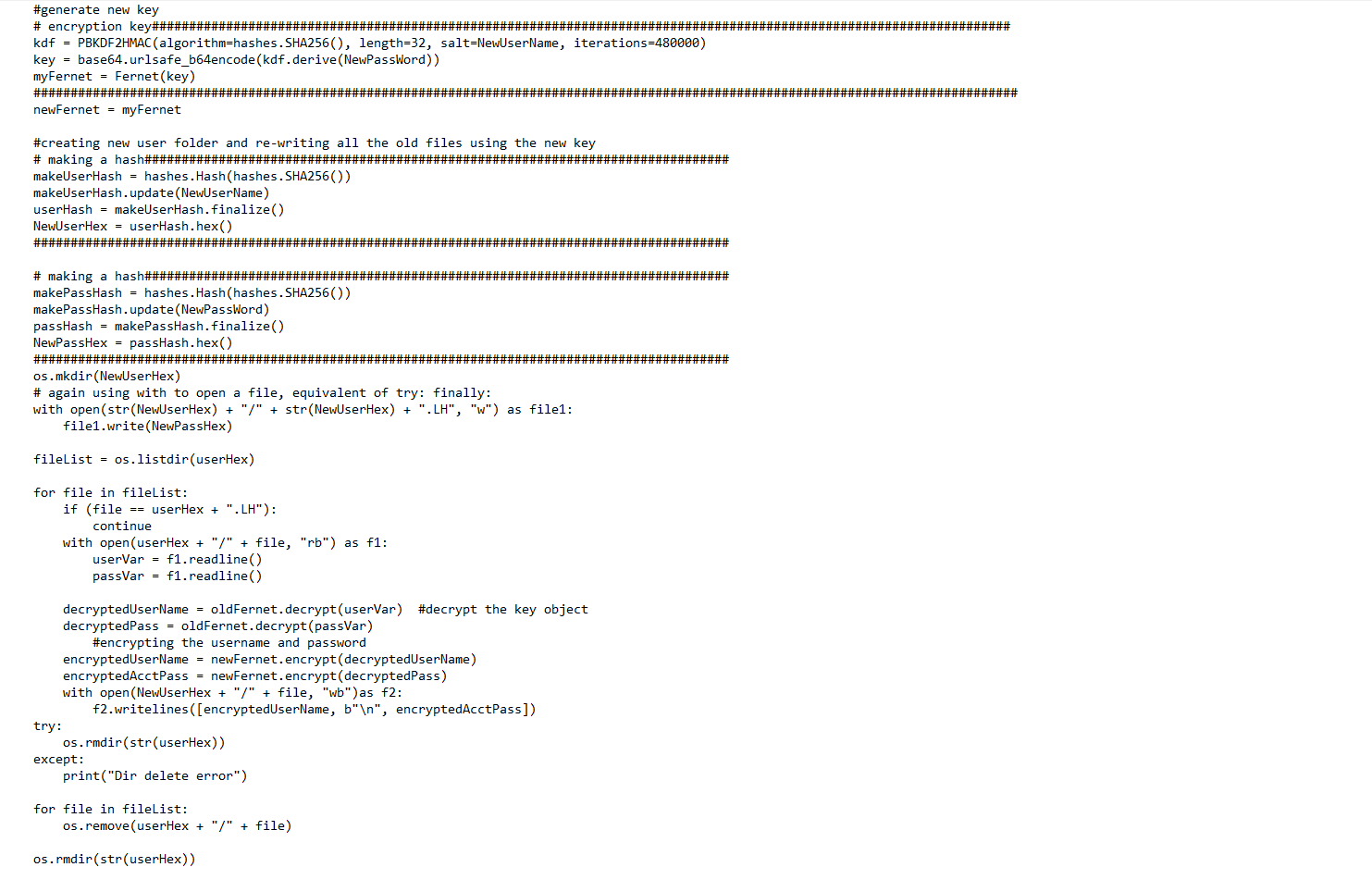
\# making a hash\#\#\#\#\#\#\#\#\#\#\#\#\#\#\#\#\#\#\#\#\#\#\#\#\#\#\#\#\#\#\#\#\#\#\#\#\#\#\#\#\#\#\#\#\#\#\#\#\#\#\#\#\#\#\#\#\#\#\#\#\#\#\#\#\#\#\#\#\#\#\#\#\#\# makeUserHash = hashes. Hash(hashes. SHA256()) makeUserHash. update (userName) userHash = makeUserHash. finalize () userHex = userHash. hex() \#\#\#\#\#\#\#\#\#\#\#\#\#\#\#\#\#\#\#\#\#\#\#\#\#\#\#\#\#\#\#\#\#\#\#\#\#\#\#\#\#\#\#\#\#\#\#\#\#\#\#\#\#\#\#\#\#\#\#\#\#\#\#\#\#\#\#\#\#\#\#\#\#\#\#\#\#\#\#\#\#\#\#\#\#\#\#\#\#\#\#\#\#\# \#getting the file name that contains the username and password for the provider in hexadecimal as we wrote it serviceNameHex = serviceName hex() \# the preferred way to open a file, no longer need to call f.close to close it, the "with" keyword ensures the file is closed with open (str(userHex) + "/" + str(serviceNameHex), "rb") as f : try: acctName =f. readline () acctPass =f.readline () decryptedUserName = myFernet. decrypt (acctName ) \#decrypt the key object decryptedPass = myFernet. decrypt( acctPass ) print(" ") \#print(decryptedUserName.decode()) pyperclip.copy(decryptedUserName. decode()) input( "Paste Username") \# print(decryptedPass. decode()) pyperclip.copy(decryptedPass. decode()) input( "Paste Password") except: print("Failed to retrieve Account Info") return create a user for the program lef createUser(): global userName global password \#implement your password generator here \#* can create other functions or classes as desiredeeded # collect username and password as bytes userName = input("Enter your Username: "). encode() passWord = input("Enter Your Password: "). encode() \# making a hash\#\#\#\#\#\#\#\#\#\#\#\#\#\#\#\#\#\#\#\#\#\#\#\#\#\#\#\#\#\#\#\#\#\#\#\#\#\#\#\#\#\#\#\#\#\#\#\#\#\#\#\#\#\#\#\#\#\#\#\#\#\#\#\#\#\#\#\#\#\#\#\#\#\#\#\#\#\#\# makeUserHash = hashes. Hash(hashes. SHA256( )) makeUserHash. update (userName) userHash = makeUserHash.finalize () userHex = userHash. hex ( ) \#\#\#\#\#\#\#\#\#\#\#\#\#\#\#\#\#\#\#\#\#\#\#\#\#\#\#\#\#\#\#\#\#\#\#\#\#\#\#\#\#\#\#\#\#\#\#\#\#\#\#\#\#\#\#\#\#\#\#\#\#\#\#\#\#\#\#\#\#\#\#\#\#\#\#\#\#\#\#\#\#\#\#\#\#\#\#\#\#\#\#\#\#\# \# making a hash\#\#\#\#\#\#\#\#\#\#\#\#\#\#\#\#\#\#\#\#\#\#\#\#\#\#\#\#\#\#\#\#\#\#\#\#\#\#\#\#\#\#\#\#\#\#\#\#\#\#\#\#\#\#\#\#\#\#\#\#\#\#\#\#\#\#\#\#\#\#\#\#\#\#\#\#\#\#\# makePassHash = hashes. Hash(hashes. SHA256( ) makePassHash. update (password) passHash = makePassHash. finalize () passHex = passHash. hex () \#\#\#\#\#\#\#\#\#\#\#\#\#\#\#\#\#\#\#\#\#\#\#\#\#\#\#\#\#\#\#\#\#\#\#\#\#\#\#\#\#\#\#\#\#\#\#\#\#\#\#\#\#\#\#\#\#\#\#\#\#\#\#\#\#\#\#\#\#\#\#\#\#\#\#\#\#\#\#\#\#\#\#\#\#\#\#\#\#\#\#\#\#\# os.mkdir(userHex) \# again using with to open a file, equivalent of try: finally: with open (str( userHex )+"/"+str( userHex )+".LH,"w" ) as file1: file1.write(passHex) return def updateUser(): global userName global password \#get the old username and password login() \# making a hash\#\#\#\#\#\#\#\#\#\#\#\#\#\#\#\#\#\#\#\#\#\#\#\#\#\#\#\#\#\#\#\#\#\#\#\#\#\#\#\#\#\#\#\#\#\#\#\#\#\#\#\#\#\#\#\#\#\#\#\#\#\#\#\#\#\#\#\#\#\#\#\#\#\#\#\#\#\#\# makeUserHash = hashes. Hash(hashes. SHA256( )) makeUserHash. update (userName) userHash = makeUserHash. finalize () userHex = userHash. hex () \#\#\#\#\#\#\#\#\#\#\#\#\#\#\#\#\#\#\#\#\#\#\#\#\#\#\#\#\#\#\#\#\#\#\#\#\#\#\#\#\#\#\#\#\#\#\#\#\#\#\#\#\#\#\#\#\#\#\#\#\#\#\#\#\#\#\#\#\#\#\#\#\#\#\#\#\#\#\#\#\#\#\#\#\#\#\#\#\#\#\#\#\#\# \#get the old key kdf= PBKDF2HMAC (algorithm=hashes.SHA256(), length=32, salt=userName, iterations=480000) key = base64.urlsafe_b64encode(kdf.derive(password)) myFernet = Fernet ( key ) oldFernet = myFernet \#get the new username and password NewUserName = input ("Enter your Username: "). encode() NewPassWord = input ("Enter Your Password: "). encode() \#generate new key \# encryption key\#\#\#\#\#\#\#\#\#\#\#\#\#\#\#\#\#\#\#\#\#\#\#\#\#\#\#\#\#\#\#\#\#\#\#\#\#\#\#\#\#\#\#\#\#\#\#\#\#\#\#\#\#\#\#\#\#\#\#\#\#\#\#\#\#\#\#\#\#\#\#\#\#\#\#\#\#\#\#\#\#\#\#\#\#\#\#\#\#\#\#\#\#\#\#\#\#\#\#\#\#\#\#\#\#\#\#\#\#\#\# kdf= PBKDF2HMAC (algorithm=hashes. SHA256(), length=32, salt=NewUserName, iterations=480000) key = base64.urlsafe_b64encode(kdf.derive(NewPassWord)) myFernet = Fernet (key) newFernet = myFernet \#creating new user folder and re-writing all the old files using the new key \# making a hash\#\#\#\#\#\#\#\#\#\#\#\#\#\#\#\#\#\#\#\#\#\#\#\#\#\#\#\#\#\#\#\#\#\#\#\#\#\#\#\#\#\#\#\#\#\#\#\#\#\#\#\#\#\#\#\#\#\#\#\#\#\#\#\#\#\#\#\#\#\#\#\#\#\#\#\#\#\#\# makeUserHash = hashes. Hash(hashes. SHA256()) makeUserHash. update(NewUserName) userHash = makeUserHash. finalize () NewUserHex = userHash. hex () \#\#\#\#\#\#\#\#\#\#\#\#\#\#\#\#\#\#\#\#\#\#\#\#\#\#\#\#\#\#\#\#\#\#\#\#\#\#\#\#\#\#\#\#\#\#\#\#\#\#\#\#\#\#\#\#\#\#\#\#\#\#\#\#\#\#\#\#\#\#\#\#\#\#\#\#\#\#\#\#\#\#\#\#\#\#\#\#\#\#\#\#\#\# \# making a hash\#\#\#\#\#\#\#\#\#\#\#\#\#\#\#\#\#\#\#\#\#\#\#\#\#\#\#\#\#\#\#\#\#\#\#\#\#\#\#\#\#\#\#\#\#\#\#\#\#\#\#\#\#\#\#\#\#\#\#\#\#\#\#\#\#\#\#\#\#\#\#\#\#\#\#\#\#\#\# makePassHash = hashes. Hash(hashes. SHA256( )) makePassHash. update(NewPassword) passHash = makePassHash. finalize () NewPassHex = passHash.hex() \#\#\#\#\#\#\#\#\#\#\#\#\#\#\#\#\#\#\#\#\#\#\#\#\#\#\#\#\#\#\#\#\#\#\#\#\#\#\#\#\#\#\#\#\#\#\#\#\#\#\#\#\#\#\#\#\#\#\#\#\#\#\#\#\#\#\#\#\#\#\#\#\#\#\#\#\#\#\#\#\#\#\#\#\#\#\#\#\#\#\#\#\#\# os.mkdir(NewUserHex) \# again using with to open a file, equivalent of try: finally: with open (str( NewUserHex )+"/"+str( NewUserHex )+".LH,"w" ) as file1: file1.write(NewPassHex) fileList = os. listdir(userHex) for file in fileList: if (file== userHex +".LH) : continue with open(userHex + "/" + file, "rb") as f1: uservar =f1. readline () passVar =f1. readline () decryptedUserName = oldFernet. decrypt(userVar) \#decrypt the key object decryptedPass = oldFernet. decrypt (passVar) \#encrypting the username and password encryptedUserName = newFernet. encrypt (decryptedUserName) encryptedAcctPass = newFernet. encrypt (decryptedPass) with open(NewUserHex + "/" +ile, "wb") as f2: f2. Writelines ([encryptedUserName, b " ", encryptedAcctPass]) try: os.rmdir (str( userHex )) except: print("Dir delete error") for file in filelist: os. remove(userHex +"/"+ file) os. rmdir (str(userHex)) 1) Write a function to return the hash of an input. This way you reduce redundant code in the program. The locations where hashes are taken are highlighted by \#\#\# replace that code with calls to you hash function. 2) Just as with the hash function write a function to return the encryption key to reduce redundan code. Again, these locations are marked by \#\#\# replace with function calls to your function. 3) Implement your random password generator from previous assignments in the program. This should be part of the create a user aspect of the program, that way the users can have the choice to make their own password or have one generated for them
Step by Step Solution
There are 3 Steps involved in it

Get step-by-step solutions from verified subject matter experts
 Study Help