







Question: Using Python3 The worlds simplest HTTP server Now youre going to create an HTTP server using the python socket api. Your program will create a
Using Python3
The worlds simplest HTTP server
Now youre going to create an HTTP server using the python socket api. Your program will create a listening socket bound to 127.0.0.1 or localhost, and a random port number > 1023. You will then use your web browser to connect to your server and receive data. Note that your server could be running on any host within your LAN (as long as theres no firewall that can block access to it).
If you are interested in the choice of IP address, here is a deep-dive explanation. The short explanation, is that this is the local machine loopback address, so that you can have both client and server running locally and communicating.
When your socket accepts a request, a new socket is created. Read the socket request on the new socket and print it. Then send the following html data on the new socket and close it.
data = "HTTP/1.1 200 OK "\ "Content-Type: text/html; charset=UTF-8 "\ "Congratulations! You've downloaded the first Wireshark lab file!
Run your program (http_server.py). Start up your web browser and navigate to 127.0.0.1:xxxx (where xxxx is the port you specified in your server). Take screenshots of your server and your browser:
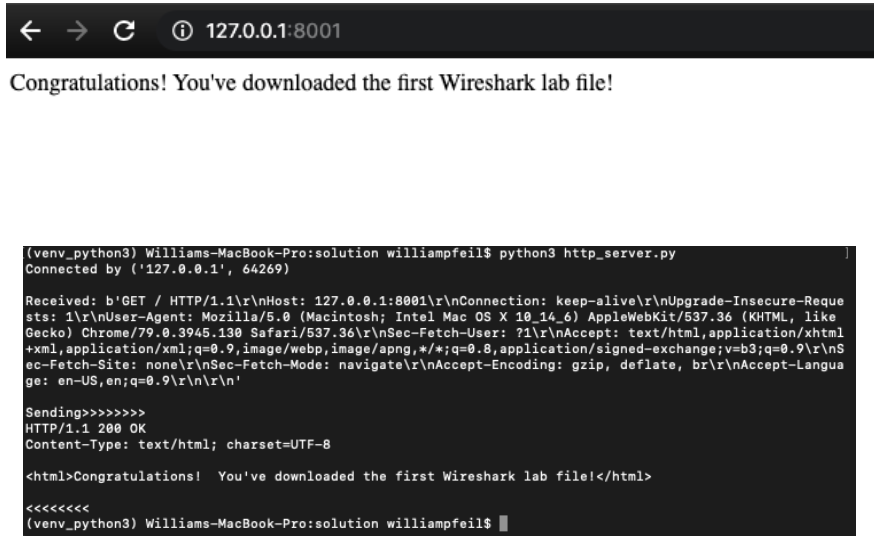
c 0 127.0.0.1:8001 Congratulations! You've downloaded the first Wireshark lab file! (venv_python3) Williams-MacBook-Pro: solution williampfeil$ python3 http_server.py Connected by ('127.0.0.1', 64269) Received: b'GET/ HTTP/1.1 Host: 127.0.0.1:8001 Connection: keep-alive Upgrade-Insecure-Reque sts: 1 User-Agent: Mozilla/5.0 (Macintosh; Intel Mac os x 10_14_6) Applewebkit/537.36 (KHTML, like Gecko) Chrome/79.0.3945.130 Safari/537.36 Sec-Fetch-User: ?1 Accept: text/html,application/xhtml +xml,application/xml;q=0.9, image/webp, image/apng,*/*;q=0.8, application/signed-exchange;v=b3;q=0.9 s ec-Fetch-site: none Sec-Fetch-Mode: navigate Accept-Encoding: gzip, deflate, br Accept-Langua ge: en-Us, en;q=0.9 ' Sending>>>>>>>> HTTP/1.1 200 OK Content-Type: text/html; charset=UTF-8 Congratulations! You've downloaded the first Wireshark lab file! (venv_python3) Williams-MacBook-Pro: solution williampfeil$ /
Step by Step Solution
There are 3 Steps involved in it

Get step-by-step solutions from verified subject matter experts
 Study Help