







Question: using sql server using these tables I want to create a query that list the count of the indivual products ordered , shows the name
using sql server
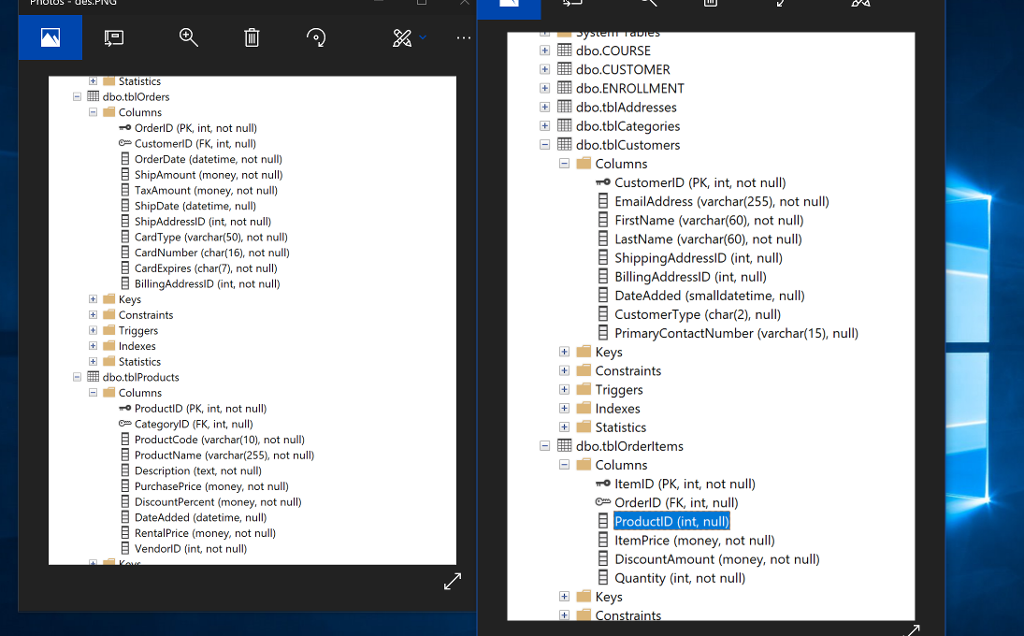
using these tables
I want to create a query that list the count of the indivual products ordered , shows the name of the product for each and then displays only the products that have been ordered more then three times
dbo.COURSE +]dbo.CUSTOMER Statistics dbo.ENROLLMENT dbo.tblOrders dbo.tblAddresses Columns rO OrdenD (PK, int, not null) ee CustomerID (FK, int, null) OrderDate (datetime, not null) ShipAmount (money, not null) l dbo.tblCategories dbo.tblCustomers Columns CustomerlD (PK, int, not null) B TaxAmount (money, not null) ShipDate (datetime, null) ShipAddressD (int not null) B CardType (varchar(50), not nul) EmailAddress (varchar(255), not null) E FirstName (varchar(60), not null) CardNumber (char(16), not null) CardExpres (char(7), not null) BillingAddressID (int, not null) LastName (varchar(60), not null) ShippingAddressID (int, null) B BillingAddressiD (int,null) DateAdded (smalldatetime, null) Keys Constraints -Triggers Indexes CustomerType (char(2), null) PrimaryContactNumber (varchar(15), null) -Keys Constraints Triggers dbo.tblProducts Columns ProductID (PK, int, not null) O CategorylD (FK, int, null -Indexes -Statistics ProductCode (varchar(10), not null) ProductName (varchar(255), not null) dbo.tblOrderitems Columns Description (text, not null) PurchasePrice (money, not null) ItemID (PK, int, not null) OrderlD (FK, int, null) DiscountPercent (money, not null) DateAdded (datetime, null) Renta!Price (money, not null) VendorID (int, not null) ProductID (int, null) E ItemPrice (money, not null) DiscountAmount (money, not null) Quantity (int, not null) E -Keys Constraints
Step by Step Solution
There are 3 Steps involved in it

Get step-by-step solutions from verified subject matter experts
 Study Help