







Question: Using the above entity relationship diagram and Sql Server 1. Write One SCRIPT to create this database (call it DocOffice) 2. Write a SQL statement
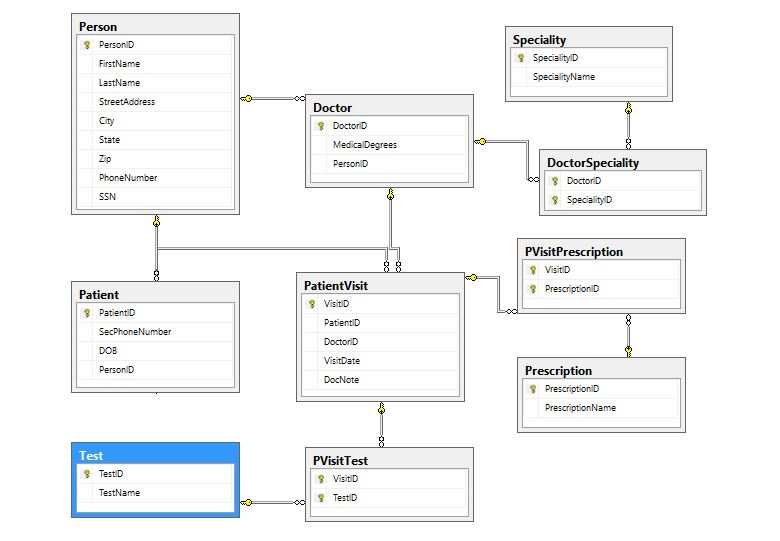
Using the above entity relationship diagram and Sql Server
1. Write One SCRIPT to create this database (call it DocOffice)
2. Write a SQL statement to Modify the view created in Q4 to show the First Name and Last name of all doctors and their specialties ALSO include doctors who DO NOT have any specialty
3. Write a SQL statement to Create a stored procedure that gives the Prescription name and the number of patients from the city of Tacoma with that prescription.
Example
| 20 | Aspirin |
| 2 | Ciprofloxacin |
4. Create trigger on the DoctorSpeciality so that every time a doctor specialty is updated or added
a new entry is made in the audit table. The audit table will have the following
(Hint-The trigger will be on DoctorSpecialty table)
Doctor FirstName
Action(indicate update or added)
Specialty
Date of modification
Person Personi FirstName Speciality Speciality SpecialityName LastName StreetAddress City Doctor Doctorid MedicalDegrees State Tip Personi PhoneNumber SSN DoctorSpeciality 8 Doctorib 8 Speciality D PVisitPrescription % Visit 8 PrescriptionID Patient 8 Patients SecPhone Number DOB Personi Patient Visit 8 VisitID Patienti Doctor VisitDate DocNote Prescription 8 Prescription PrescriptionName Test TestiD TestName PVisitTest 8 VisitD 8 TestID
Step by Step Solution
There are 3 Steps involved in it

Get step-by-step solutions from verified subject matter experts
 Study Help