







Question: Using the attached spreadsheet, find the solution to the question. Question: Perform a sensitivity analysis on the probability of a great market. To do this,
Using the attached spreadsheet, find the solution to the question.
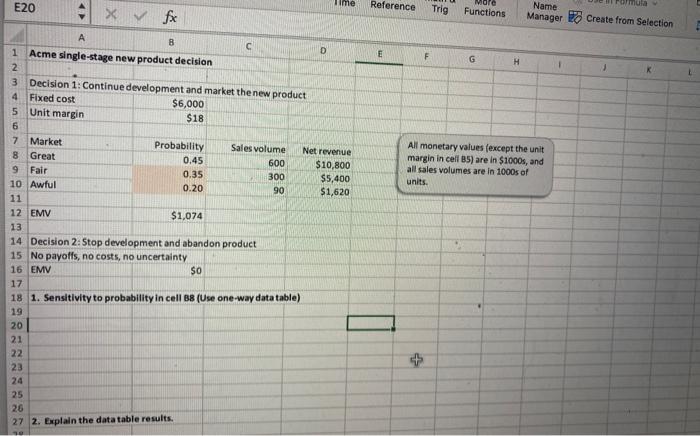
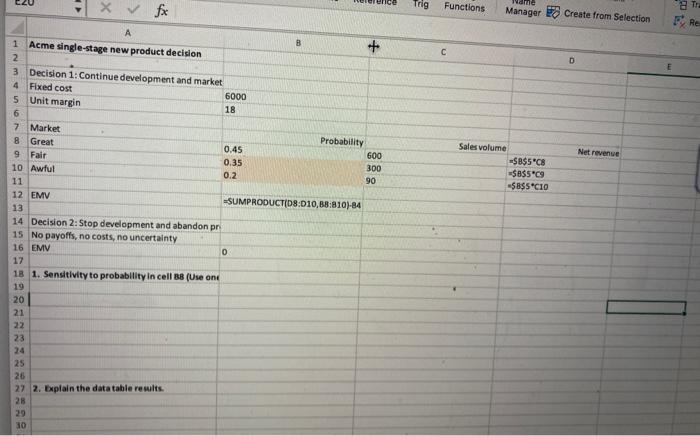
Question: Perform a sensitivity analysis on the probability of a great market. To do this, enter formulas in cells B9 and B10 (see Figure 9.4) to ensure that the probabili- ties of fair and awful remain in the same ratio, 35 to 20, and that all three probabilities continue to sum to 1. Then let the probability of great vary from 0.25 to 0.50 in increments of 0.05. Is it ever best to abandon the product in this range?
Figure 9.4
Decision trees present a challenge for Excel. The challenge is to take advantage of Excels calculation capabilities (to calculate EMVs, for example) and its graphical capabilities (to depict the decision tree). Fortunately, Palisade has developed a powerful add-in to Excel called PrecisionTree that makes the process relatively straightforward. This add-in not only enables you to draw and label a decision tree, but it also performs the folding-back procedure automatically and then allows you to perform sensitivity analysis on key input parameters. The first thing you must do to use PrecisionTree is to add it in. We assume you have already installed the Palisade DecisionTools Suite. To run PrecisionTree, click the Windows Start button, go to the Programs tab, locate the Palisades DecisionTools suite, and select PrecisionTree. (Alternatively, if you have a PrecisionTree icon on your desktop, you can double-click it.) If Excel is already running, PrecisionTree will open on top of it. If Excel is not running, opening PrecisionTree will open Excel as well. After a few seconds, you will see the Welcome screen in Figure 9.8. Note the Quick Start link. It will be discussed shortly. Once you click OK to dismiss the Welcome screen, you will know that PrecisionTree is loaded because of the new PrecisionTree tab and associated ribbon shown in Figure 9.9
Step by Step Solution
There are 3 Steps involved in it

Get step-by-step solutions from verified subject matter experts
 Study Help