







Question: Using the code I have completed I need help to be able to take that and create a Student class with public attributes (or fields
Using the code I have completed I need help to be able to take that and create a Student class with public attributes (or fields or instance variables) firstName and lastName. It's not conventional to use public, but more so to understand the difference between public and private attributes.
Code I have so far:
import java.util.Scanner;
public class Program07 {
//declare the three required variables
private static int maxNumbersStudents = 0;
private static int actualNumberStudents = 0;
private static String[] studentNames;
//main method
public static void main(String[] args) {
Scanner sc = new Scanner(System.in);
//retrieving the max number of students
System.out.println("Enter the maximum number of students");
maxNumbersStudents = Integer.parseInt(sc.nextLine());
//initializing the student array
studentNames = new String[maxNumbersStudents];
//call method to fill array
enterStudentNames(studentNames);
//print array elements
printStudentNames(studentNames);
//sort the array
sortStudentNames(studentNames);
System.out.println();
printStudentNames(studentNames);
}
/ew method to get student names
public static void enterStudentNames(String[] studentNames) {
Scanner sc = new Scanner(System.in);
String firstName;
String lastName;
String fullStudentName;
//loop from 0 to maxNumberStudents
for (actualNumberStudents = 0; actualNumberStudents
//ask user for last name
System.out.print("First name (enter period . to quit):");
firstName = sc.nextLine();
//check if first name equals to .
//if yes, break from loop
if (firstName.equals(".")) {
break;
}
//ask user for last name
System.out.print("Last name:");
lastName = sc.nextLine();
//concatenating the name
fullStudentName = lastName + "," + firstName;
//saving the name to student array
studentNames[actualNumberStudents] = fullStudentName;
}
}
//printing the students name
public static void printStudentNames(String[] studentNames) {
//required method
for(int i=0;i if(studentNames[i]==null || studentNames[i].isEmpty()){ break; } System.out.println((i+1)+". "+studentNames[i]); } } //sort method using compare to public static void sortStudentNames(String[] studentNames) { //using two for loops for (int i = 0; i for (int j = i + 1; j //comparing the elements if(studentNames[i].compareTo(studentNames[j])>0){ //swapping in array String temp = studentNames[i]; studentNames[i] = studentNames[j]; studentNames[j] = temp; } } } } } Instructions to follow to add to existing java coding: 1. Call your class Program00A, so your filename will be Program00A.java. It is essential for grading purposes that everyone have the same class name. 2. Copy existing code provided into Program00A. 3. Create a new class called Student. You may do this either by creating a new file called Student.java with a class called Student, or you may make an internal class that is inside your Program00A class. Remember, by convention, class names should always start with a capital letter; however, the compiler will accept a lowercase letter, so lowercase is legal, but it violates agreed-upon conventions. 4. Create several lines of comments of identification and description at the top of the Student file similar to those at the top of the Program00A file. 5. Create public attributes of type String called firstName and lastName. These by convention should start with lowercase. It violates one of the main purposes of classes to have public attributes, but we will fix this in Program00B. The reason to do this is so that you understand the differences between public and private attributes. 6. Create a method in Student class called toString. You should read more about this special method in Chapter 11 Section 6. The toString method converts an object with attributes of any type into a String so that it can be printed. Most classes that will be output should have a toString. Also debuggers use the toString to help you debug your program, so its usually a good idea to have one unless your class has tons of attributes. Your toString method should look something like this: 7. In Program00A class, change your array from type String to type Student. 8. If you called your array something like names or studentNames, you should change it because now it is of type Student, so something like students would be appropriate; I will be assuming that it is now called students in the rest of my instructions. Array names usually are plural because you have more than one element. In IntelliJ, you can right click on studentNames in the line where you declared it, click on Refactor, then Rename, then type students, and hit Enter; it will rename that variable everywhere. Notice that the array name students starts with lowercase and is plural. 9. In enterStudentNames, you will need to create a Student object using the default constructor since we didnt put an explicit constructor into our Student class as we should always do (dont worry, well rectify this in Program 00B). You will set an element of the students array to this new student object (see code below). When you dont supply your class with a constructor, it creates one for you called the default constructor. This default constructor takes no parameters and sets all reference type attributes (like String) to null and all primitive numeric types to zero. 10. You will set an element of your array to store that new object. Then you will need to set that objects attributes to the first and last names that you got from the user; the dot operator accesses an attribute or method name from the class. Mine looks like this: These statements will replace the one where you assigned your arrays element in 7 and you no longer need the variable fullStudentName. I called my array students and this is in the for loop where Im incrementing actualNumberStudents. My local String variables that hold my user input are called firstName and lastName just like the attribute names, but they do NOT have to match the attribute names. I might have called them firstNameInput and lastNameInput or anything else that is descriptive. It would be legal to call them x and y, but that would not be meaningful, readable, or maintainable. Note that this is setting the lastName and firstName attributes in the Student class. We shouldnt be allowed to do this directly, but well fix it in Program B. The reason we can do it here is that you declared them public. 11. Your if statement in your sort method will no longer work because the compareTo expects a String, not a type Student. So you need to replace that line with something like this: We could write a compareTo function for our Student class, but thats getting beyond the scope of this course (youll do that next semester). The call to toString will turn students[i] into a String of with lastName concatenated to a comma and a blank and concatenated to firstName. This is not as efficient as just using last and first names, but it will do the job and we already needed a toString method to make printing easier. 12. Make any other changes you need to in main because of this change using an array of type Student. You will now be passing an array of type Student to your sort and print methods, so you will need to change your parameters to type Student[] instead of String[]. Fix anything in the methods that this change requires. (For example, in the sort method, you will probably have a String temp variable that needs to be changed to Student temp.) 13. You should change sortStudentNames to sortStudents since you are now not just sorting names but objects called Student. If you want, you could also change printStudentNames to printStudents, but there is an argument to be made either way on that method name. Again, you can use IntelliJs Refactor/Replace to change the name of the method(s) like you did the name of the variable. 14. In the print method, you will need to comment out your 7 printf statement and put something like this: Note that this is getting the lastName and firstName attributes from the Student class. We shouldnt be allowed to do this directly, but well fix it in Program00B. 15. That should do it for changing everything to use the Student class unless you did some of the extra credit methods in the previous assignment. If so, you should fix them to use the Student class as well. 16. Get all that running, then well tackle some other things regarding toString. 17. Call toString by commenting out the printf statement in your print method and using this line instead (if your for loop variable is not i, substitute your own variable name there): 18. Compile and get that working. Then eliminate .toString() . You dont need it because the compiler automatically knows to call toString when the object is not of type String. Recompile and test that; youll see it does the same thing. 19. Now, lets do one more thing to toString method in Student. Lets make the first names all line up by using the String.format method. Do this by commenting out the current return statement and replace it with this one: 20. The String.format method works like the printf method with the format specifier string followed by the variables whose values will be inserted into it. Youve already seen %s where any string variable will go there, but %12s means that it will take 12 characters even if it is shorter, and %-12s has a negative sign, which means to leftjustify. The comma and blank in the format specifier string will literally put a comma and blank into the string as required. 21. That last change does NOT require any changes to the calling of toString, so compile and fix any compile errors. Then when it compiles, run it, test it, and debug it. 22. Note that, when we are using toString in the compareTo call in our if statement, this change to toString will still work, but it will make the compareTo much more inefficient since now it is comparing lots of blanks to each other. Like I mentioned before, the best way to handle this is to write our own compareTo method in our Student class, but thats beyond the scope of this chapter. If you would like 10% extra credit, research this on your own on the Internet (there might be something on it later in our book), and create a compareTo method in Student class. Then change that line to call your compareTo instead of Strings compareTo. Be sure to note at the top of your Word file that you did this extra credit. Sample runs should look like this: 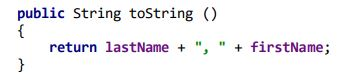





![static int actualNumberStudents = 0; private static String[] studentNames; //main method public](https://dsd5zvtm8ll6.cloudfront.net/si.experts.images/questions/2024/09/66f46648a187d_00066f4664820a9d.jpg)
![static void main(String[] args) { Scanner sc = new Scanner(System.in); //retrieving the](https://dsd5zvtm8ll6.cloudfront.net/si.experts.images/questions/2024/09/66f4664941747_00066f46648ce6eb.jpg)
Step by Step Solution
There are 3 Steps involved in it

Get step-by-step solutions from verified subject matter experts
 Study Help