







Question: Using the data in the student spreadsheet file Ethan Allen financial.xlsx , forecast the June 3 0 , 2 0 1 9 income statements and
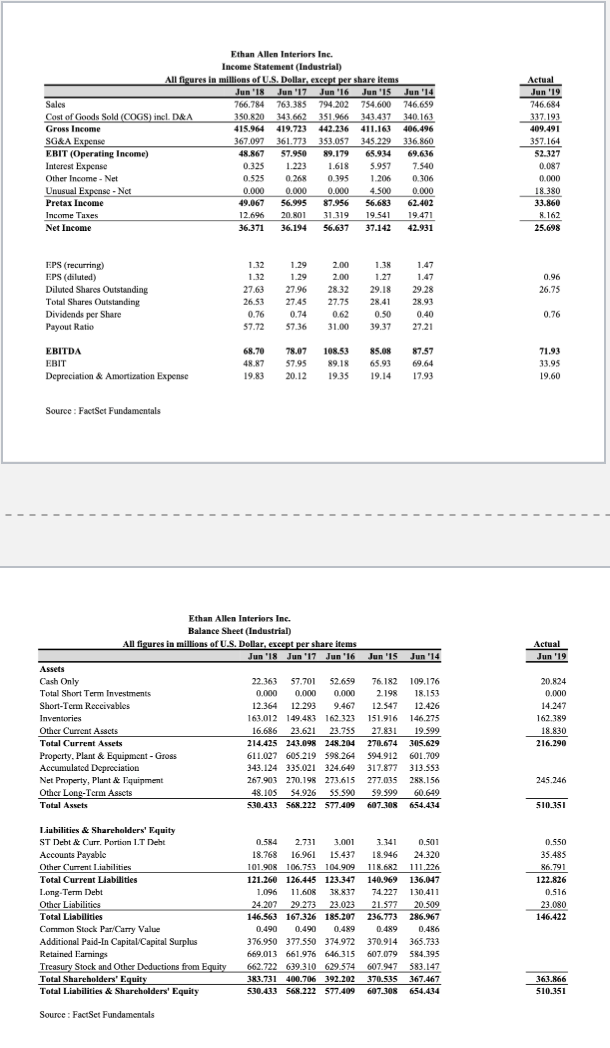
Using the data in the student spreadsheet file Ethan Allen financial.xlsx forecast the June income statements and balance sheet for Ethan Allen. Use the percent of sales method and the following assumptions: sales in FY will be $; The tax rate will be ; Each item that changes with sales will be the fiveyear average percentage of sales; Property, Plant & Equipment Gross will increase to $; and The dividend will be $ per share. Use your judgment on all other items
Ethan Allen Interiors Inc.
Income Statement Industrial
All figures in millions of US Dollar, except per share items
Source : FactSet Fundamentals
please put in excel format.
Here are some tips on the assignment.
#a Default projected value for for each of the items in the income statement and balance sheet should be the Last Year's value, unless the item changes with Sales. I've covered all the items that change with sales in the lecture so other items that I have not talked about, you can assume it will stay the same as last year.
Total Share holder's equity is calculated as sum of Common Stock ParCarry Value, Additional PaidIn CapitalCapital Surplus, Retained Earnings minusTreasury Stock and Other Deductions from Equity
b Please manually add DFN to the long term debt add actual numbers, not reference the DFN until DFN converges to Zero. You don't need to use the iterative worksheet.
e To run the scenario analysis for DFN when sales number changes, you need to run the scenario analysis on the proforma income statement tab, because you will be changing the sales numbers. But DFN is in the proforma balance sheet tab, so to access DFN in the scenario analysis you need to create a cell in PF income statement that references the DFN in PF balance sheet, and use it as the result cell in the scenario analysis.
Step by Step Solution
There are 3 Steps involved in it
1 Expert Approved Answer
Step: 1 Unlock

Question Has Been Solved by an Expert!
Get step-by-step solutions from verified subject matter experts
Step: 2 Unlock
Step: 3 Unlock
 Study Help