







Question: Using the Database structure in figure 1, create a database in Microsoft Access OR Microsoft SQL server and populate each table with at least fifteen
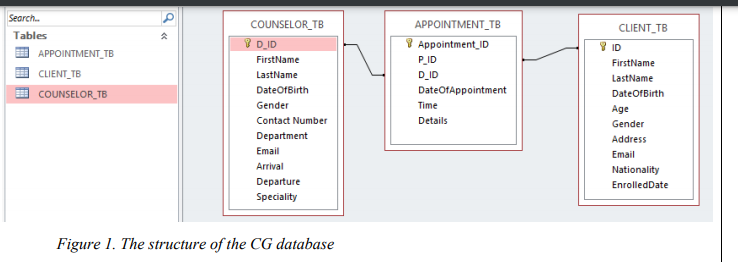
Using the Database structure in figure 1, create a database in Microsoft Access OR Microsoft SQL server and populate each table with at least fifteen (15) appropriate records. Then, you are required to design an appropriate user interface, connect it to the database, retrieve and display all CLIENT_TB records in a DataGridView control on the interface.
b. Create functionalities for a user to be able to ADD new Records to the CLIENT_TB Table in the database, as well as Delete and Update Existing Records(using appropriate user interfaces).
c. Create a function in your program that will enable a user to search for a Client, and if the Client is found, the user can then select it to display details of the Client as well as the list of all the Appointments for that particular Client.
d. Create a function in your program that will enable a user to book new appointment for Clients, by clicking on a button (Create Appointment) on the form in (c) above. Clicking on the button should open a new form with the Client ID already filled. Also, information on all Counselors must already be loaded in a Combobox on the new opened form for the user to choose from. Another button (Add), which is on the new form must be clicked, when the user has filled out the rest of the appointment field, to complete the process.
Note: Create the program in Visual basic and provide code and screenshot(visual studio) and Microsoft Access Database
Search.. Tables COUNSELOR_TB CLIENT_TB Y DID APPOINTMENT_TB CLIENT_TB COUNSELOR_TB APPOINTMENT_TB 7 Appointment ID PID D_ID DateOfAppointment Time Details FirstName LastName Date of Birth Gender Contact Number Department Email Arrival Departure Speciality FirstName LastName Date of Birth Age Gender Address Email Nationality EnrolledDate Figure 1. The structure of the CG database Search.. Tables COUNSELOR_TB CLIENT_TB Y DID APPOINTMENT_TB CLIENT_TB COUNSELOR_TB APPOINTMENT_TB 7 Appointment ID PID D_ID DateOfAppointment Time Details FirstName LastName Date of Birth Gender Contact Number Department Email Arrival Departure Speciality FirstName LastName Date of Birth Age Gender Address Email Nationality EnrolledDate Figure 1. The structure of the CG database
Step by Step Solution
There are 3 Steps involved in it

Get step-by-step solutions from verified subject matter experts
 Study Help