







Question: Using the directions, I need help figuring out the right formulas to put in Excel that will result in the models below. it is time
Using the directions, I need help figuring out the right formulas to put in Excel that will result in the models below.
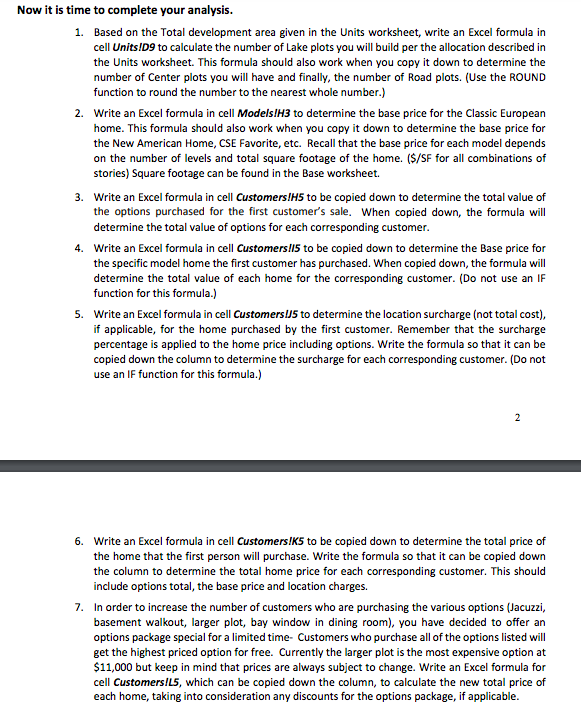
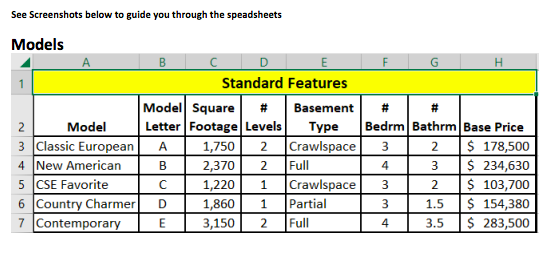
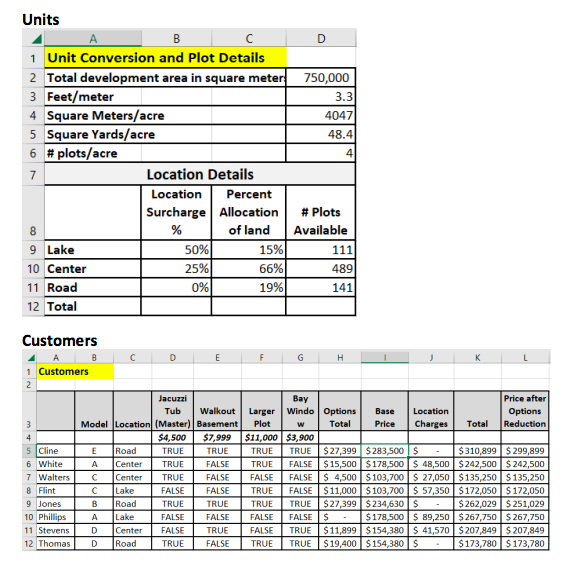
it is time to complete your analysis. 1. Based on the Total development area given in the Units worksheet, write an Excel formula in cell UnitsIDg to calculate the number of Lake plots you will build per the allocation described in the Units worksheet. This formula should also work when you copy it down to determine the number of Center plots you will have and finally, the number of Road plots. (Use the ROUND function to round the number to the nearest whole number.) 2. Write an Excel formula in cell ModelslH3 to determine the base price for the Classic European home. This formula should also work when you copy it down to determine the base price for the New American Home, CSE Favorite, etc. Recall that the base price for each model depends on the number of levels and total square footage of the home. ( $/SF for all combinations of stories) Square footage can be found in the Base worksheet. 3. Write an Excel formula in cell Customers!H5 to be copied down to determine the total value of the options purchased for the first customer's sale. When copied down, the formula will determine the total value of options for each corresponding customer. 4. Write an Excel formula in cell Customersll5 to be copied down to determine the Base price for the specific model home the first customer has purchased. When copied down, the formula will determine the total value of each home for the corresponding customer. (Do not use an IF function for this formula.) 5. Write an Excel formula in cell Customers IIS to determine the location surcharge (not total cost), if applicable, for the home purchased by the first customer. Remember that the surcharge percentage is applied to the home price including options. Write the formula so that it can be copied down the column to determine the surcharge for each corresponding customer. (Do not use an IF function for this formula.) 2 6. Write an Excel formula in cell CustomersIK5 to be copied down to determine the total price of the home that the first person will purchase. Write the formula so that it can be copied down the column to determine the total home price for each corresponding customer. This should include options total, the base price and location charges. 7. In order to increase the number of customers who are purchasing the various options (Jacuzzi, basement walkout, larger plot, bay window in dining room), you have decided to offer an options package special for a limited time- Customers who purchase all of the options listed will get the highest priced option for free. Currently the larger plot is the most expensive option at $11,000 but keep in mind that prices are always subject to change. Write an Excel formula for cell Customers/L5, which can be copied down the column, to calculate the new total price of each home, taking into consideration any discounts for the options package, if applicable. See Screenshots below to guide you through the speadsheets Models Customers it is time to complete your analysis. 1. Based on the Total development area given in the Units worksheet, write an Excel formula in cell UnitsIDg to calculate the number of Lake plots you will build per the allocation described in the Units worksheet. This formula should also work when you copy it down to determine the number of Center plots you will have and finally, the number of Road plots. (Use the ROUND function to round the number to the nearest whole number.) 2. Write an Excel formula in cell ModelslH3 to determine the base price for the Classic European home. This formula should also work when you copy it down to determine the base price for the New American Home, CSE Favorite, etc. Recall that the base price for each model depends on the number of levels and total square footage of the home. ( $/SF for all combinations of stories) Square footage can be found in the Base worksheet. 3. Write an Excel formula in cell Customers!H5 to be copied down to determine the total value of the options purchased for the first customer's sale. When copied down, the formula will determine the total value of options for each corresponding customer. 4. Write an Excel formula in cell Customersll5 to be copied down to determine the Base price for the specific model home the first customer has purchased. When copied down, the formula will determine the total value of each home for the corresponding customer. (Do not use an IF function for this formula.) 5. Write an Excel formula in cell Customers IIS to determine the location surcharge (not total cost), if applicable, for the home purchased by the first customer. Remember that the surcharge percentage is applied to the home price including options. Write the formula so that it can be copied down the column to determine the surcharge for each corresponding customer. (Do not use an IF function for this formula.) 2 6. Write an Excel formula in cell CustomersIK5 to be copied down to determine the total price of the home that the first person will purchase. Write the formula so that it can be copied down the column to determine the total home price for each corresponding customer. This should include options total, the base price and location charges. 7. In order to increase the number of customers who are purchasing the various options (Jacuzzi, basement walkout, larger plot, bay window in dining room), you have decided to offer an options package special for a limited time- Customers who purchase all of the options listed will get the highest priced option for free. Currently the larger plot is the most expensive option at $11,000 but keep in mind that prices are always subject to change. Write an Excel formula for cell Customers/L5, which can be copied down the column, to calculate the new total price of each home, taking into consideration any discounts for the options package, if applicable. See Screenshots below to guide you through the speadsheets Models Customers
Step by Step Solution
There are 3 Steps involved in it

Get step-by-step solutions from verified subject matter experts
 Study Help