







Question: Using the existing code to add additional cleaning logic to the clean_phone_numbers() function. Original Requirements 1. clean_phone_numbers ( ): Accepts a list of phone numbers
Using the existing code to add additional cleaning logic to the clean_phone_numbers() function.
Original Requirements
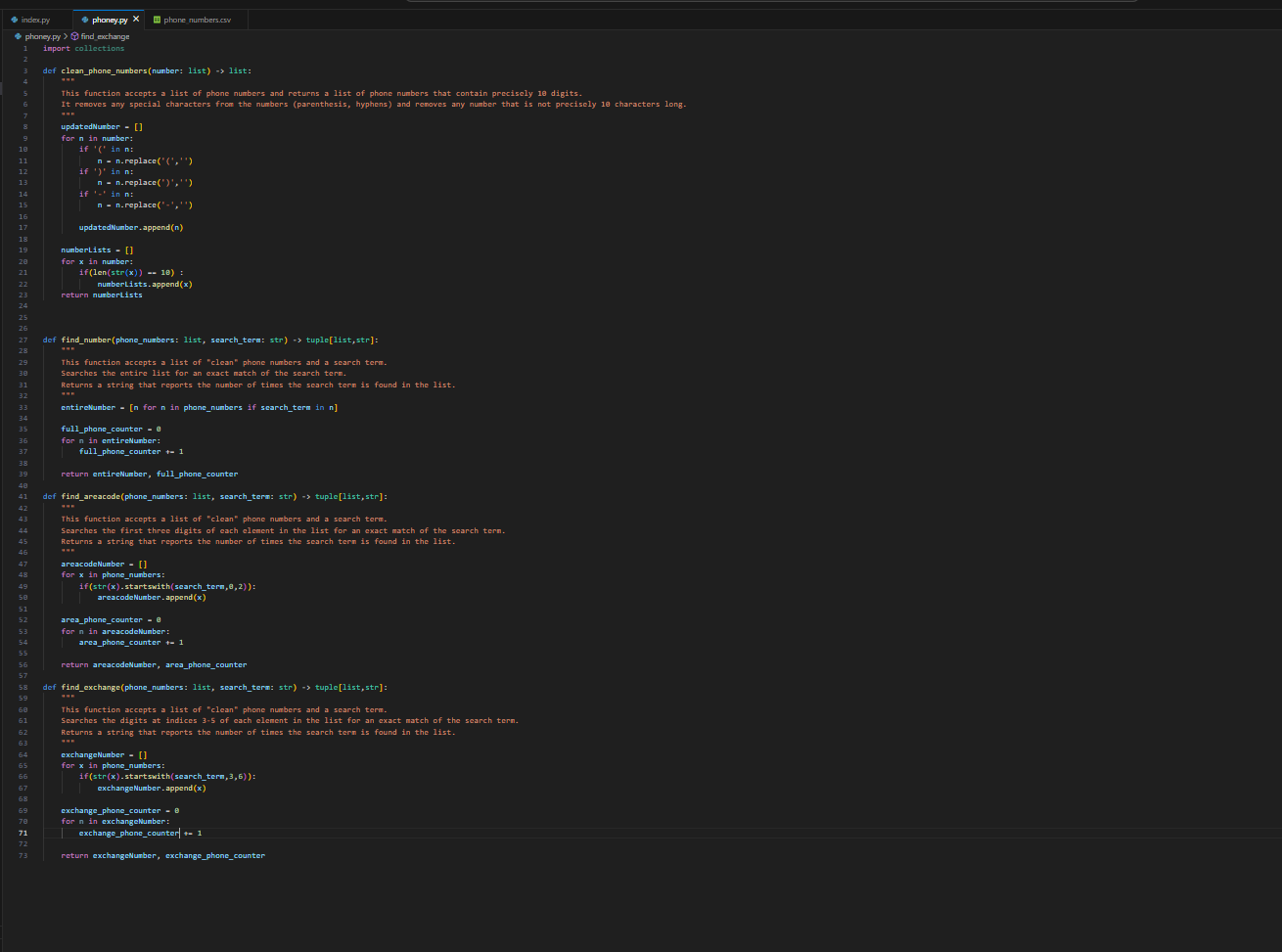
1. clean_phone_numbers ( ): Accepts a list of phone numbers and returns a list of phone numbers that contain precisely 10 digits. It removes any special characters from the numbers (parenthesis, hyphens) and removes any number that is not precisely 10 characters long
Additional Requirements In North America, phone numbers consist of three parts: ABB-CDD-ZZZZ where:
ABB: the area code
CDD: the exchange
ZZZZ: the station code/line of the individual
Using regular expressions, you should further filter the phone numbers according to the following rules:
1. The FIRST digit in the area code (labeled "A" in the pattern above) CANNOT be a 1 or a 0.
2. The FIRST digit in the exchange (labeled "C" in the pattern above) CANNOT be a 1 or a 0.
3. The EXCHANGE (labeled "CDD" in the pattern above) CANNOT be equal to "555"
Hints . Do not try to accomplish all of the filtering in a single regular expression. Use multiple expressions to filter the list of phone numbers.
Below is the code to build upon:
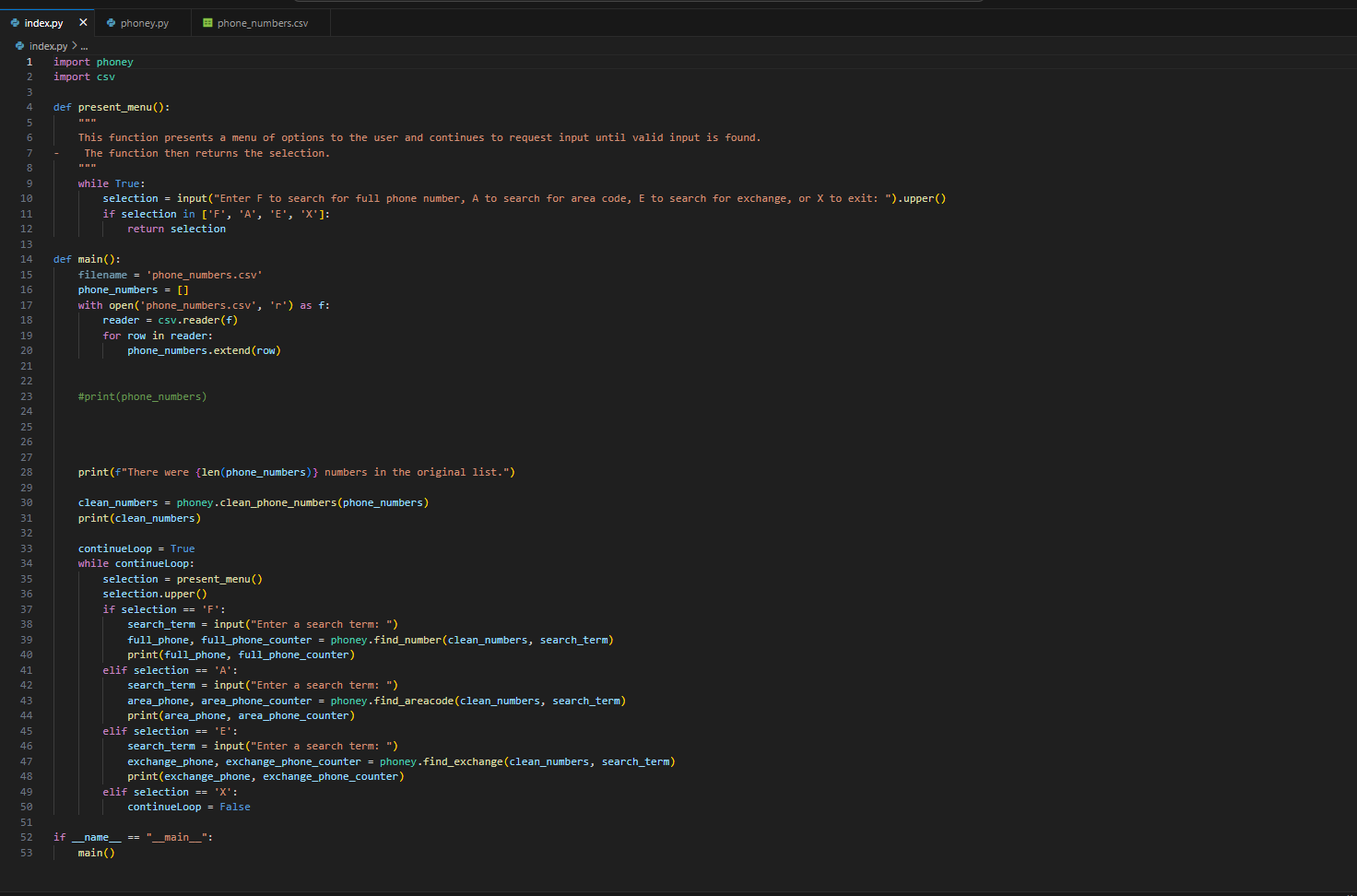
index.py index.py > ... 1 import phoney 2 import csv 3 4 5 6 7 8 9 10 11 12 13 13 14 15 16 17 18 19 20 21 22 23 24 25 26 27 28 29 30 31 32 33 34 35 36 37 38 39 40 41 42 43 44 45 46 47 48 X phoney.py 49 50 51 52 53 def present_menu(): This function presents a menu of options to the user and continues to request input until valid input is found. The function then returns the selection. while True: selection = input ("Enter F to search for full phone number, A to search for area code, E to search for exchange, or X to exit: ").upper() if selection in ['F', 'A', 'E', 'X']: return selection def main(): phone_numbers.csv filename= 'phone_numbers.csv' phone_numbers = [] with open('phone_numbers.csv', 'r') as f: reader = csv.reader (f) for row in reader: phone_numbers.extend(row) #print (phone_numbers) print (f"There were (len (phone_numbers)} numbers in the original list.") clean_numbers = phoney.clean_phone_numbers (phone_numbers) print (clean_numbers) continueLoop = True while continueLoop: selection = present_menu() selection.upper () if selection == 'F' search_term= input("Enter a search term: ") full_phone, full_phone_counter = phoney.find_number(clean_numbers, search_term) print (full_phone, full_phone_counter) elif selection == 'A': search_term = input("Enter a search term: ") area_phone, area_phone_counter = phoney.find_areacode (clean_numbers, search_term) print(area_phone, area_phone_counter) KANNA elif selection == 'E': ( search term= input("Enter a search term: ") exchange_phone, exchange_phone_counter = phoney.find_exchange (clean_numbers, search_term) print (exchange_phone, exchange_phone_counter) elif selection == 'X': continueLoop = False if name == ___main__": main()
Step by Step Solution
There are 3 Steps involved in it

Get step-by-step solutions from verified subject matter experts
 Study Help