







Question: Using the GCU Virtualization Solution, construct a SOC testing sandbox. This virtual environment should contain the virtual machines (VMs) listed below. Each virtual machine should
Using the GCU Virtualization Solution, construct a SOC testing sandbox. This virtual environment should contain the virtual machines (VMs) listed below. Each virtual machine should be part of a single sub-net/domain. As you are creating the virtual environment, collect screenshots that document each completed virtual machine. These will be referenced in the written submission portion of the assignment.
- Windows Server
- Windows Workstation
- Kali Linux or Security Parrot
- Metasploitable 2
- Security Onion
I really just need help setting up the security onion VM. I have never worked with this software and there are a lot of options I don't even know what they mean. I want this VM to be on IP 10.0.0.5 so it is on the same subnet as the other VMs.
This is the host-only network the rest of the VMs are on:
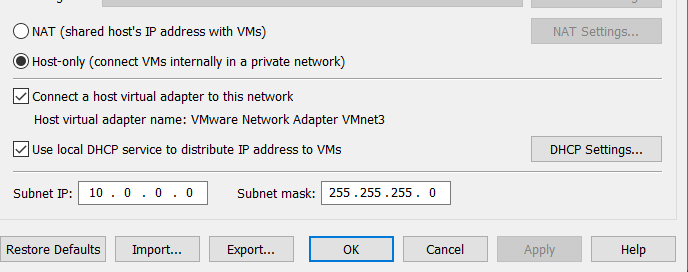
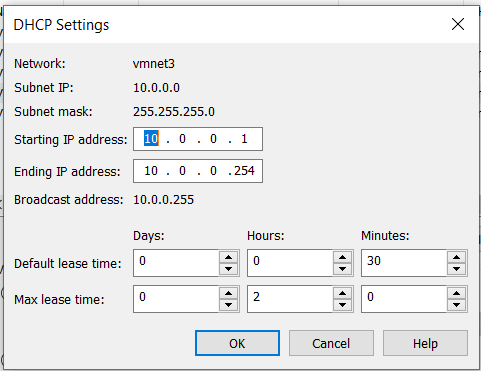
NAT Settings... ONAT (shared host's IP address with VMS) Host-only connect VMs internally in a private network) Connect a host virtual adapter to this network Host virtual adapter name: VMware Network Adapter VMnet3 Use local DHCP service to distribute IP address to VMS DHCP Settings... Subnet IP: 10. 0 0.0 Subnet mask: 255.255.255.0 Restore Defaults Import... Export... OK Cancel Apply Help DHCP Settings vmnet3 Network: Subnet IP: Subnet mask: 10.0.0.0 255.255.255.0 Starting IP address: 10.0.0.1 Ending IP address: 10.0.0.254 Broadcast address: 10.0.0.255 Days: Hours: Minutes: Default lease time: 0 0 30 Max lease time: 0 2 0 OK Cancel Help
Step by Step Solution
There are 3 Steps involved in it

Get step-by-step solutions from verified subject matter experts
 Study Help