







Question: Using the INVOICE table structure shown above, do the following: Draw the dependency diagram and identify all dependencies, including all partial and transitive dependencies. You
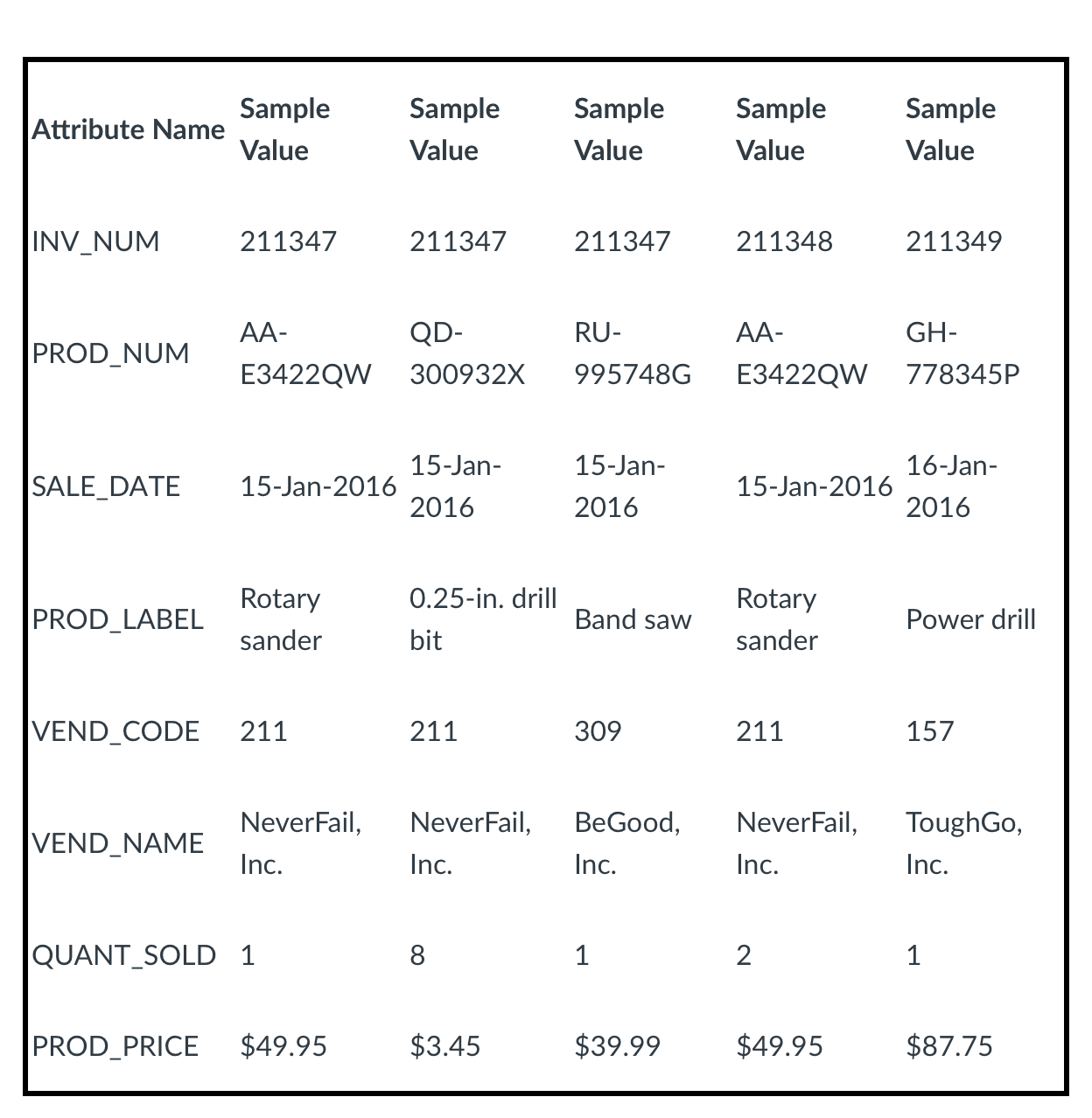
Using the INVOICE table structure shown above, do the following:
- Draw the dependency diagram and identify all dependencies, including all partial and transitive dependencies. You can assume that the table does not contain repeating groups and that any invoice number may reference more than one product. (Hint: This table uses a composite primary key.) must draw dependency diagram.
- Remove all partial and transitive dependencies, and draw the new dependency diagrams as 3NF. you must draw a new dependency.
\begin{tabular}{|c|c|c|c|c|c|} \hline Attribute Name & SampleValue & SampleValue & SampleValue & SampleValue & SampleValue \\ \hline INV_NUM & 211347 & 211347 & 211347 & 211348 & 211349 \\ \hline PROD_NUM & AA-E3422QW & QD-300932X & RU-995748G & AA-E3422QW & GH778345P \\ \hline SALE_DATE & 15-Jan-2016 & 15Jan2016 & 15-Jan-2016 & 15-Jan-2016 & 16-Jan-2016 \\ \hline PROD_LABEL & Rotarysander & 0.25-in.drillbit & Band saw & Rotarysander & Power drill \\ \hline VEND_CODE & 211 & 211 & 309 & 211 & 157 \\ \hline VEND_NAME & NeverFail,Inc. & NeverFail,Inc. & BeGood,Inc. & NeverFail,Inc. & ToughGo,Inc. \\ \hline QUANT_SOLD & 1 & 8 & 1 & 2 & 1 \\ \hline PROD_PRICE & $49.95 & $3.45 & $39.99 & $49.95 & $87.75 \\ \hline \end{tabular}
Step by Step Solution
There are 3 Steps involved in it

Get step-by-step solutions from verified subject matter experts
 Study Help