







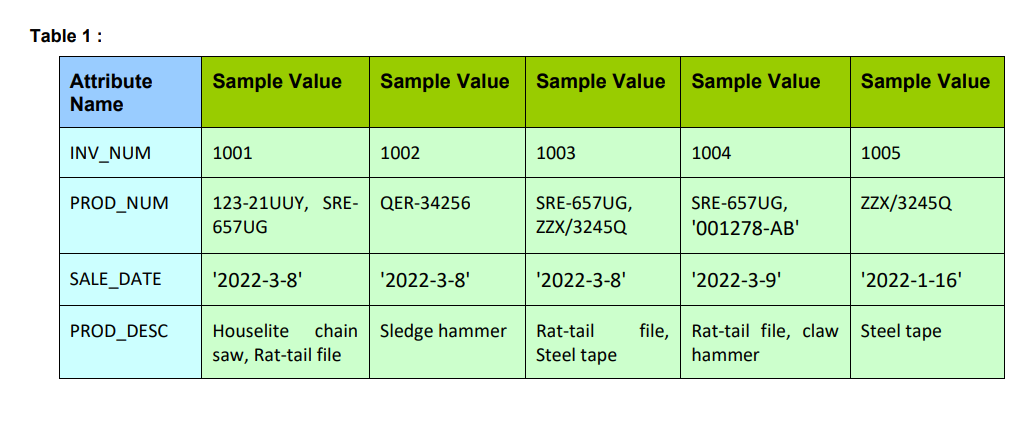
Question: Using the INVOICE table structure shown in Table 1 , do the following: Table 1 : table [ [ table [ [ Attribute
Using the INVOICE table structure shown in Table do the following: Table :
tabletableAttributeNameSample Value,Sample Value,Sample Value,Sample Value,Sample ValueINVNUM,PRODNUM,tableUUY, SREUGQERtableSREUGZZXQtableSREUGABZZXQSALEDATE,PRODDESC,tableHouselite chainsaw Rattail fileSledge hammer,tableRattail file,Steel tapetableRattail file, clawhammerSteel tapetableVENDCODE,VENDNAME,tableShellySmithson KAnnelise CrystallJames Johnson,tableAnneliseCrystalltableShellySmithson JamesJohnsonArthur JonesQUANTSOLD,PRODPRICE,$$$$$$
Table :
Attribute
Name
Sample Value Sample Value Sample Value Sample Value Sample Value
INVNUM
PRODNUM UUY, SREUG
QER SREUG
ZZXQ
SREUG
AB
ZZXQ
SALEDATE
PRODDESC Houselite chain
saw, Rattail file
Sledge hammer Rattail file,
Steel ta
VENDCODE
Annelise Crystall
James Johnson Annelise
Crystall,
Shelly K
Smithson, James
Johnson
Arthur Jones
QUANTSOLD
PRODPRICE $ $ $ $ $ $
a Draw its dependency diagram and identify all dependencies, including all partial and transitive dependencies.
b Remove all partial dependencies, and draw the new dependency diagrams. Identify the normal forms for each
table structure you created. Remove all transitive dependencies, write the relational schema, and draw the
new dependency diagrams. Also identify the normal forms for each table structure you created.
c Draw the dependency diagrams that are in NFHint: You might have to create a few new attributes. Also
make sure that the new dependency diagrams contain attributes that meet proper design criteria; that is
make sure there are no multivalued attributes, that the naming conventions are met, and so on
d Draw the Crows Foot ERD. ERD should be created starting from solution of part b normalized form and then
further enhanced to reflect the correct business scenario.
e Create the database and insert data as per Table and additional data for the sake of completeness.
f Formulate and execute the following queries.
i Write a query to display product Prodcode, ProdQOH and ProdPRICE for all the products where
price is greater than
ii Write a query to display prodnum of products that are supplied by VENDCODE between and
iii. List all the products in products table in descending order of the price
iv Using the 'PRODUCT' table as a reference, construct a SQL query to calculate the total value of the
products currently in inventory name the column as Totworth.
v Display name of VENDOR who supplied product UUY'.
vi Write a single query that will double the price of product supplied by vendor whose name is 'James
JohnsonNote: you have to strictly use SUBQUERY to extract vendor code based on vendor name
and use vendcode to update the price
g If you are a database administrator, what measures you will apply to ensure the security of the data?
Step by Step Solution
There are 3 Steps involved in it
1 Expert Approved Answer
Step: 1 Unlock

Question Has Been Solved by an Expert!
Get step-by-step solutions from verified subject matter experts
Step: 2 Unlock
Step: 3 Unlock
 Study Help