







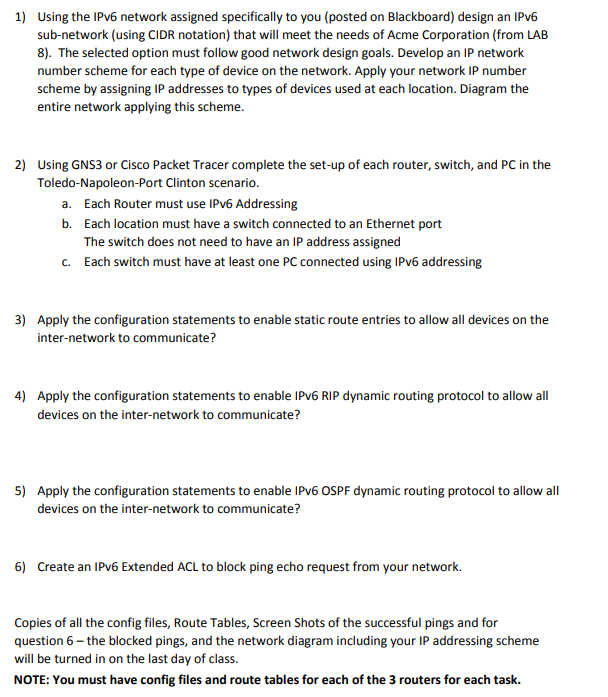
Question: Using the IPv 6 network assigned specifically to you ( posted on Blackboard ) design an IPv 6 sub - network ( using CIDR notation
Using the IPv network assigned specifically to you posted on Blackboard design an IPv
subnetwork using CIDR notation that will meet the needs of Acme Corporation from LAB
The selected option must follow good network design goals. Develop an IP network
number scheme for each type of device on the network. Apply your network IP number
scheme by assigning IP addresses to types of devices used at each location. Diagram the
entire network applying this scheme.
Using GNS or Cisco Packet Tracer complete the setup of each router, switch, and PC in the
ToledoNapoleonPort Clinton scenario.
a Each Router must use IPv Addressing
b Each location must have a switch connected to an Ethernet port
The switch does not need to have an IP address assigned
c Each switch must have at least one PC connected using IPv addressing
Apply the configuration statements to enable static route entries to allow all devices on the
internetwork to communicate?
Apply the configuration statements to enable IPv RIP dynamic routing protocol to allow all
devices on the internetwork to communicate?
Apply the configuration statements to enable IPv OSPF dynamic routing protocol to allow all
devices on the internetwork to communicate?
Create an IPv Extended ACL to block ping echo request from your network.
Copies of all the config files, Route Tables, Screen Shots of the successful pings and for
question the blocked pings, and the network diagram including your IP addressing scheme
will be turned in on the last day of class.
NOTE: You must have config files and route tables for each of the routers for each task.
My ipv network is: :c:ba::
You can ask me if you need any more information.
Step by Step Solution
There are 3 Steps involved in it
1 Expert Approved Answer
Step: 1 Unlock

Question Has Been Solved by an Expert!
Get step-by-step solutions from verified subject matter experts
Step: 2 Unlock
Step: 3 Unlock
 Study Help