







Question: Using the One - Way Frequencies Task to Generate Frequency Counts and Percentages a . Use the data set employee _ organization and the One
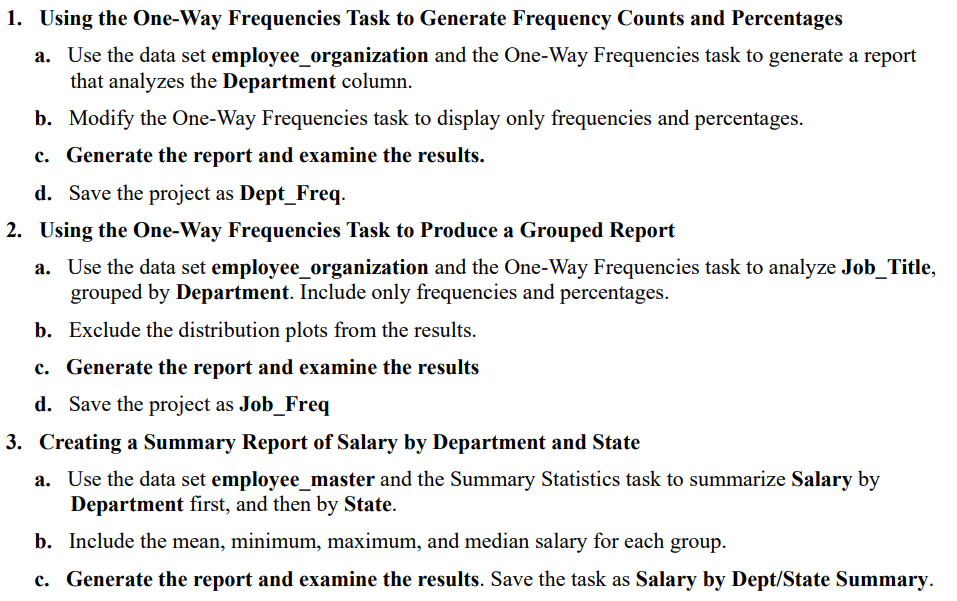
Using the OneWay Frequencies Task to Generate Frequency Counts and Percentages
a Use the data set employeeorganization and the OneWay Frequencies task to generate a report
that analyzes the Department column.
b Modify the OneWay Frequencies task to display only frequencies and percentages.
c Generate the report and examine the results.
d Save the project as DeptFreq.
Using the OneWay Frequencies Task to Produce a Grouped Report
a Use the data set employeeorganization and the OneWay Frequencies task to analyze JobTitle,
grouped by Department. Include only frequencies and percentages.
b Exclude the distribution plots from the results.
c Generate the report and examine the results
d Save the project as JobFreq
Creating a Summary Report of Salary by Department and State
a Use the data set employeemaster and the Summary Statistics task to summarize Salary by
Department first, and then by State.
b Include the mean, minimum, maximum, and median salary for each group.
c Generate the report and examine the results. Save the task as Salary by DeptState Summary.
Step by Step Solution
There are 3 Steps involved in it
1 Expert Approved Answer
Step: 1 Unlock

Question Has Been Solved by an Expert!
Get step-by-step solutions from verified subject matter experts
Step: 2 Unlock
Step: 3 Unlock
 Study Help