







Question: Using the Orders database introduced in Watt (2014) - Appendix C; write the SQL Statements for below cases: Get all the orders placed by a
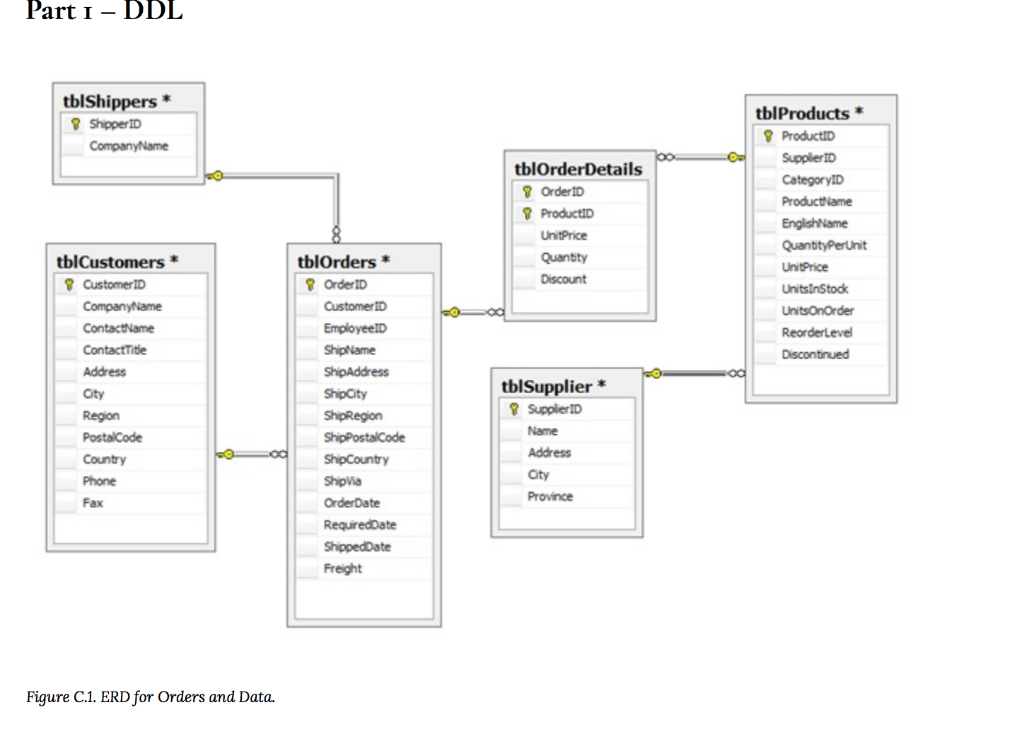
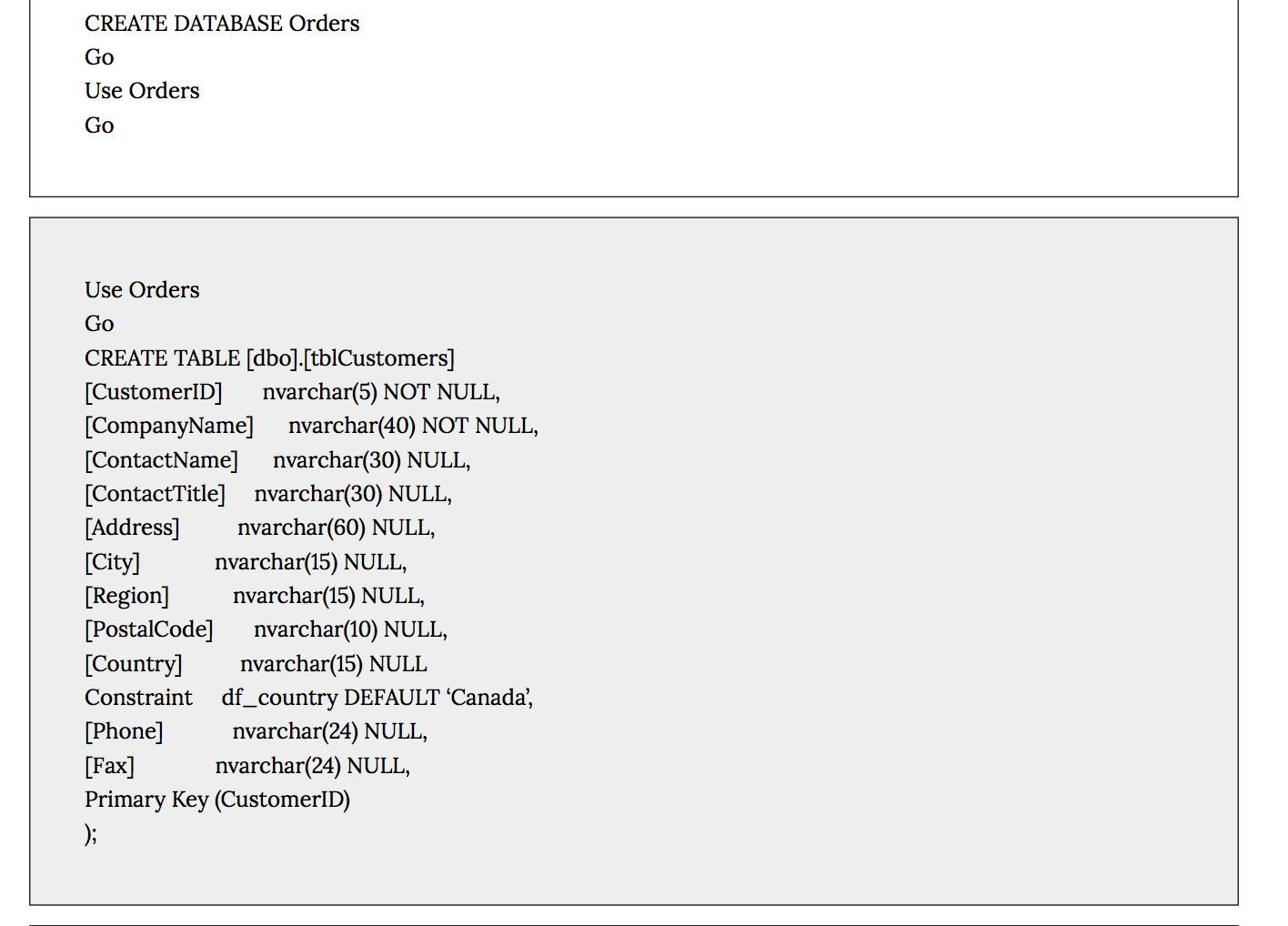
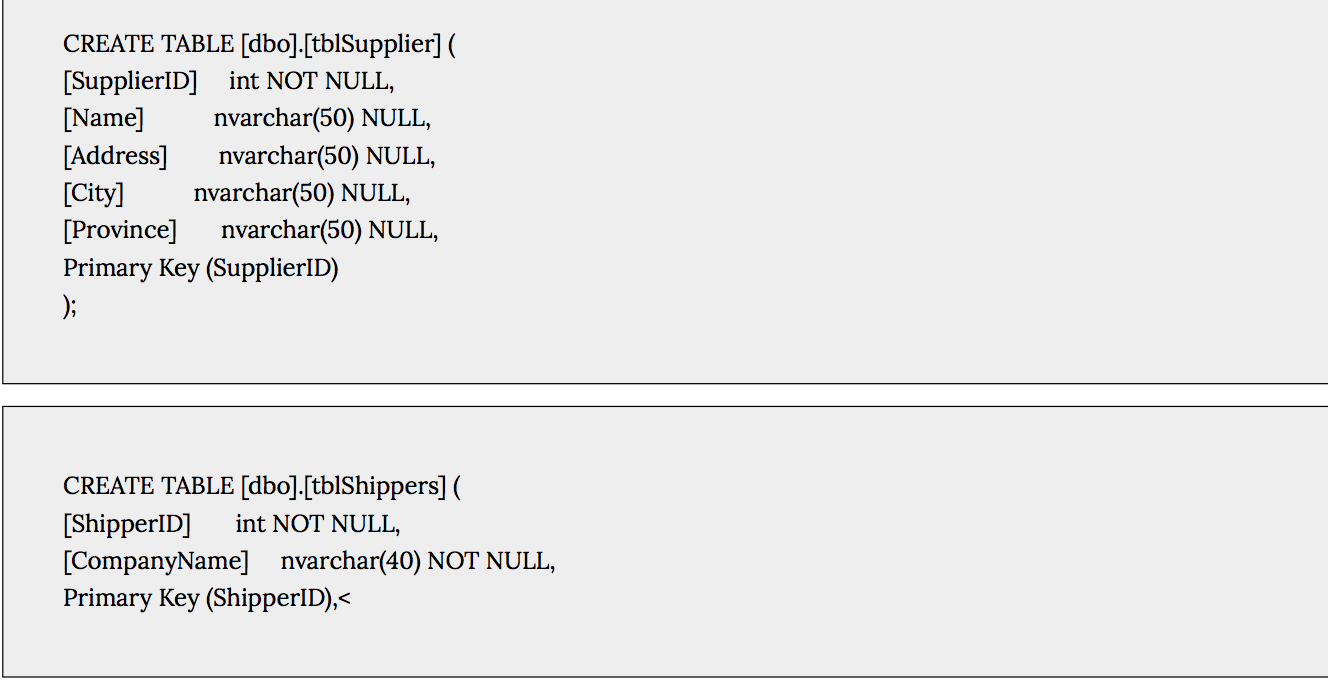
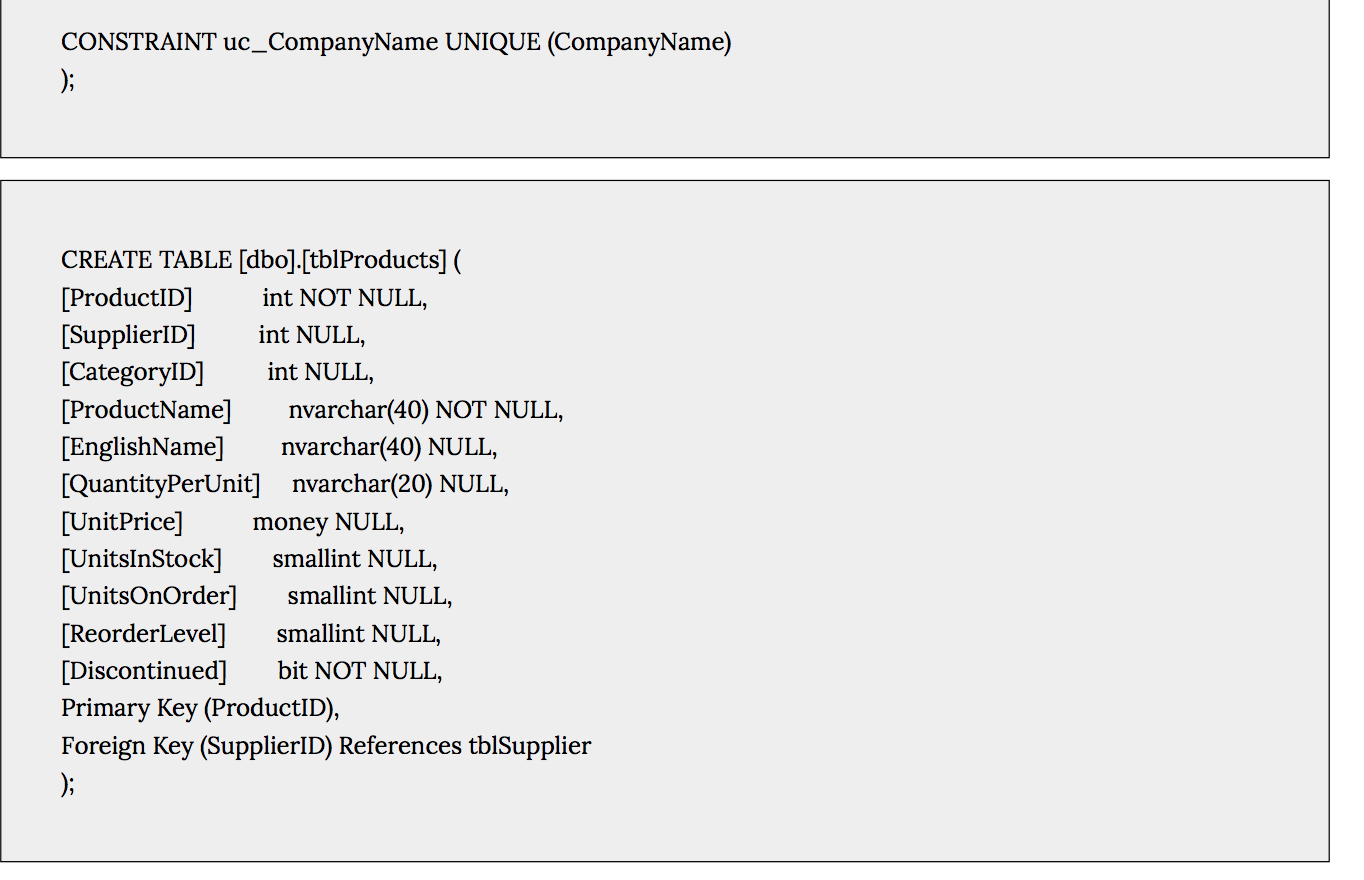
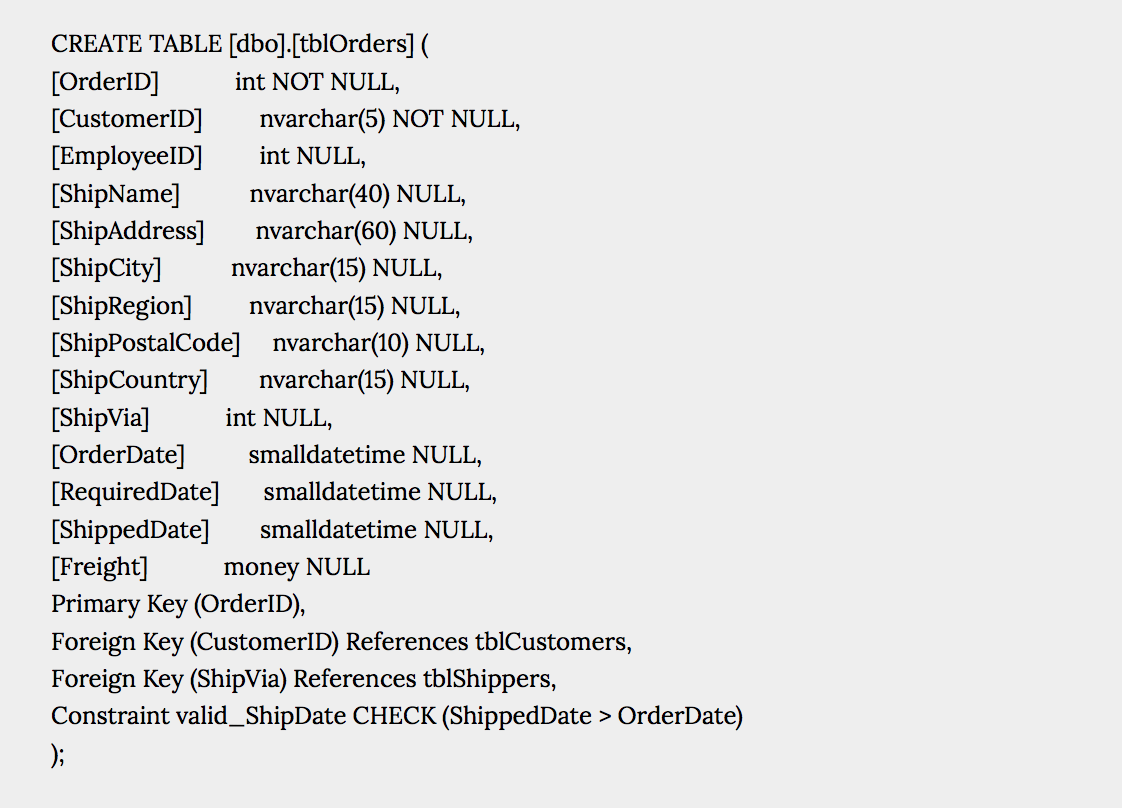
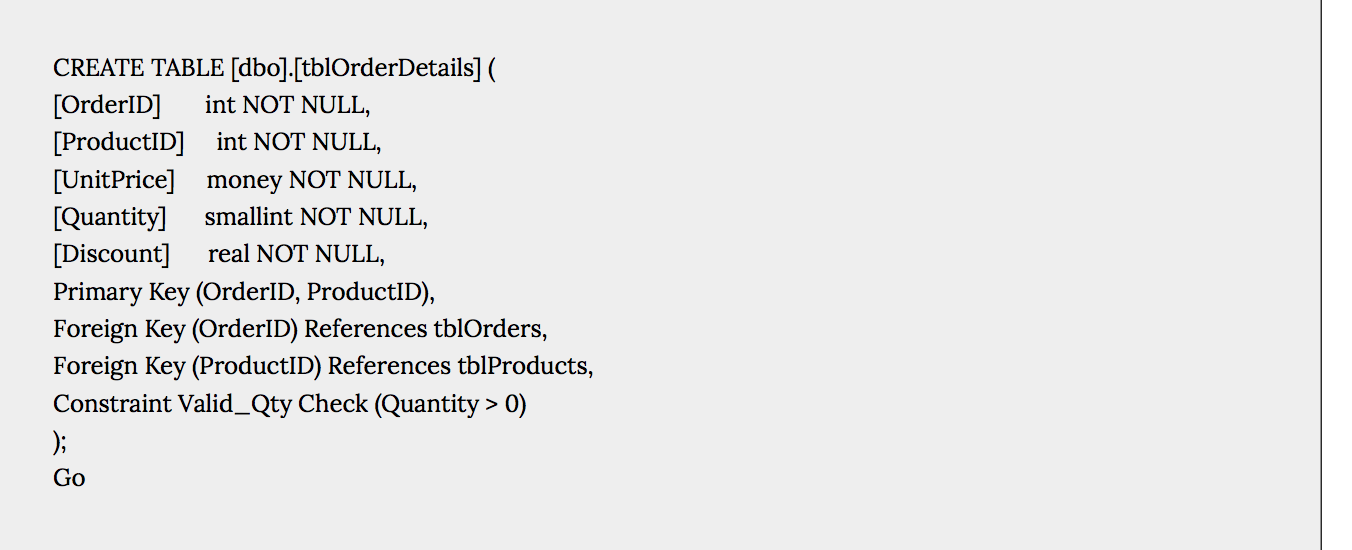 Using the Orders database introduced in Watt (2014) - Appendix C; write the SQL Statements for below cases:
- Get all the orders placed by a specific customer. CustomerID for this customer is MAGAA
- Show customers whose ContactTitle is not Sales Associate. Display CustomerID, CompanyName, Contact Name, and ContactTitle
- Show customers who bought products where the EnglishName includes the string chocolate. Display CustomerID, CompanyName, ProductID, ProductName, and EnglishName
- Show products which were bought by customers from Italy or USA. . Display CustomerID, CompanyName, ShipCountry, ProductID, ProductName, and EnglishName
- Show total price of each product in each order. Note that there is not a column named as total price. You should calculate it and create a column named as TotalPrice. Display OrderID, ProductID, ProductName, UnitPrice, Quantity, Discount, and TotalPrice
- Show how many products there are in each category and show the results in ascending order by the total number of products. Display CategoryName, and TotalProducts
- Show the total number of customers in each City. Display Country, City, TotalCustomers
- Show the orders which were shipped late than the actual required date. Display OrderID, OrderDate, RequiredDate, and ShippedDate
Part I DDL tblShippers * 8 Shipper ID Company Name tblOrder Details 8 Order ID 8 ProductID UnitPrice Quantity tblProducts * ProductID Supplier ID CategoryID Productivame EnglishName Quantity PerUnit UnitPrice UnitsinStock Units OnOrder Reorderlevel Discontinued Discount tblCustomers * Customer ID Company Name ContactName Contact Title Address City Region Postal Code Country Phone Fax tblOrders * OrderID Customer ID EmployeeID ShipName ShipAddress Ship City ShipRegion ShipPostalCode Ship Country Ship via Order Date RequiredDate ShippedDate Freight tblSupplier * Supplier ID Name Address City Province Figure C.1. ERD for Orders and Data. CREATE DATABASE Orders Go Use Orders Go Use Orders Go CREATE TABLE [dbo].[tblCustomers] [CustomerID] nvarchar(5) NOT NULL, [CompanyName] nvarchar(40) NOT NULL, [ContactName] nvarchar(30) NULL, [ContactTitle] nvarchar(30) NULL, [Address] nvarchar(60) NULL, [City] nvarchar(15) NULL, [Region] nvarchar(15) NULL, [PostalCode] nvarchar(10) NULL, [Country] nvarchar(15) NULL Constraint df_country DEFAULT Canada, [Phone] nvarchar(24) NULL, [Fax] nvarchar(24) NULL, Primary Key (CustomerID) ); CREATE TABLE [dbo].[tblSupplier] ( [SupplierID] int NOT NULL, [Name] nvarchar(50) NULL, [Address] nvarchar(50) NULL, [City] nvarchar(50) NULL, [Province] nvarchar(50) NULL, Primary Key (SupplierID) ); CREATE TABLE [dbo].[tblShippers] ( [ShipperID] int NOT NULL, [CompanyName] nvarchar(40) NOT NULL, Primary Key (ShipperID), OrderDate) ); CREATE TABLE [dbo].[tblOrderDetails] ( [OrderID] int NOT NULL, [ProductID] int NOT NULL, [UnitPrice] money NOT NULL, [Quantity] smallint NOT NULL, [Discount] real NOT NULL, Primary Key (OrderID, ProductID), Foreign Key (OrderID) References tblOrders, Foreign Key (ProductID) References tblProducts, Constraint Valid_Qty Check (Quantity > 0) ); Go
Step by Step Solution
There are 3 Steps involved in it

Get step-by-step solutions from verified subject matter experts
 Study Help