



Question: Using the PAP for Problem 25, at the end of Chapter 5: do parts: a, c, & e. As done in lecture, use Excel to
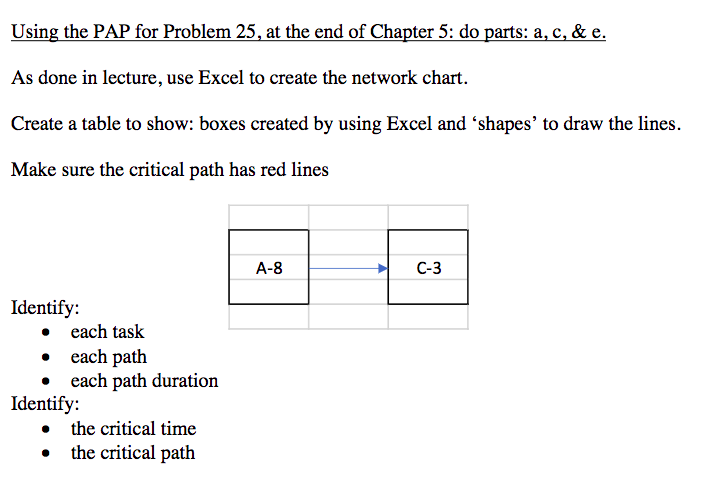
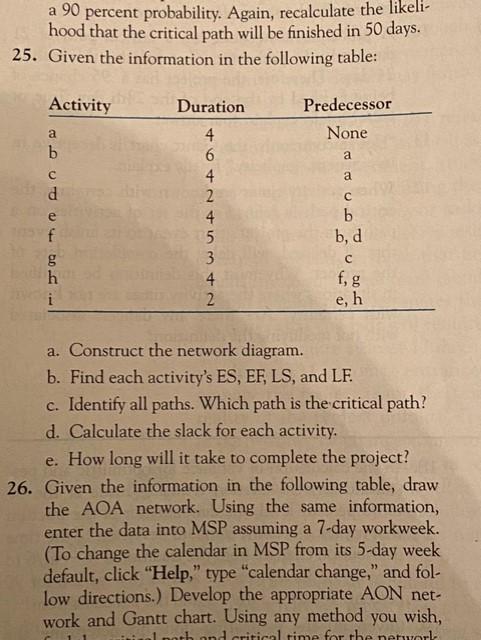
Using the PAP for Problem 25, at the end of Chapter 5: do parts: a, c, & e. As done in lecture, use Excel to create the network chart. Create a table to show: boxes created by using Excel and 'shapes' to draw the lines. Make sure the critical path has red lines A-8 C-3 Identify: each task each path each path duration Identify: the critical time the critical path a 90 percent probability. Again, recalculate the likeli- hood that the critical path will be finished in 50 days. 25. Given the information in the following table: Activity Duration Predecessor None a a d 4 6 4 2 4. 5 3 4 2 b b, f f, g h i e, h a. Construct the network diagram. b. Find each activity's ES, EF, LS, and LF. c. Identify all paths. Which path is the critical path? d. Calculate the slack for each activity. e. How long will it take to complete the project? 26. Given the information in the following table, draw the AOA network. Using the same information, enter the data into MSP assuming a 7-day workweek. (To change the calendar in MSP from its 5-day week default, click "Help," type "calendar change," and fol- low directions.) Develop the appropriate AON net- work and Gantt chart. Using any method you wish, Londritical time for the network
Step by Step Solution
There are 3 Steps involved in it

Get step-by-step solutions from verified subject matter experts