







Question: Using the source code and the given output in Java, I have to modify the code to give South and East, with the East Panel
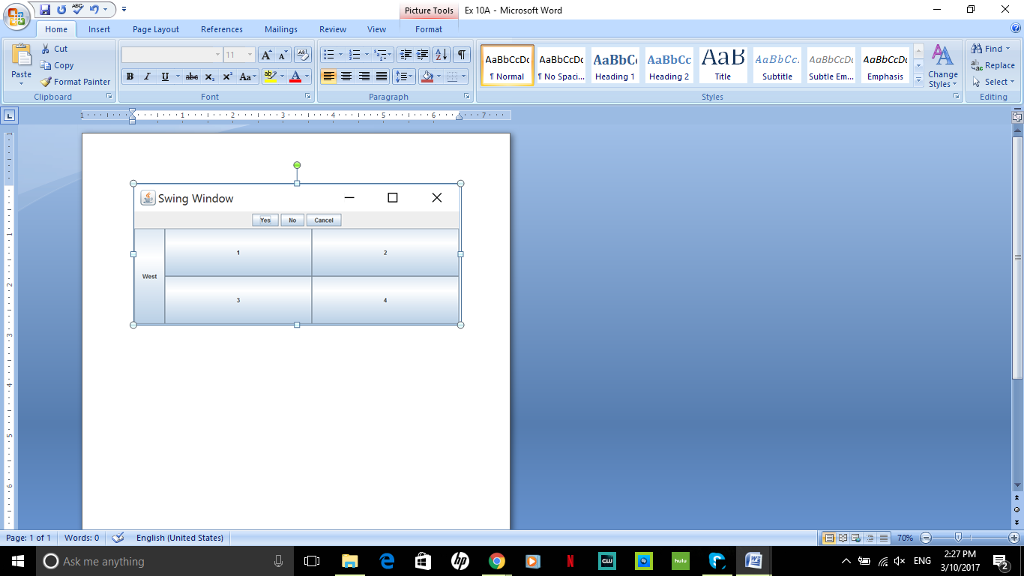
Using the source code and the given output in Java, I have to modify the code to give South and East, with the East Panel having four radio buttons, and the South panel having five check boxes. Also, take the West panel and add a text field with text colored blue and in italics.
Source Code:
import javax.swing.*;
import java.awt.*;
class Layout extends JFrame
{
Container contentPane = getContentPane();
JPanel pnl = new JPanel();
JPanel grid = new JPanel(new GridLayout(2,2));
public Layout()
{
super( "Swing Window" );
setSize( 500,200 );
setDefaultCloseOperation( EXIT_ON_CLOSE );
pnl.add(new JButton("Yes") );
pnl.add(new JButton("No") );
pnl.add(new JButton("Cancel") );
grid.add(new JButton("1"));
grid.add(new JButton("2"));
grid.add(new JButton("3"));
grid.add(new JButton("4"));
contentPane.add("North", pnl );
contentPane.add("Center", grid );
contentPane.add("West",new JButton("West"));
setVisible( true );
}
public static void main( String[] args )
{
Layout gui = new Layout() ;
}
}
Output:
Step by Step Solution
There are 3 Steps involved in it

Get step-by-step solutions from verified subject matter experts
 Study Help