



Question: using the source codes at the bottom of the page Serendipity Booksellers Software Development Project Part 4: A Problem-Solving Exercise 1.The Main Menu Modify the
using the source codes at the bottom of the page
Serendipity Booksellers Software Development
Project Part 4: A Problem-Solving Exercise
1.The Main Menu
Modify the mainmenu.cpp program so it validates the users input. If a value outside the range of 1 through 4 is entered, the program should display an error message. Here is an example screen:
Serendipity Booksellers
Main Menu
1. Cashier Module
2. Inventory Database Module
3. Report Module
4. Exit
Enter Your Choice: 5
Please enter a number in the range 1 4.
Later, in Chapter 6, you will begin merging you will begin merging all the programs you have written into the mainmenu.cpp file. You will now start making preparations for that. After the user input has been validated, add a switch statement that branches to a section of code, depending on which menu choice the user made. For now, the program should simply display a message like You selected item 1 when the user enters a number. Here is an example of the screen:
Serendipity Booksellers
Main Menu
1. Cashier Module
2. Inventory Database Module
3. Report Module
4 .Exit
Enter Your Choice: 3
You selected item 3.
2.The Inventory Database Menu
You will make the same modifications to invmenu.cpp that you made to mainmenu.cpp.
Modify the invmenu.cpp program so it validates the users input. If a value outside the range of 1 through 5 is entered, the program should display an error message. Here is an example screen:
Serendipity Booksellers
Inventory Database
1. Look Up a Book
2. Add a Book
3. Edit a Books Record
4. Delete a Book
5. Return to the Main Menu
Enter Your Choice: 9
Please enter a number in the range 1 5.
After the user input has been validated, add a switch statement that branches to a section of code, depending on which menu choice the user made. For now, the program should simply display a message like You selected item 1 when the user enters a number. Here is an example of the screen:
Serendipity Booksellers
Inventory Database
1. Look Up a Book
2. Add a Book
3. Edit a Books Record
4. Delete a Book
5. Return to the Main Menu
Enter Your Choice: 2
You selected item 2.
3.The Reports Menu
You will make the same modifications to reports.cpp that you made to mainmenu.cpp and invmenu.cpp.
Modify the reports.cpp program so it validates the users input. If a value outside the range of 1 through 7 is entered, the program should display an error message. Here is an example screen:
Serendipity Booksellers
Reports
1. Inventory Listing
2. Inventory Wholesale Value
3. Inventory Retail Value
4. Listing by Quantity
5. Listing by Cost
6. Listing by Age
7. Return to Main Menu
Enter Your Choice: 8
Please enter a number in the range 1 7.
After the user input has been validated, add a switch statement that branches to a section of code, depending on which menu choice the user made. For now, the program should simply display a message like You selected item 1 when the user enters a number. Here is an example of the screen:
Serendipity Booksellers
Reports
1. Inventory Listing
2. Inventory Wholesale Value
3. Inventory Retail Value
4. Listing by Quantity
5. Listing by Cost
6. Listing by Age
7. Return to Main Menu
Enter Your Choice: 5
You selected item 5.
source code for mainmenu.cpp and cashier.cpp
| #include cout> ws, date); cout> numOfBook; cout> ws, ISBN); cout> ws, Title); cout> price; subtotal = numOfBook * price; tax = 6 * subtotal / 100; total = subtotal + tax; // setting to 2 decimal places in fixed point notation cout |
| Modified Program mainmenu.cpp |
| #include cout cout cout cout cout cout> choice; if(choice 4) cout |
source codes for report.cpp and invmenu.cpp
invmenu.cpp
#include
#include
using namespace std;
int main()
{
cout
cout
cout
cout
cout
cout
cout
cout
int choice = 0;
while(1)
{
cin>>choice;
if(choice5)
{
cout
cout
}
else
break;
}
return 0;
}
current OUTPUT:
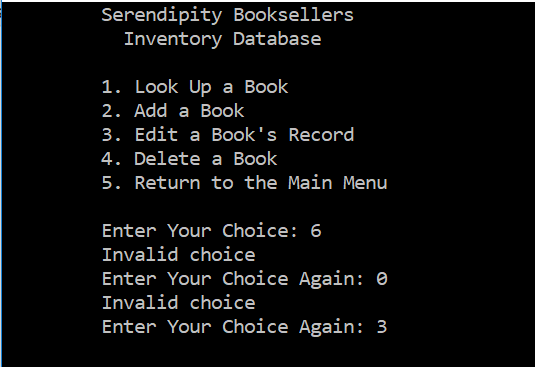
reports.cpp
#include
#include
using namespace std;
int main()
{
cout
cout
cout
cout
cout
cout
cout
cout
cout
cout
int choice = 0;
while(1)
{
cin>>choice;
if(choice7)
{
cout
cout
}
else
break;
}
return 0;
}
Curren OUTPUT so far:
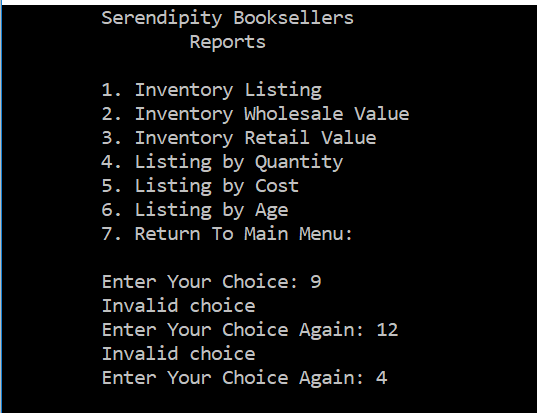
Serendipity Booksellers Inventory Database 1. Look Up a Book 2. Add a Book 3. Edit a Book's Record 4. Delete a Book 5. Return to the Main Menu Enter Your Choice: 6 Invalid choice Enter Your Choice Again: e Invalid choice Enter Your Choice Again: 3
Step by Step Solution
There are 3 Steps involved in it

Get step-by-step solutions from verified subject matter experts