







Question: Using the structured flowchart, write an NXC program for the elevator control described in Homework 3. Because the elevator needs nine sensors and the NXT
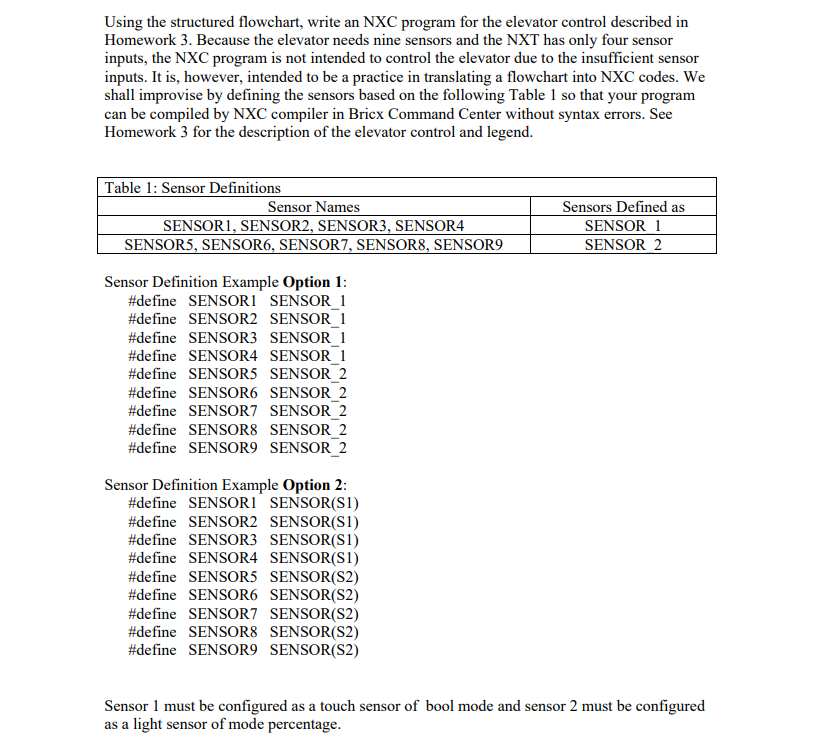
Using the structured flowchart, write an NXC program for the elevator control described in Homework 3. Because the elevator needs nine sensors and the NXT has only four sensor inputs, the NXC program is not intended to control the elevator due to the insufficient sensor inputs. It is, however, intended to be a practice in translating a flowchart into NXC codes. We shall improvise by defining the sensors based on the following Table 1 so that your program can be compiled by NXC compiler in Bricx Command Center without syntax errors. See Homework 3 for the description of the elevator control and legend. Table 1: Sensor Definitions Sensor Names Sensors Defined as SENSOR1, SENSOR2, SENSOR3, SENSOR4 SENSOR_1 SENSOR5, SENSOR6, SENSOR7, SENSOR8, SENSOR9 SENSOR_2 Sensor Definition Example Option 1: #define SENSOR1 SENSOR_1 #define SENSOR2 SENSOR_1 #define SENSOR3 SENSOR_1 #define SENSOR4 SENSOR_1 #define SENSOR5 SENSOR_2 #define SENSOR6 SENSOR_2 #define SENSOR7 SENSOR_2 #define SENSOR8 SENSOR_2 #define SENSOR9 SENSOR_2 Sensor Definition Example Option 2: #define SENSOR1 SENSOR(S1) #define SENSOR2 SENSOR(S1) #define SENSOR3 SENSOR(S1) #define SENSOR4 SENSOR(S1) #define SENSOR5 SENSOR(S2) #define SENSOR6 SENSOR(S2) #define SENSOR7 SENSOR(S2) #define SENSOR8 SENSOR(S2) #define SENSOR9 SENSOR(S2) Sensor 1 must be configured as a touch sensor of bool mode and sensor 2 must be configured as a light sensor of mode percentage.
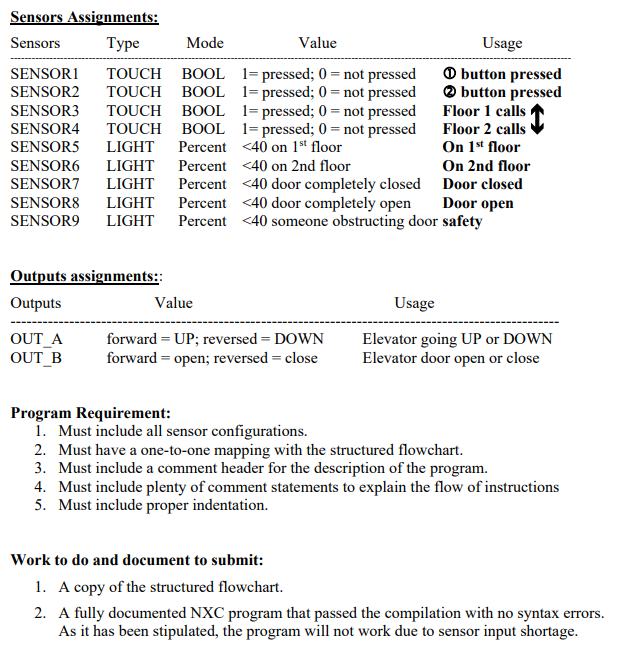
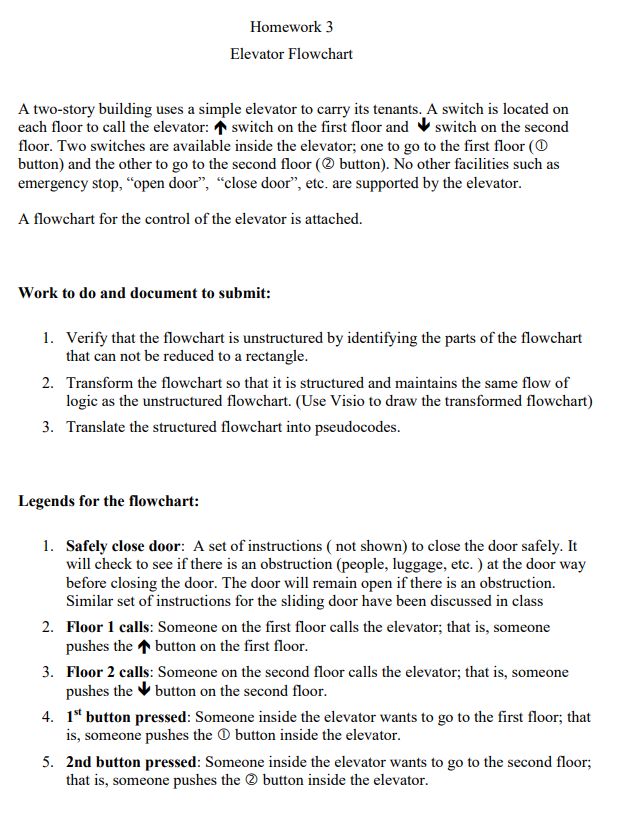
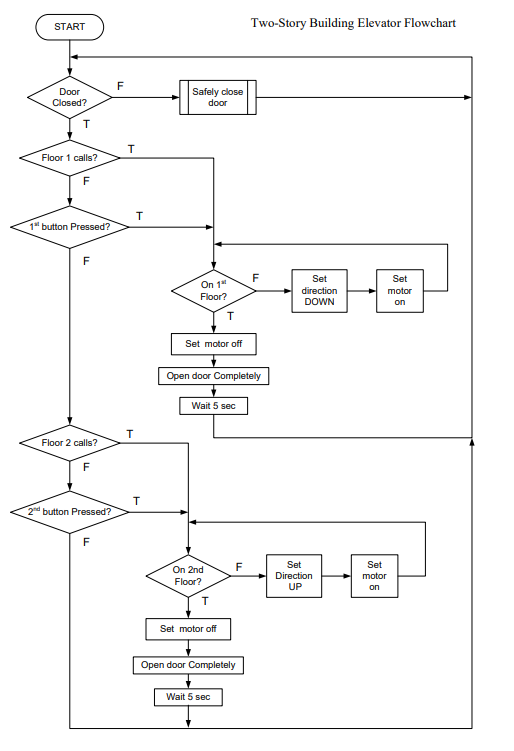
HW 3 for reference
Using the structured flowchart, write an NXC program for the elevator control described in Homework 3. Because the elevator needs nine sensors and the NXT has only four sensor inputs, the NXC program is not intended to control the elevator due to the insufficient sensor inputs. It is, however, intended to be a practice in translating a flowchart into NXC codes. We shall improvise by defining the sensors based on the following Table 1 so that your program can be compiled by NXC compiler in Bricx Command Center without syntax errors. See Homework 3 for the description of the elevator control and legend. Table 1: Sensor Definitions Sensor Names SENSOR1, SENSOR2, SENSOR3, SENSOR4 SENSOR5, SENSOR6, SENSOR7, SENSOR8, SENSOR9 Sensors Defined as SENSOR 1 SENSOR 2 Sensor Definition Example Option 1 #define SENSORI SENSORI #define SENSOR2 SENSORI #define SENSOR3 SENSOR I #define SENSOR4 SENSOR I #define SENSOR5 SENSOR 2 #define SENSOR6 SENSOR 2 #define SENSOR7 SENSOR 2 #define SENSOR8 SENSOR 2 #define SENSOR9 SENSOR 2 Sensor Definition Example Option 2 #define #define #define #define #define #define #define #define #define SENSORI SENSOR2 SENSOR3 SENSOR4 SENSORS SENSOR6 SENSOR7 SENSOR8 SENSOR9 SENSOR(SI) SENSOR(SI) SENSOR(SI) SENSOR(SI) SENSOR(S2) SENSOR(S2) SENSOR(S2) SENSOR(S2) SENSOR(S2) Sensor 1 must be configured as a touch sensor of bool mode and sensor 2 must be configured as a light sensor of mode percentage Using the structured flowchart, write an NXC program for the elevator control described in Homework 3. Because the elevator needs nine sensors and the NXT has only four sensor inputs, the NXC program is not intended to control the elevator due to the insufficient sensor inputs. It is, however, intended to be a practice in translating a flowchart into NXC codes. We shall improvise by defining the sensors based on the following Table 1 so that your program can be compiled by NXC compiler in Bricx Command Center without syntax errors. See Homework 3 for the description of the elevator control and legend. Table 1: Sensor Definitions Sensor Names SENSOR1, SENSOR2, SENSOR3, SENSOR4 SENSOR5, SENSOR6, SENSOR7, SENSOR8, SENSOR9 Sensors Defined as SENSOR 1 SENSOR 2 Sensor Definition Example Option 1 #define SENSORI SENSORI #define SENSOR2 SENSORI #define SENSOR3 SENSOR I #define SENSOR4 SENSOR I #define SENSOR5 SENSOR 2 #define SENSOR6 SENSOR 2 #define SENSOR7 SENSOR 2 #define SENSOR8 SENSOR 2 #define SENSOR9 SENSOR 2 Sensor Definition Example Option 2 #define #define #define #define #define #define #define #define #define SENSORI SENSOR2 SENSOR3 SENSOR4 SENSORS SENSOR6 SENSOR7 SENSOR8 SENSOR9 SENSOR(SI) SENSOR(SI) SENSOR(SI) SENSOR(SI) SENSOR(S2) SENSOR(S2) SENSOR(S2) SENSOR(S2) SENSOR(S2) Sensor 1 must be configured as a touch sensor of bool mode and sensor 2 must be configured as a light sensor of mode percentage
Step by Step Solution
There are 3 Steps involved in it

Get step-by-step solutions from verified subject matter experts
 Study Help