







Question: Using the temps.txt data file (Located on the Data Canvas Page) which has temperatures in degrees Celsius create a new data file (table.txt) that consists
Using the temps.txt data file (Located on the Data Canvas Page) which has temperatures in degrees Celsius create a new data file (table.txt) that consists of a table of temperatures in Celsius, Fahrenheit and Kelvin. The equation to convert Celsius to Fahrenheit is: F = 9.0/5.0 * Celsius + 32.0 To convert Celsius to Kelvin add 273.15 degrees. The table should have headings for each temperature as shown below. Upload the text file to Canvas.
c++
data file: http://uahcs.org/CS121/data/temps.txt
test output:
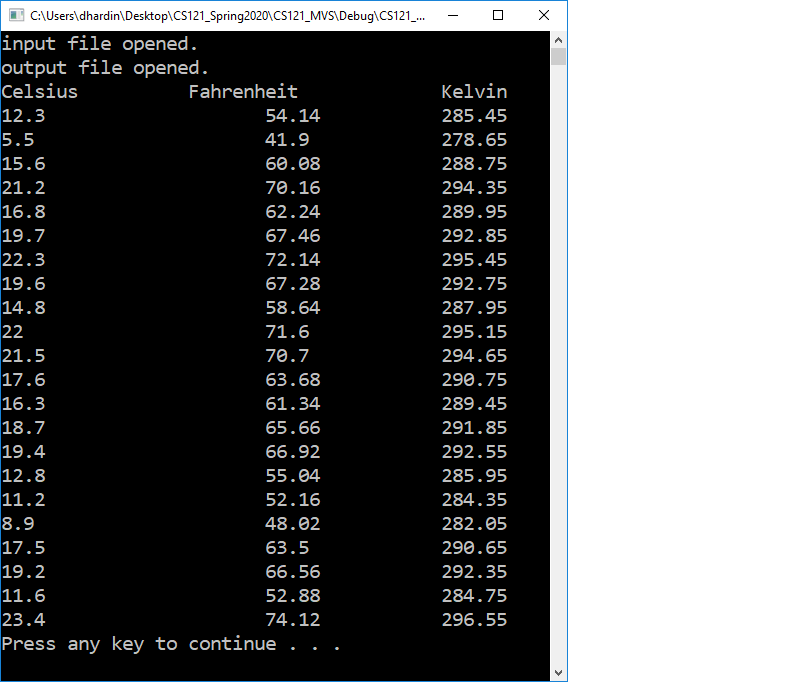
- X 5.5 C:\Users\dhardin\Desktop\CS121_Spring2020\CS121_MVS\Debug CS121_... input file opened. output file opened. Celsius Fahrenheit 12.3 54.14 41.9 15.6 60.08 21.2 70.16 16.8 62.24 19.7 67.46 22.3 72.14 19.6 67.28 14.8 58.64 22 71.6 21.5 70.7 17.6 63.68 16.3 61.34 18.7 65.66 19.4 66.92 12.8 55.04 11.2 52.16 8.9 48.02 17.5 63.5 19.2 66.56 11.6 52.88 23.4 74.12 Press any key to continue ... Kelvin 285.45 278.65 288.75 294.35 289.95 292.85 295.45 292.75 287.95 295.15 294.65 290.75 289.45 291.85 292.55 285.95 284.35 282.05 290.65 292.35 284.75 296.55
Step by Step Solution
There are 3 Steps involved in it

Get step-by-step solutions from verified subject matter experts
 Study Help