







Question: Using the the Microsoft Threat Modeling tool model the web service that takes an user input from the internet and gets a response from query
Using the the Microsoft Threat Modeling tool "model" the web service that takes an user input from the internet and gets a response from query of a database as shown in the picture below.
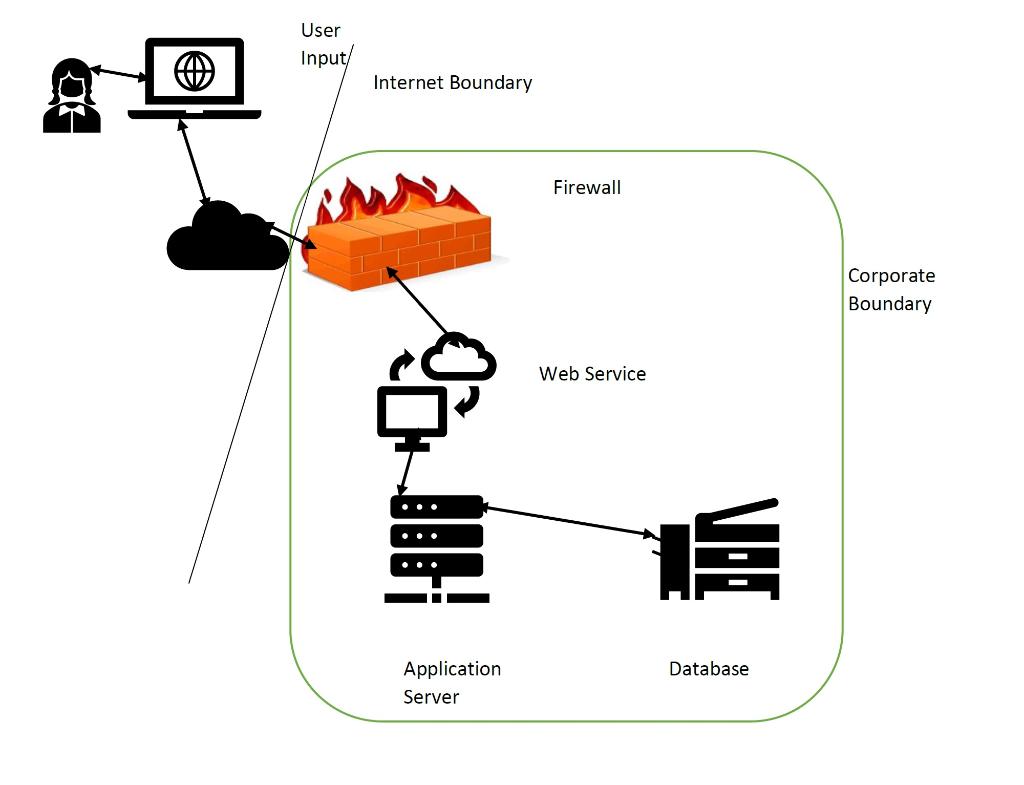
For all communication modify the link properties to be encrypted. For data stored at individual components have the data be encrypted. Generate:
1. A threat report keeping the state as Not Started.
2. Go to each individual threat and change the states to either "Mitigated", "Not Applicable", "Need Investigation". Change the priority as deemed for each threat and provide justification.
3. Regenerate a threat report after working on all the threats.
What to Submit?
Submit a zip file that contains the following:
1. Write-up in Microsoft Word about the Lab goals and insights
2. Threat report from "Microsoft Threat Modeling tool" where threats are just generated by the tool (threats are in a Not Started state)
2. Threat report from "Microsoft Threat Modeling tool" with threats having different states other than "Not Started" state, with adjusted priority and justification
User Input/ Internet Boundary Firewall Corporate Boundary Web Service VIT Database Application Server User Input/ Internet Boundary Firewall Corporate Boundary Web Service VIT Database Application Server
Step by Step Solution
There are 3 Steps involved in it

Get step-by-step solutions from verified subject matter experts
 Study Help