







Question: using this code, answer the question in the image render _ hw 0 1 ( pFrame _ Buffer& fb , HW 0 1 _ Data&
using this code, answer the question in the image
renderhwpFrameBuffer& fb HWData& hwdata
Window Size, in Pixels
const int winwidth fbwidthget;
const int winheight fbheightget;
const auto& tryoutmaybeunused hwdata.tryout;
const auto& tryoutmaybeunused hwdata.tryout;
kbdinputhandlefbhwdata;
imageboxdragfbhwdata; Update image box corners.
Coordinates Used for Placement of Other Objects
const int sqslen minwinwidth,winheight;
const int sqx sqslen sqy winheight ;
const int sqx sqx sqslen, sqy sqy sqslen;
One vertex of the square is at sqxsqy and the opposite
vertex is at sqxsqy
RRGGBB
const uintt colorred xff;
const uintt colorblue xff;
const uintt colorgreen xff;
Demo Code: Draw Sine Waves No need to modify this.
int numwaves ;
float plotht sqslenfloatnumwaves;
for float
yb sqy plotht freq MPI winwidth sqx;
yb sqy;
yb plotht freq
for int x ; x winwidth ; x
int y yb sin x freq plotht ;
fb y winwidth x xff;
Demo Code: Draw Lines Radiating From a Point No need to modify.
This code calls the linedraw routine.
int nrects ;
int npts nrects ;
float cr sqslen; Inner radius
float cr sqslen; Outer radius.
pCoor cctr cr cr; Center of "circle"
float deltatheta MPI npts;
vector vecs;
for int i; i imgpixels.size;
and read pixel if they are valid, otherwise use color red.
uintt imgpixel outofrange colorred : imgpixels imgidx ;
Finally, write image pixel into frame buffer.
fb fby winwidth fbx imgpixel;
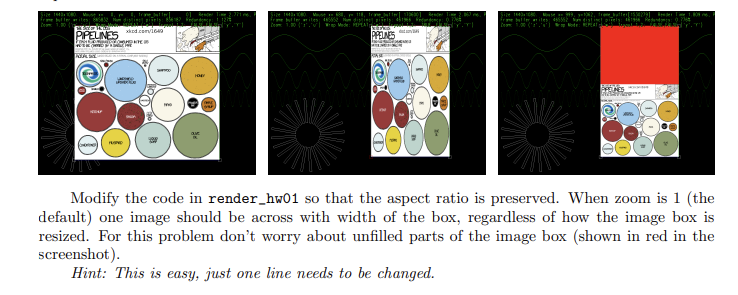
Modify the code in renderhw so that the aspect ratio is preserved. When zoom is the
default one image should be across with width of the box, regardless of how the image box is
resized. For this problem don't worry about unfilled parts of the image box shown in red in the
screenshot
Hint: This is easy, just one line needs to be changed.
Step by Step Solution
There are 3 Steps involved in it
1 Expert Approved Answer
Step: 1 Unlock

Question Has Been Solved by an Expert!
Get step-by-step solutions from verified subject matter experts
Step: 2 Unlock
Step: 3 Unlock
 Study Help