







Question: Using this general journal I made, what would the general journal be (question 3) and what would it look like with the balances calculated (question
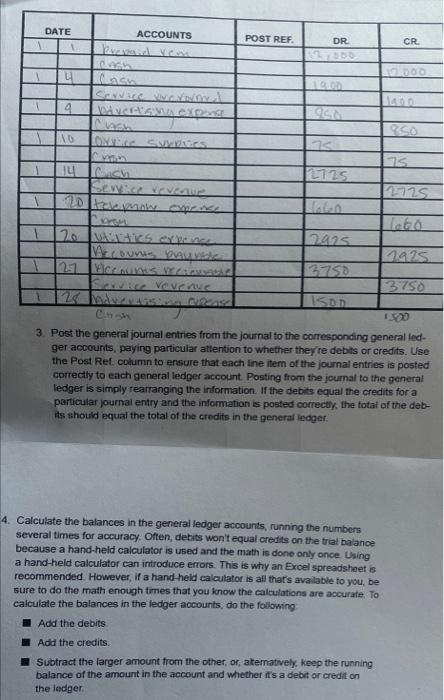
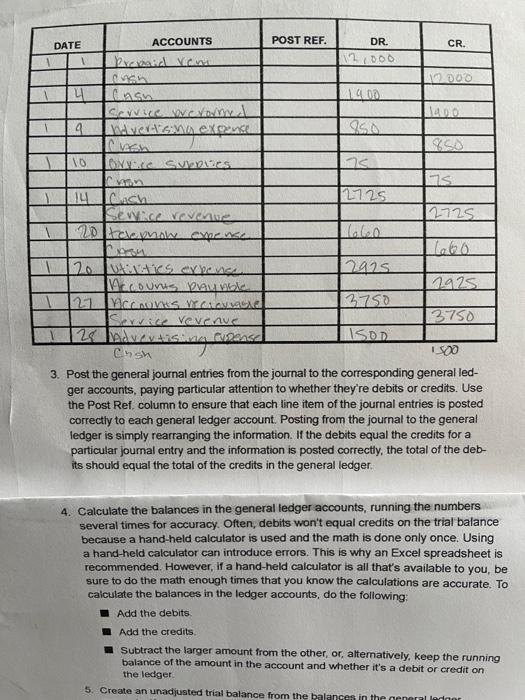
ACCOUNTS CR A 4 Cash Service VivCVITY I 9 850 10 Orvice Surpres 75 14 Cuch Service revenue 2725 labo 20 utilities expense 2925 1925 3750 Accouns meses Service revenue 3750 128 Indurvising cupend ISOD Crish 1300 3. Post the general journal entries from the journal to the corresponding general led- ger accounts, paying particular attention to whether they're debits or credits. Use the Post Ref. column to ensure that each line item of the journal entries is posted correctly to each general ledger account. Posting from the journal to the general ledger is simply rearranging the information. If the debits equal the credits for a particular journal entry and the information is posted correctly, the total of the deb- its should equal the total of the credits in the general ledger 4. Calculate the balances in the general ledger accounts, running the numbers several times for accuracy. Often, debits won't equal credits on the trial balance because a hand-held calculator is used and the math is done only once. Using a hand-held calculator can introduce errors. This is why an Excel spreadsheet is recommended. However, if a hand-held calculator is all that's available to you, be sure to do the math enough times that you know the calculations are accurate. To calculate the balances in the ledger accounts, do the following Add the debits Add the credits. Subtract the larger amount from the other, or, alternatively, keep the running balance of the amount in the account and whether it's a debit or credit on the ledger. A 1 DATE POST REF. DR. 75 2725 ACCOUNTS CR. Prepaid ven 12.000 Cash 1400 Service vrevormy I ndvertising expense Orvice Supplies 75 14 |ch Service revenue 2725 20 telepnow expense 20 2925 utilities expense Accounts paynble 2925 3750 ACCOUNTS Vectoriale Service revenue 3750 Pensel ISOD Cnsh 1500 3. Post the general journal entries from the journal to the corresponding general led- ger accounts, paying particular attention to whether they're debits or credits. Use the Post Ref. column to ensure that each line item of the journal entries is posted correctly to each general ledger account. Posting from the journal to the general ledger is simply rearranging the information. If the debits equal the credits for a particular journal entry and the information is posted correctly, the total of the deb- its should equal the total of the credits in the general ledger. 4. Calculate the balances in the general ledger accounts, running the numbers several times for accuracy. Often, debits won't equal credits on the trial balance because a hand-held calculator is used and the math is done only once. Using a hand-held calculator can introduce errors. This is why an Excel spreadsheet is recommended. However, if a hand-held calculator is all that's available to you, be sure to do the math enough times that you know the calculations are accurate. To calculate the balances in the ledger accounts, do the following: Add the debits. Add the credits. Subtract the larger amount from the other, or, alternatively, keep the running balance of the amount in the account and whether it's a debit or credit on the ledger. 5. Create an unadjusted trial balance from the balances in the general ledger DATE 1 1 4 T 9 110 1 1 POST REF. DR. 12,000 19.00 75 2725 ACCOUNTS CR A 4 Cash Service VivCVITY I 9 850 10 Orvice Surpres 75 14 Cuch Service revenue 2725 labo 20 utilities expense 2925 1925 3750 Accouns meses Service revenue 3750 128 Indurvising cupend ISOD Crish 1300 3. Post the general journal entries from the journal to the corresponding general led- ger accounts, paying particular attention to whether they're debits or credits. Use the Post Ref. column to ensure that each line item of the journal entries is posted correctly to each general ledger account. Posting from the journal to the general ledger is simply rearranging the information. If the debits equal the credits for a particular journal entry and the information is posted correctly, the total of the deb- its should equal the total of the credits in the general ledger 4. Calculate the balances in the general ledger accounts, running the numbers several times for accuracy. Often, debits won't equal credits on the trial balance because a hand-held calculator is used and the math is done only once. Using a hand-held calculator can introduce errors. This is why an Excel spreadsheet is recommended. However, if a hand-held calculator is all that's available to you, be sure to do the math enough times that you know the calculations are accurate. To calculate the balances in the ledger accounts, do the following Add the debits Add the credits. Subtract the larger amount from the other, or, alternatively, keep the running balance of the amount in the account and whether it's a debit or credit on the ledger. A 1 DATE POST REF. DR. 75 2725 ACCOUNTS CR. Prepaid ven 12.000 Cash 1400 Service vrevormy I ndvertising expense Orvice Supplies 75 14 |ch Service revenue 2725 20 telepnow expense 20 2925 utilities expense Accounts paynble 2925 3750 ACCOUNTS Vectoriale Service revenue 3750 Pensel ISOD Cnsh 1500 3. Post the general journal entries from the journal to the corresponding general led- ger accounts, paying particular attention to whether they're debits or credits. Use the Post Ref. column to ensure that each line item of the journal entries is posted correctly to each general ledger account. Posting from the journal to the general ledger is simply rearranging the information. If the debits equal the credits for a particular journal entry and the information is posted correctly, the total of the deb- its should equal the total of the credits in the general ledger. 4. Calculate the balances in the general ledger accounts, running the numbers several times for accuracy. Often, debits won't equal credits on the trial balance because a hand-held calculator is used and the math is done only once. Using a hand-held calculator can introduce errors. This is why an Excel spreadsheet is recommended. However, if a hand-held calculator is all that's available to you, be sure to do the math enough times that you know the calculations are accurate. To calculate the balances in the ledger accounts, do the following: Add the debits. Add the credits. Subtract the larger amount from the other, or, alternatively, keep the running balance of the amount in the account and whether it's a debit or credit on the ledger. 5. Create an unadjusted trial balance from the balances in the general ledger DATE 1 1 4 T 9 110 1 1 POST REF. DR. 12,000 19.00 75 2725
Step by Step Solution
There are 3 Steps involved in it

Get step-by-step solutions from verified subject matter experts
 Study Help