







Question: Using Unix commands & also using a terminal on the Mac computer. Asst 3: Basic Unix Commands In this assignment, you will demonstrate your ability
Using Unix commands & also using a terminal on the Mac computer.
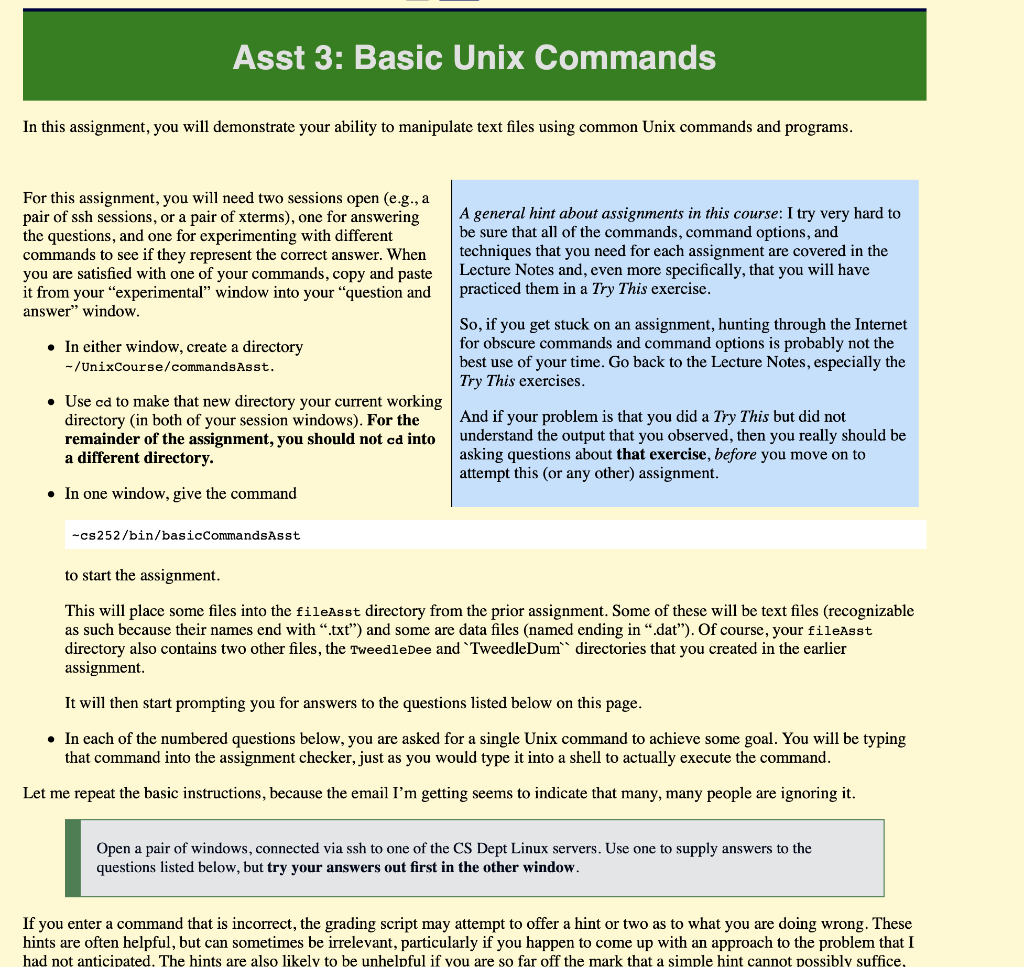
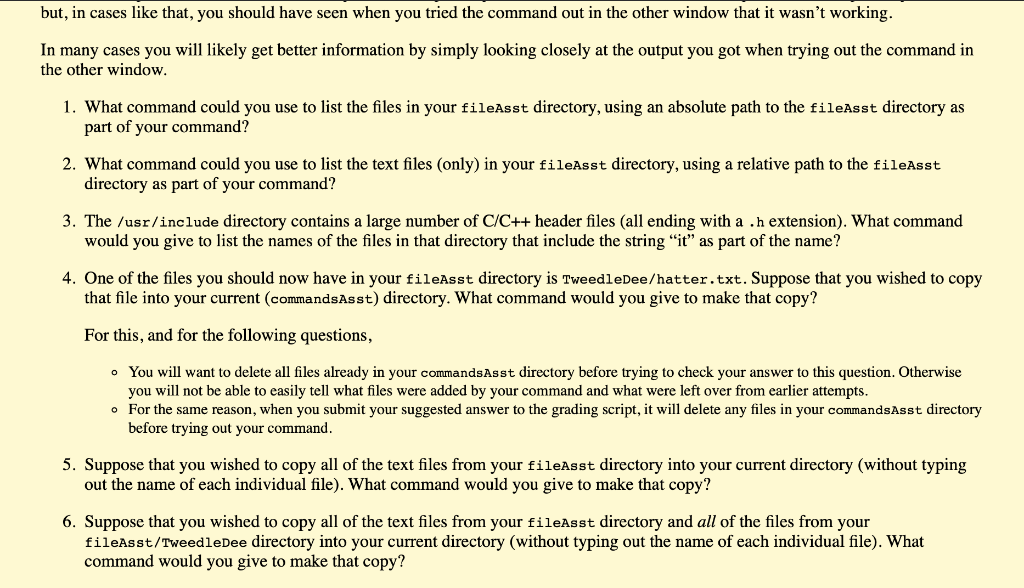
Asst 3: Basic Unix Commands In this assignment, you will demonstrate your ability to manipulate text files using common Unix commands and programs. For this assignment, you will need two sessions open (e.g., a pair of ssh sessions, or a pair of xterms), one for answering the questions, and one for experimenting with different commands to see if they represent the correct answer. When you are satisfied with one of your commands, copy and paste it from your "experimental" window into your question and answer" window. A general hint about assignments in this course: I try very hard to be sure that all of the commands, command options, and techniques that you need for each assignment are covered in the Lecture Notes and, even more specifically, that you will have practiced them in a Try This exercise. In either window, create a directory -/UnixCourse/commands Asst. So, if you get stuck on an assignment, hunting through the Internet for obscure commands and command options is probably not the best use of your time. Go back to the Lecture Notes, especially the Try This exercises. Use cd to make that new directory your current working directory in both of your session windows). For the remainder of the assignment, you should not cd into a different directory. And if your problem is that you did a Try This but did not understand the output that you observed, then you really should be asking questions about that exercise, before you move on to attempt this (or any other) assignment. In one window, give the command -cs252/bin/basicCommandsAsst to start the assignment. This will place some files into the fileAsst directory from the prior assignment. Some of these will be text files (recognizable as such because their names end with .txt") and some are data files (named ending in ".dat"). Of course, your fileAsst directory also contains two other files, the TweedleDee and "TweedleDum directories that you created in the earlier assignment. It will then start prompting you for answers to the questions listed below on this page. In each of the numbered questions below, you are asked for a single Unix command to achieve some goal. You will be typing that command into the assignment checker, just as you would type it into a shell to actually execute the command. Let me repeat the basic instructions, because the email I'm getting seems to indicate that many, many people are ignoring it. Open a pair of windows, connected via ssh to one of the CS Dept Linux servers. Use one to supply answers to the questions listed below, but try your answers out first in the other window. If you enter a command that is incorrect, the grading script may attempt to offer a hint or two as to what you are doing wrong. These hints are often helpful, but can sometimes be irrelevant, particularly if you happen to come up with an approach to the problem that I had not anticipated. The hints are also likely to be unhelpful if you are so far off the mark that a simple hint cannot possibly suffice, but, in cases like that, you should have seen when you tried the command out in the other window that it wasn't working. In many cases you will likely get better information by simply looking closely at the output you got when trying out the command in the other window. 1. What command could you use to list the files in your fileAsst directory, using an absolute path to the fileAsst directory as part of your command? 2. What command could you use to list the text files (only) in your fileAsst directory, using a relative path to the fileAsst directory as part of your command? 3. The /usr/include directory contains a large number of C/C++ header files (all ending with a .h extension). What command would you give to list the names of the files in that directory that include the string "it" as part of the name? 4. One of the files you should now have in your fileAsst directory is TweedleDee/hatter.txt. Suppose that you wished to copy that file into your current (commandsAsst) directory. What command would you give to make that copy? For this, and for the following questions, . You will want to delete all files already in your commandsAsst directory before trying to check your answer to this question. Otherwise you will not be able to easily tell what files were added by your command and what were left over from earlier attempts. . For the same reason, when you submit your suggested answer to the grading script, it will delete any files in your commandsAsst directory before trying out your command. 5. Suppose that you wished to copy all of the text files from your fileAsst directory into your current directory (without typing out the name of each individual file). What command would you give to make that copy? 6. Suppose that you wished to copy all of the text files from your fileAsst directory and all of the files from your fileAsst/TweedleDee directory into your current directory (without typing out the name of each individual file). What command would you give to make that copy? Asst 3: Basic Unix Commands In this assignment, you will demonstrate your ability to manipulate text files using common Unix commands and programs. For this assignment, you will need two sessions open (e.g., a pair of ssh sessions, or a pair of xterms), one for answering the questions, and one for experimenting with different commands to see if they represent the correct answer. When you are satisfied with one of your commands, copy and paste it from your "experimental" window into your question and answer" window. A general hint about assignments in this course: I try very hard to be sure that all of the commands, command options, and techniques that you need for each assignment are covered in the Lecture Notes and, even more specifically, that you will have practiced them in a Try This exercise. In either window, create a directory -/UnixCourse/commands Asst. So, if you get stuck on an assignment, hunting through the Internet for obscure commands and command options is probably not the best use of your time. Go back to the Lecture Notes, especially the Try This exercises. Use cd to make that new directory your current working directory in both of your session windows). For the remainder of the assignment, you should not cd into a different directory. And if your problem is that you did a Try This but did not understand the output that you observed, then you really should be asking questions about that exercise, before you move on to attempt this (or any other) assignment. In one window, give the command -cs252/bin/basicCommandsAsst to start the assignment. This will place some files into the fileAsst directory from the prior assignment. Some of these will be text files (recognizable as such because their names end with .txt") and some are data files (named ending in ".dat"). Of course, your fileAsst directory also contains two other files, the TweedleDee and "TweedleDum directories that you created in the earlier assignment. It will then start prompting you for answers to the questions listed below on this page. In each of the numbered questions below, you are asked for a single Unix command to achieve some goal. You will be typing that command into the assignment checker, just as you would type it into a shell to actually execute the command. Let me repeat the basic instructions, because the email I'm getting seems to indicate that many, many people are ignoring it. Open a pair of windows, connected via ssh to one of the CS Dept Linux servers. Use one to supply answers to the questions listed below, but try your answers out first in the other window. If you enter a command that is incorrect, the grading script may attempt to offer a hint or two as to what you are doing wrong. These hints are often helpful, but can sometimes be irrelevant, particularly if you happen to come up with an approach to the problem that I had not anticipated. The hints are also likely to be unhelpful if you are so far off the mark that a simple hint cannot possibly suffice, but, in cases like that, you should have seen when you tried the command out in the other window that it wasn't working. In many cases you will likely get better information by simply looking closely at the output you got when trying out the command in the other window. 1. What command could you use to list the files in your fileAsst directory, using an absolute path to the fileAsst directory as part of your command? 2. What command could you use to list the text files (only) in your fileAsst directory, using a relative path to the fileAsst directory as part of your command? 3. The /usr/include directory contains a large number of C/C++ header files (all ending with a .h extension). What command would you give to list the names of the files in that directory that include the string "it" as part of the name? 4. One of the files you should now have in your fileAsst directory is TweedleDee/hatter.txt. Suppose that you wished to copy that file into your current (commandsAsst) directory. What command would you give to make that copy? For this, and for the following questions, . You will want to delete all files already in your commandsAsst directory before trying to check your answer to this question. Otherwise you will not be able to easily tell what files were added by your command and what were left over from earlier attempts. . For the same reason, when you submit your suggested answer to the grading script, it will delete any files in your commandsAsst directory before trying out your command. 5. Suppose that you wished to copy all of the text files from your fileAsst directory into your current directory (without typing out the name of each individual file). What command would you give to make that copy? 6. Suppose that you wished to copy all of the text files from your fileAsst directory and all of the files from your fileAsst/TweedleDee directory into your current directory (without typing out the name of each individual file). What command would you give to make that copy
Step by Step Solution
There are 3 Steps involved in it

Get step-by-step solutions from verified subject matter experts
 Study Help