







Question: Using VBA from excel what is a simple algorithm using a FOR statement to find the value of f by using the equation below. Construct
Using VBA from excel what is a simple algorithm using a FOR statement to find the value of f by using the equation below. Construct an interface like the one below and use those values given as input. Possible values of f range from 0.008 to 0.1. Round the final answer to five decimal places to the right of the decimal and present in a message box. The graph below shows the response of the left and right sides of the equation. Hopefully, this will help you develop a strategy to exit the For statement. Please use only VBA Excel loops to answer the question, Please show coding. Kept getting errors in my coding trying to find where my error is or if it's wrong all together.
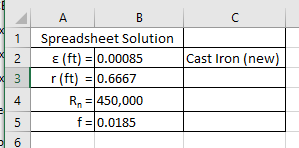
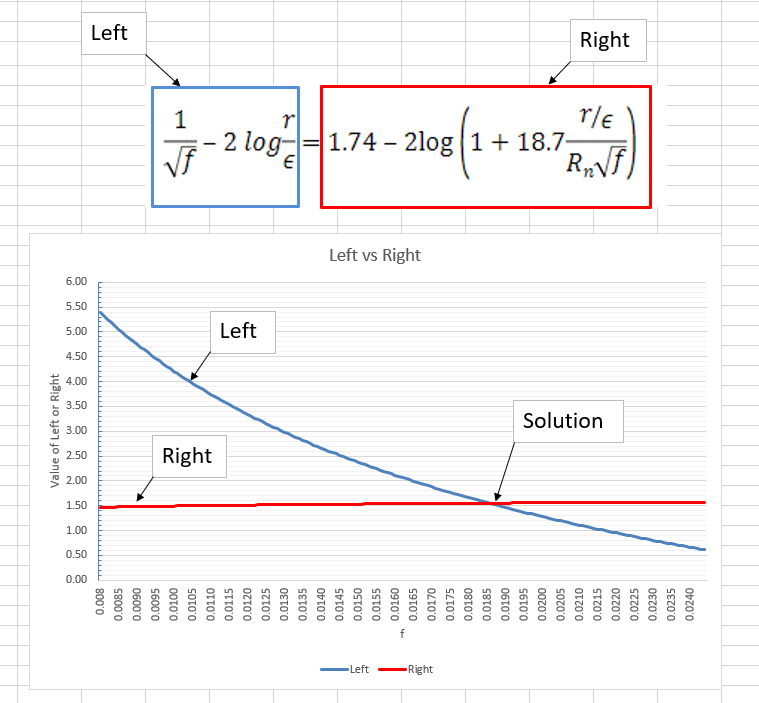
1 2 Cast Iron (new) A B Spreadsheet Solution E (ft) = 0.00085 r (ft) = 0.6667 R = 450,000 f = 0.0185 3 4 5 6 Value of Left or Right Z w u 5 5.00 5.50 6.00 Left Right Left Vf 1 :- 2 loga E Left-Right 0.008 0.0085 0.0090 0.0095 0.0100 0.0105 0.0110 0.0115 0.0120 0.0125 0.0130 0.0135 0.0140 0.0145 0.0150 0.0155 0.0160 0.0165 0.0170 0.0175 0.0180 0.0185 0.0190 0.0195 0.0200 0.0205 0.0210 0.0215 0.0220 0.0225 0.0230 0.0235 0.0240 Left vs Right 1.74 2log 1 + 18.7 Solution RrVF r/E Right 1 2 Cast Iron (new) A B Spreadsheet Solution E (ft) = 0.00085 r (ft) = 0.6667 R = 450,000 f = 0.0185 3 4 5 6 Value of Left or Right Z w u 5 5.00 5.50 6.00 Left Right Left Vf 1 :- 2 loga E Left-Right 0.008 0.0085 0.0090 0.0095 0.0100 0.0105 0.0110 0.0115 0.0120 0.0125 0.0130 0.0135 0.0140 0.0145 0.0150 0.0155 0.0160 0.0165 0.0170 0.0175 0.0180 0.0185 0.0190 0.0195 0.0200 0.0205 0.0210 0.0215 0.0220 0.0225 0.0230 0.0235 0.0240 Left vs Right 1.74 2log 1 + 18.7 Solution RrVF r/E Right
Step by Step Solution
There are 3 Steps involved in it

Get step-by-step solutions from verified subject matter experts
 Study Help