







Question: using visual basic i have to If it is less than 1000, a Critical-style message box should be displayed indicating the error. The error text
using visual basic i have to
If it is less than 1000, a Critical-style message box should be displayed indicating the error.
The error text should read: Base rent must be 1000 or higher, the box title should say Input Error and the button should be OK.
If the rent is non-numeric, a Critical-style message box should be displayed indicating the error.
The error text should read: Base rent must be a number, the box title should say Input Error and the button should be OK.
I got it to work howwver when i input letters and i close the message box that comes up it takes me back to my code i have attached the code below. How can i fix it so it doesnt take me back to mt code whwn closing the message box of no letters allowed
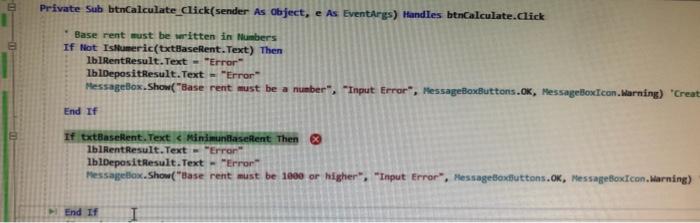
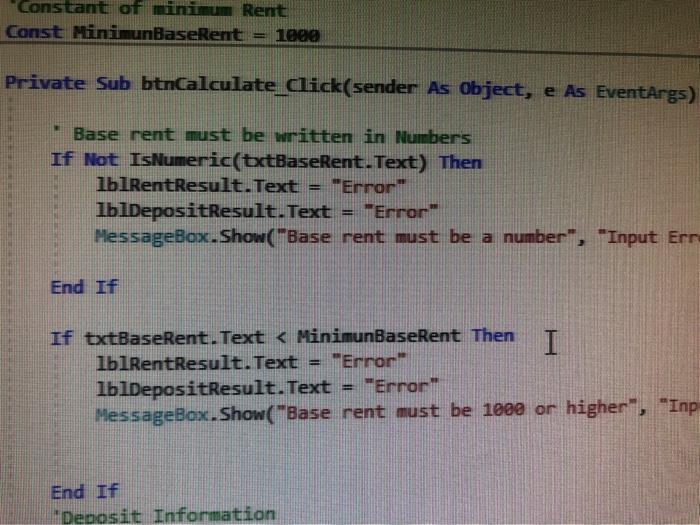
e Private Sub btnCalculate_Click(sender As Object, e As EventArgs) Handles btnCalculate.click Base rent must be written in Numbers If Not Ishumeric(txtBaseRent.Text) Then IblRent Result.Text = "Error IblDepositResult.Text = "Error MessageBox.Show("Base rent must be a number", "Input Error MessageBoxButtons.ok, Message Box Icon.Warning) "Creat End If If txtBaseRent. Text
Step by Step Solution
There are 3 Steps involved in it
1 Expert Approved Answer
Step: 1 Unlock

Question Has Been Solved by an Expert!
Get step-by-step solutions from verified subject matter experts
Step: 2 Unlock
Step: 3 Unlock
 Study Help