







Question: using visual basic stored as csv records in a text file. This file must be placed in the project's bin/Debug folder. Format of each record:
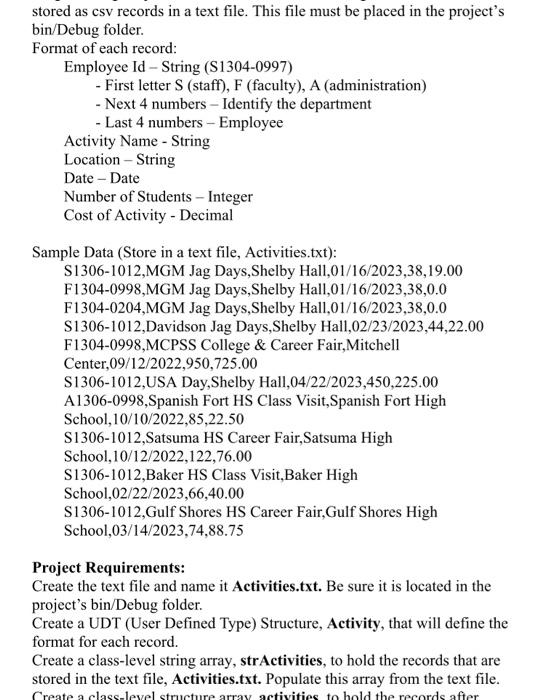
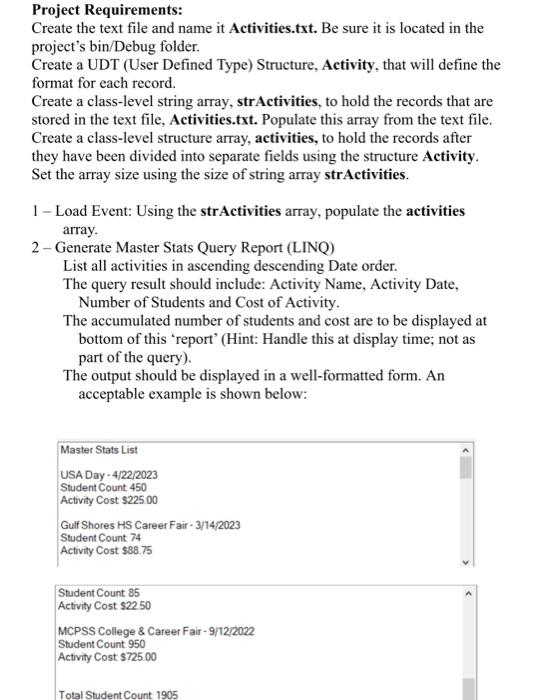
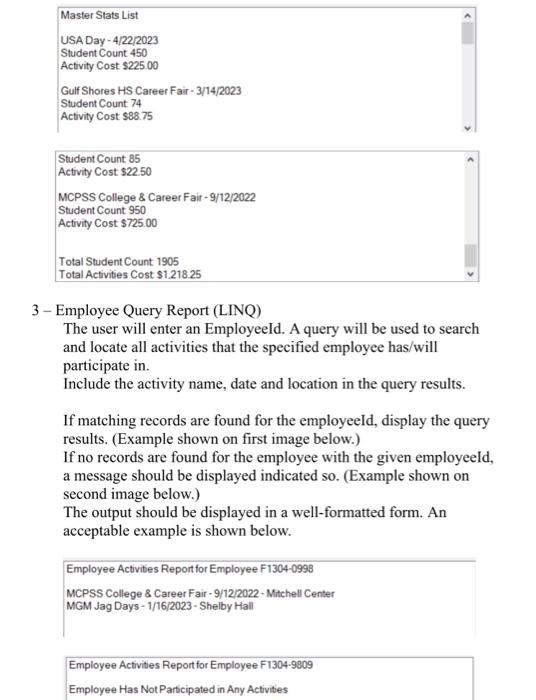
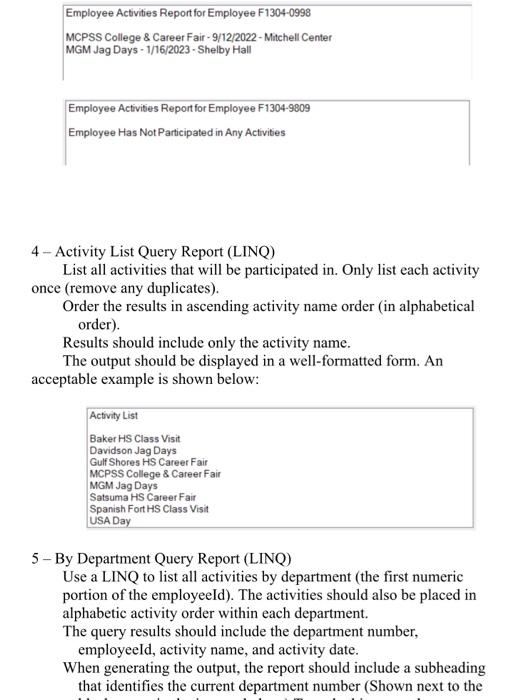
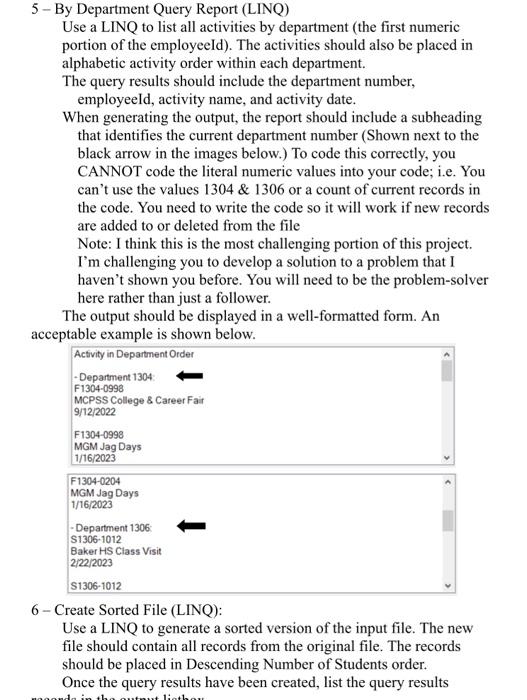
stored as csv records in a text file. This file must be placed in the project's bin/Debug folder. Format of each record: Employee Id - String (S1304-0997) - First letter S (staff), F (faculty), A (administration) - Next 4 numbers - Identify the department - Last 4 numbers - Employee Activity Name - String Location - String Date - Date Number of Students - Integer Cost of Activity - Decimal Sample Data (Store in a text file, Activities.txt): S1306-1012,MGM Jag Days,Shelby Hall,01/16/2023,38,19.00 F1304-0998,MGM Jag Days,Shelby Hall,01/16/2023,38,0.0 F1304-0204,MGM Jag Days,Shelby Hall,01/16/2023,38,0.0 S1306-1012,Davidson Jag Days,Shelby Hall,02/23/2023,44,22.00 F1304-0998,MCPSS College \& Career Fair,Mitchell Center,09/12/2022,950,725.00 S1306-1012,USA Day,Shelby Hall,04/22/2023,450,225.00 A1306-0998,Spanish Fort HS Class Visit,Spanish Fort High School,10/10/2022,85,22.50 S1306-1012,Satsuma HS Career Fair,Satsuma High School,10/12/2022,122,76.00 S1306-1012,Baker HS Class Visit,Baker High School,02/22/2023,66,40.00 S1306-1012,Gulf Shores HS Career Fair,Gulf Shores High School,03/14/2023,74,88.75 Project Requirements: Create the text file and name it Activities.txt. Be sure it is located in the project's bin/Debug folder. Create a UDT (User Defined Type) Structure, Activity, that will define the format for each record. Create a class-level string array, strActivities, to hold the records that are stored in the text file, Activities.txt. Populate this array from the text file. Project Requirements: Create the text file and name it Activities.txt. Be sure it is located in the project's bin/Debug folder. Create a UDT (User Defined Type) Structure, Activity, that will define the format for each record. Create a class-level string array, strActivities, to hold the records that are stored in the text file, Activities.txt. Populate this array from the text file. Create a class-level structure array, activities, to hold the records after they have been divided into separate fields using the structure Activity. Set the array size using the size of string array strActivities. 1 - Load Event: Using the strActivities array, populate the activities array. 2 - Generate Master Stats Query Report (LINQ) List all activities in ascending descending Date order. The query result should include: Activity Name, Activity Date, Number of Students and Cost of Activity. The accumulated number of students and cost are to be displayed at bottom of this 'report' (Hint: Handle this at display time; not as part of the query). The output should be displayed in a well-formatted form. An acceptable example is shown below: Master Stats List USA Day - 4/22/2023 Student Count 450 Activity Cost $225.00 Gulf Shores HS Career Fair - 3/14/2023 Student Count 74 Activity Cost $88.75 Student Count 85 Activity Cost $22.50 MCPSS College \& Career Fair - 9/12/2022 Student Count 950 Activity Cost $725.00 Total Student Count 1905 Total Activities Cost \$1.218.25 3 - Employee Query Report (LINQ) The user will enter an EmployeeId. A query will be used to search and locate all activities that the specified employee has/will participate in. Include the activity name, date and location in the query results. If matching records are found for the employeeId, display the query results. (Example shown on first image below.) If no records are found for the employee with the given employeeId, a message should be displayed indicated so. (Example shown on second image below.) The output should be displayed in a well-formatted form. An acceptable example is shown below. Employee Activities Report for Employee F1304-0998 MCPSS College \& Career Fair - 9/12/2022- Mitchell Center MGM Jag Days - 1/16/2023 - Shelby Hall Employee Activities Report for Employee F1304-9809 Employee Has Not Participated in Any Activities 4 - Activity List Query Report (LINQ) List all activities that will be participated in. Only list each activity once (remove any duplicates). Order the results in ascending activity name order (in alphabetical order). Results should include only the activity name. The output should be displayed in a well-formatted form. An acceptable example is shown below: Activity List Baker HS Class Visit Davidson Jag Days Gulf Shores HS Career Fair MCPSS College 8 Career Fair MGM Jag Days Satsuma HS Career Fair Spanish Fort HS Class Visit USA Day 5 - By Department Query Report (LINQ) Use a LINQ to list all activities by department (the first numeric portion of the employeeId). The activities should also be placed in alphabetic activity order within each department. The query results should include the department number, employeeId, activity name, and activity date. When generating the output, the report should include a subheading that identifies the current department number (Shown next to the 5 - By Department Query Report (LINQ) Use a LINQ to list all activities by department (the first numeric portion of the employeeId). The activities should also be placed in alphabetic activity order within each department. The query results should include the department number, employeeId, activity name, and activity date. When generating the output, the report should include a subheading that identifies the current department number (Shown next to the black arrow in the images below.) To code this correctly, you CANNOT code the literal numeric values into your code; i.e. You can't use the values 1304&1306 or a count of current records in the code. You need to write the code so it will work if new records are added to or deleted from the file Note: I think this is the most challenging portion of this project. I'm challenging you to develop a solution to a problem that I haven't shown you before. You will need to be the problem-solver here rather than just a follower. The output should be displayed in a well-formatted form. An acceptable example is shown below. 6 - Create Sorted File (LINQ): Use a LINQ to generate a sorted version of the input file. The new file should contain all records from the original file. The records should be placed in Descending Number of Students order. Once the query results have been created, list the query results
Step by Step Solution
There are 3 Steps involved in it

Get step-by-step solutions from verified subject matter experts
 Study Help