





Question: Using visual studio 2019-desktop development with programming C, Incomplete version of code has be given to assist (must follow that format) Intro to Programming in
Using visual studio 2019-desktop development with programming C, Incomplete version of code has be given to assist (must follow that format)
Using visual studio 2019-desktop development with programming C, Incomplete version of code
has be given to assist (must follow that format) Intro to Programming

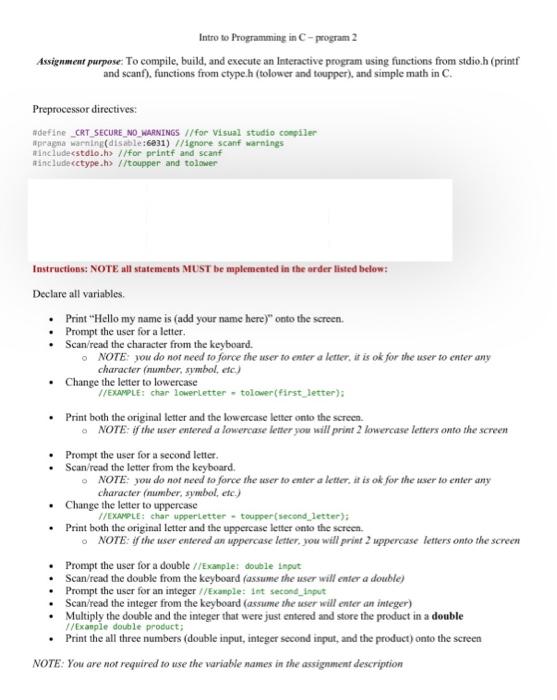
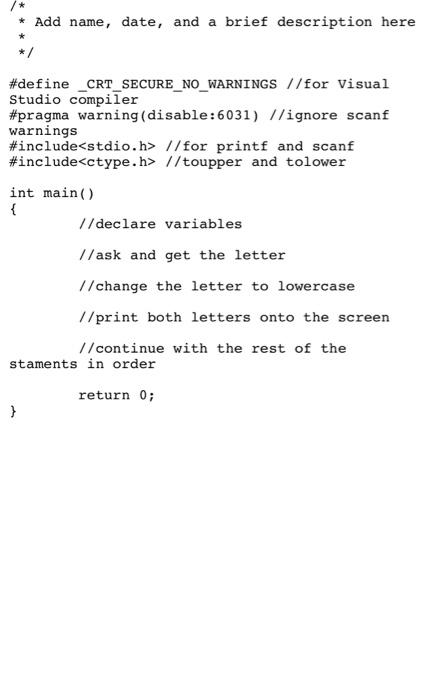
Intro to Programming in C-program 2 Assignment purpose: To compile, build, and execute an Interactive program using functions from stdio.h (printf and scanf), functions from ctype.h (tolower and toupper), and simple math in C. Preprocessor directives: #define _CRT_SECURE_NO_WARNINGS //for visual studio compiler Wprapa warning(disable: 6831) 1/ignore scanf warnings Rincludestdio.h> //for printf and scanf Rinclude //toupper and to lower Instructions: NOTE all statements MUST be mplemented in the order listed below: Declare all variables Print "Hello my name is (add your name here)" onto the screen. Prompt the user for a letter. Scan/read the character from the keyboard. NOTE: you do not need to force the user to enter a letter, it is ok for the user to enter any character (number, symbol, etc.) Change the letter to lowercase //EXAMPLE: charlowerletter tolower(first_letter); Print both the original letter and the lowercase letter onto the screen. NOTE: if the user entered a lowercase letter you will print 2 lowercase letters onto the screen Prompt the user for a second letter. Scan/read the letter from the keyboard, NOTE you do not need to force the user to enter a letter it is ok for the user to enter any character number, symbol, etc.) . Change the letter to uppercase //EXAMPLE: char upperletter - toupper(second_letter): Print both the original letter and the uppercase letter onto the screen NOTE: if the user entered an uppercase letter, you will print 2 uppercase letters onto the screen Prompt the user for a double //Example: double input Scan/read the double from the keyboard (assume the user will enter a double) Prompt the user for an integer //Example: Int second_input Scan/read the integer from the keyboard (assume the user will enter an integer) Multiply the double and the integer that were just entered and store the product in a double //Example double product; Print the all three numbers (double input, integer second input, and the product) onto the screen NOTE: You are not required to use the variable names in the assignment description * Add name, date, and a brief description here */ #define _CRT_SECURE_NO_WARNINGS //for Visual Studio compiler #pragma warning(disable:6031) 1/ignore scanf warnings #include //for printf and scanf #include //toupper and tolower int main() { 1/declare variables //ask and get the letter 1/change the letter to lowercase //print both letters onto the screen // continue with the rest of the staments in order return 0; }

Step by Step Solution

There are 3 Steps involved in it

1 Expert Approved Answer
Step: 1 Unlock blur-text-image
Question Has Been Solved by an Expert!

Get step-by-step solutions from verified subject matter experts

Step: 2 Unlock
Step: 3 Unlock

Students Have Also Explored These Related Databases Questions!